Don't miss your chance to take the Fabric Data Engineer (DP-600) exam for FREE! Find out how by watching the DP-600 session on-demand now through April 28th.
Learn moreJoin the FabCon + SQLCon recap series. Up next: Power BI, Real-Time Intelligence, IQ and AI, and Data Factory take center stage. All sessions are available on-demand after the live show. Register now
Hi
I have the following data:
| value | year | category |
| 72175 | 2011 | A |
| 71709 | 2012 | A |
| 70671 | 2014 | A |
| 70369 | 2015 | A |
| 70103 | 2016 | A |
| 69922 | 2017 | A |
| 69828 | 2018 | A |
| 69776 | 2019 | A |
| 69915 | 2020 | A |
| 69850 | 2021 | A |
| 10420 | 2011 | B |
| 10420 | 2012 | B |
| 10420 | 2018 | B |
I also have 2 measures:
A=calculate(average(table[value]),table[category]="A")
B=calculate(average(table[value]),table[category]="B")
I need a 3rd measure:
C=calculate(divide([b],[a]))
This works as expected, except when B has no values, the visual that has the C measure shows 0% instead of no value. I've tried setting the alternate result of divide to 0,"" or blank() and nothing seems to work. Ideally it would need to show no value. The years are on a second table, that is connected to the table above with a single direction link.
Thanks.
Solved! Go to Solution.
@qmestu ,
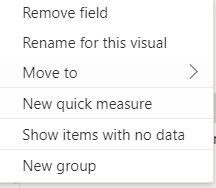
did you try to enable the show items with no data on the year field ?
If I answered your question, please mark my post as solution so it would appeare to others, Appreciate your Kudos 👍
Proud to be a Super User! | |
@qmestu ,
did you try to enable the show items with no data on the year field ?
If I answered your question, please mark my post as solution so it would appeare to others, Appreciate your Kudos 👍
Proud to be a Super User! | |
Hello @qmestu ,
did you try this C=calculate(divide([b],[a], "No value" ))
If I answered your question, please mark my post as solution so it would appeare to others, Appreciate your Kudos 👍
Proud to be a Super User! | |
Even if this would work, it would show "no value" on the chart, which isn't what i need. I need it to show the year but without any value. Thanks.
Check out the April 2026 Power BI update to learn about new features.
If you have recently started exploring Fabric, we'd love to hear how it's going. Your feedback can help with product improvements.
A new Power BI DataViz World Championship is coming this June! Don't miss out on submitting your entry.
| User | Count |
|---|---|
| 41 | |
| 37 | |
| 34 | |
| 21 | |
| 16 |
| User | Count |
|---|---|
| 64 | |
| 58 | |
| 31 | |
| 25 | |
| 25 |