Get Fabric or SQL Certified for Free.
Get certified for free when you join Fabric Data Days 2026 and dive into Fabric, Power BI, SQL, AI, and other essential data skills.
Join now- Power BI forums
- Get Help with Power BI
- Desktop
- Service
- Report Server
- Power Query
- Mobile Apps
- Developer
- DAX Commands and Tips
- Custom Visuals Development Discussion
- Health and Life Sciences
- Power BI Spanish forums
- Translated Spanish Desktop
- Training and Consulting
- Instructor Led Training
- Dashboard in a Day for Women, by Women
- Galleries
- Data Stories Gallery
- Themes Gallery
- Contests Gallery
- QuickViz Gallery
- Quick Measures Gallery
- Visual Calculations Gallery
- Notebook Gallery
- Translytical Task Flow Gallery
- TMDL Gallery
- R Script Showcase
- Webinars and Video Gallery
- Ideas
- Custom Visuals Ideas (read-only)
- Issues
- Issues
- Events
- Upcoming Events
Try your skills in the Power BI Dataviz World Championship! Round one ends June 26. Join now
- Power BI forums
- Forums
- Get Help with Power BI
- Desktop
- Re: Divide function not giving right value
- Subscribe to RSS Feed
- Mark Topic as New
- Mark Topic as Read
- Float this Topic for Current User
- Bookmark
- Subscribe
- Printer Friendly Page


- Mark as New
- Bookmark
- Subscribe
- Mute
- Subscribe to RSS Feed
- Permalink
- Report Inappropriate Content
Divide function not giving right value
Hi all,
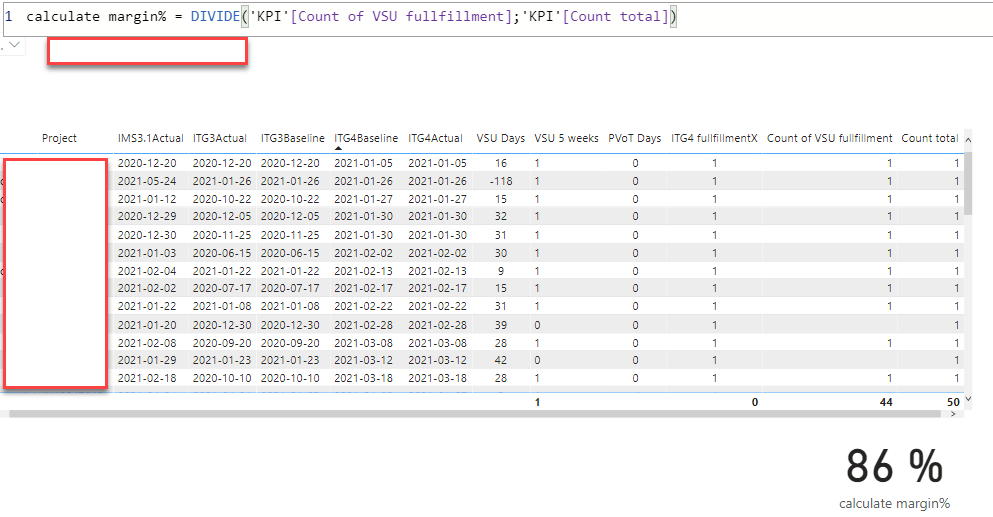
in a tabel I have several measures displayed and in one of the measures i would like to calculate the margin% but it seems to give wrong value.
44/50=88%
any idea where i might be doing wrong?
Solved! Go to Solution.

- Mark as New
- Bookmark
- Subscribe
- Mute
- Subscribe to RSS Feed
- Permalink
- Report Inappropriate Content
Probably a filter context issue...
What is the code for both measures and
what does each measure in the DIVIDE function deliver in a card visual?
Also what does the % measure deliver for the total row if added to the table visual?
Did I answer your question? Mark my post as a solution!
In doing so, you are also helping me. Thank you!
Proud to be a Super User!
Paul on Linkedin.


- Mark as New
- Bookmark
- Subscribe
- Mute
- Subscribe to RSS Feed
- Permalink
- Report Inappropriate Content
Hi, @jalaomar ;
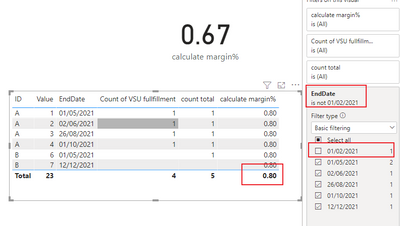
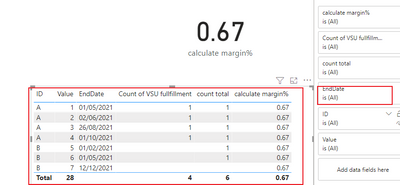
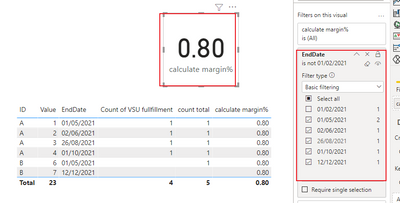
I tested a simple data, if your table's filter is different from your card visual , so it may be cause the different result.such as:
1.when the table's filter is enddate is not 2021-2-1,the result is 4/5=0.8
2.if the table not have filter .it show 0.67
3.So keep the filter criteria consistent in every visual.
Best Regards,
Community Support Team_ Yalan Wu
If this post helps, then please consider Accept it as the solution to help the other members find it more quickly.
- Mark as New
- Bookmark
- Subscribe
- Mute
- Subscribe to RSS Feed
- Permalink
- Report Inappropriate Content
So true!!
- Mark as New
- Bookmark
- Subscribe
- Mute
- Subscribe to RSS Feed
- Permalink
- Report Inappropriate Content
Probably a filter context issue...
What is the code for both measures and
what does each measure in the DIVIDE function deliver in a card visual?
Also what does the % measure deliver for the total row if added to the table visual?
Did I answer your question? Mark my post as a solution!
In doing so, you are also helping me. Thank you!
Proud to be a Super User!
Paul on Linkedin.
- Mark as New
- Bookmark
- Subscribe
- Mute
- Subscribe to RSS Feed
- Permalink
- Report Inappropriate Content
Hi,
I need to calculate how many projects that have fulfilled a certain criteria, all else is working well.
These are my measures
VSU Days = DATEDIFF('KPI'[MIS3.1Actual 2];'KPI'[ITG4Actual2];DAY)
VSU 5 weeks = IF('KPI'[VSU Days] <=35; "1";"0")
PVoT Days = DATEDIFF('KPI'[ITG4Baseline2];'KPI'[ITG4Actual2];DAY)
ITG4 fullfillmentX = SWITCH(TRUE();
Count total = CALCULATE(COUNTROWS('KPI'))


- Mark as New
- Bookmark
- Subscribe
- Mute
- Subscribe to RSS Feed
- Permalink
- Report Inappropriate Content
@jalaomar ,Can you share sample data and sample output in table format? Or a sample pbix after removing sensitive data.
Try like
Divide([Count of VSU fullfilment]*1.0, [Count Total])
- Mark as New
- Bookmark
- Subscribe
- Mute
- Subscribe to RSS Feed
- Permalink
- Report Inappropriate Content
Hi, These are my measures
VSU Days = DATEDIFF('KPI'[MIS3.1Actual 2];'KPI'[ITG4Actual2];DAY)
VSU 5 weeks = IF('KPI'[VSU Days] <=35; "1";"0")
PVoT Days = DATEDIFF('KPI'[ITG4Baseline2];'KPI'[ITG4Actual2];DAY)
ITG4 fullfillmentX = SWITCH(TRUE();
Count total = CALCULATE(COUNTROWS('KPI'))

- Mark as New
- Bookmark
- Subscribe
- Mute
- Subscribe to RSS Feed
- Permalink
- Report Inappropriate Content
Change the [Count of SVU fulfillment] to
Count of VSU fullfillment = CALCULATE(COUNTROWS('KPI'); FILTER('KPI'; [VSU 5 weeks]=1))
Also, please provide the answers to the following:
what does each measure in the DIVIDE function deliver in a card visual?
Also what does the % measure deliver for the total row if added to the table visual?
Did I answer your question? Mark my post as a solution!
In doing so, you are also helping me. Thank you!
Proud to be a Super User!
Paul on Linkedin.
- Mark as New
- Bookmark
- Subscribe
- Mute
- Subscribe to RSS Feed
- Permalink
- Report Inappropriate Content
Hi,
What should I change in the measure?
Count of VSU fullfillment = CALCULATE(COUNTROWS('KPI'); FILTER('KPI'; [VSU 5 weeks]="1"))
what does each measure in the DIVIDE function deliver in a card visual?
Count of VSU fullfillment measure is calculating the total number of rows that has the value 1 (1 is a string)
Count Total is a measure calculating the total number of rows in the table
Calculate margin% is calculating the % of projects that have the value 1
Value 1 is indicating that the project has managed to deliver a machine within 35 days (diff between 2 actual dates)
Also what does the % measure deliver for the total row if added to the table visual?
Count Total & Count of VSU fullfillment I will not visualize in the table, just wanted to verify that the measure is working properly
but Magin% i need to visualize as it is the KPI value to indicate the % of projects that has reached target.

Helpful resources

Data Days 2026
Don't miss out on Data Days, June 15 through August 7. Learn Fabric, Power BI, SQL, AI and more.

Power BI DataViz World Championships - June 2026
A new Power BI DataViz World Championship is coming this June! Don't miss out on submitting your entry.

| User | Count |
|---|---|
| 25 | |
| 22 | |
| 22 | |
| 19 | |
| 13 |


| User | Count |
|---|---|
| 68 | |
| 55 | |
| 44 | |
| 42 | |
| 30 |


