
Join us at FabCon Atlanta from March 16 - 20, 2026, for the ultimate Fabric, Power BI, AI and SQL community-led event. Save $200 with code FABCOMM.
Register now!The Power BI Data Visualization World Championships is back! Get ahead of the game and start preparing now! Learn more
Hi
Am not really sure how I would tackle this issue I have, I have thought of many ways but none of been successful.
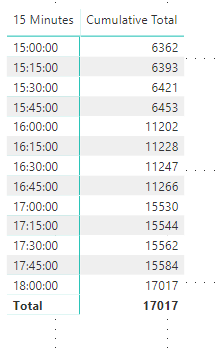
I have a column that displays flat data that I do not want to summarize and shows a cumulative value against a 15 min time, this data is supplied by forecast so it’s always flat data image below.
Then I have created a table that displays data by a measure and a column of 15minutes window. The measure gives me the total shipments and then I apply the 15 column to breakdown the table to show the volume between these times. The tables are also unrelated.
The problem that I have got is how would I divide my measure breakdown Vs my unrelated do not summarize column? if its possible...
So how would I divide image one with image 2 to give me the difference between each time increment?
This is my measure that gives me my total shipments,
Solved! Go to Solution.
@Anonymous ,
It seems that you may just use LOOKUPVALUE.
@Anonymous ,
It seems that you may just use LOOKUPVALUE.
The Power BI Data Visualization World Championships is back! Get ahead of the game and start preparing now!
| User | Count |
|---|---|
| 38 | |
| 38 | |
| 36 | |
| 28 | |
| 28 |
| User | Count |
|---|---|
| 124 | |
| 89 | |
| 73 | |
| 66 | |
| 65 |