Join us at FabCon Atlanta from March 16 - 20, 2026, for the ultimate Fabric, Power BI, AI and SQL community-led event. Save $200 with code FABCOMM.
Register now!The Power BI Data Visualization World Championships is back! Get ahead of the game and start preparing now! Learn more
Hi,
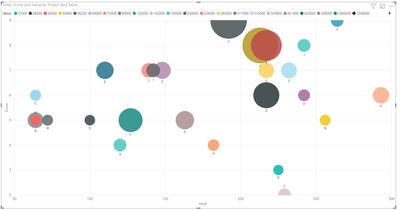
is there any way to use diverging colors in the attached or below scatterplot. I would like to have diverging colors using value field but it's not showing divergig option in the formatting under colors.
Is this a limitation in Power BI? if it's is there any way to achieve that?
Appreciate quick help!
Regards
Harsha
Solved! Go to Solution.
HI @Anonymous
Please follow the steps below.
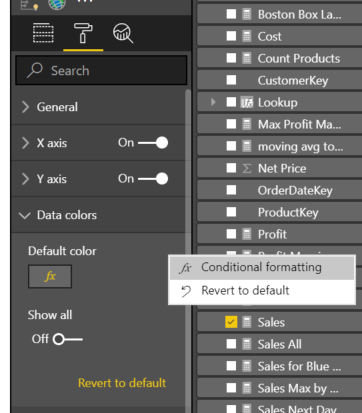
1. In format section of the visual, under Data color, Default color Section find 3 dots and click on them
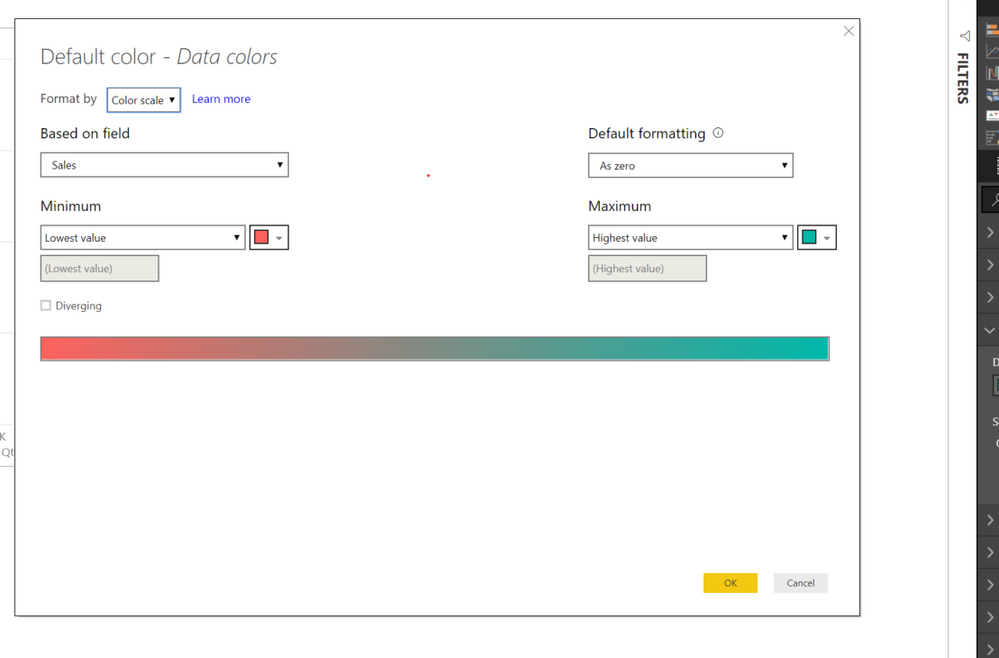
2. next select your field for your cryteria as below
Regards,
Mariusz
If this post helps, then please consider Accept it as the solution to help the other members find it more quickly.
HI @Anonymous
Please follow the steps below.
1. In format section of the visual, under Data color, Default color Section find 3 dots and click on them
2. next select your field for your cryteria as below
Regards,
Mariusz
If this post helps, then please consider Accept it as the solution to help the other members find it more quickly.
Hi Mariusz,
Thanks for the quick response. it worked.
Regards
Harsha
The Power BI Data Visualization World Championships is back! Get ahead of the game and start preparing now!
Check out the November 2025 Power BI update to learn about new features.
| User | Count |
|---|---|
| 59 | |
| 43 | |
| 42 | |
| 23 | |
| 17 |
| User | Count |
|---|---|
| 190 | |
| 122 | |
| 96 | |
| 66 | |
| 46 |