cancel
Showing results for 
Search instead for 
Did you mean: 

Learn from the best! Meet the four finalists headed to the FINALS of the Power BI Dataviz World Championships! Register now

Reply
Peter_Sun
Frequent Visitor

Distribution Point Calculated on Power BI

Hi All, 


Could anyone help me solve below business scenarions? 


Distribution Point Definition: One product sold to one customer with real purchasing value amonnt ( we might send customer samples for free and this of couse won't be calculated as DPs) called One DP. 


I need to use a DAX to do this calculation. 


I tried to use DISTINCTCOUNT Function, but it could only tell me how many products are sold per month, or how many customers we have per month. I need sort of combing them altogether. 


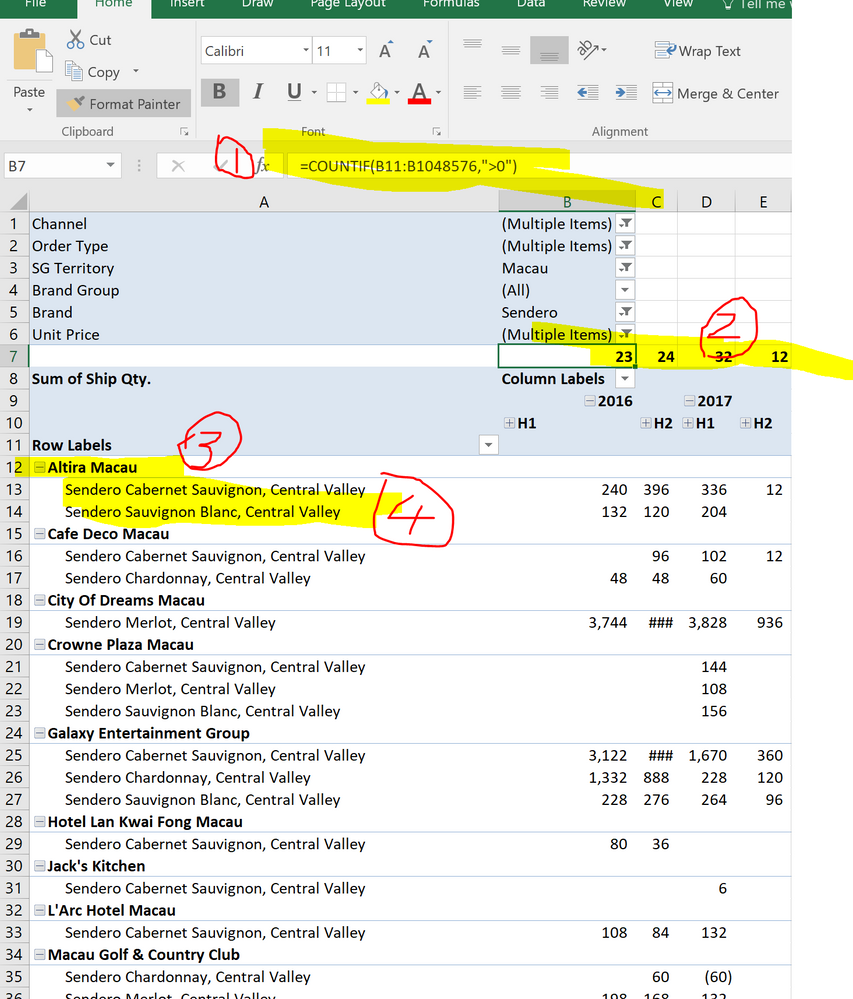
I could do this in Excel using Countif  as below (1) and came out the DPs as (2)

On below tables (3) is customer name and (4) is products purchased by this customer. 


DPs.PNG


We might want to know how many DPs we are having per month or per quarter. 


Really Appreciate if anyone could solve me this puzzle. 


Thanks,

Peter Sun 

2 REPLIES 2
Greg_Deckler
Community Champion
Community Champion

If you can post some sample raw data I can be more specific. Otherwise, the general replacement for COUNTIF in DAX is CALCULATE like so:


Measure = CALCULATE(COUNT([Column]),FILTER(Table,[Column/Measure] > 0))

Something along those lines.


Follow on LinkedIn
@ me in replies or I'll lose your thread!!!
Instead of a Kudo, please vote for this idea
Become an expert!: Enterprise DNA
External Tools: MSHGQM
YouTube Channel!: Microsoft Hates Greg
Latest book!:
DAX For Humans

DAX is easy, CALCULATE makes DAX hard...

Thanks for your quick reply 


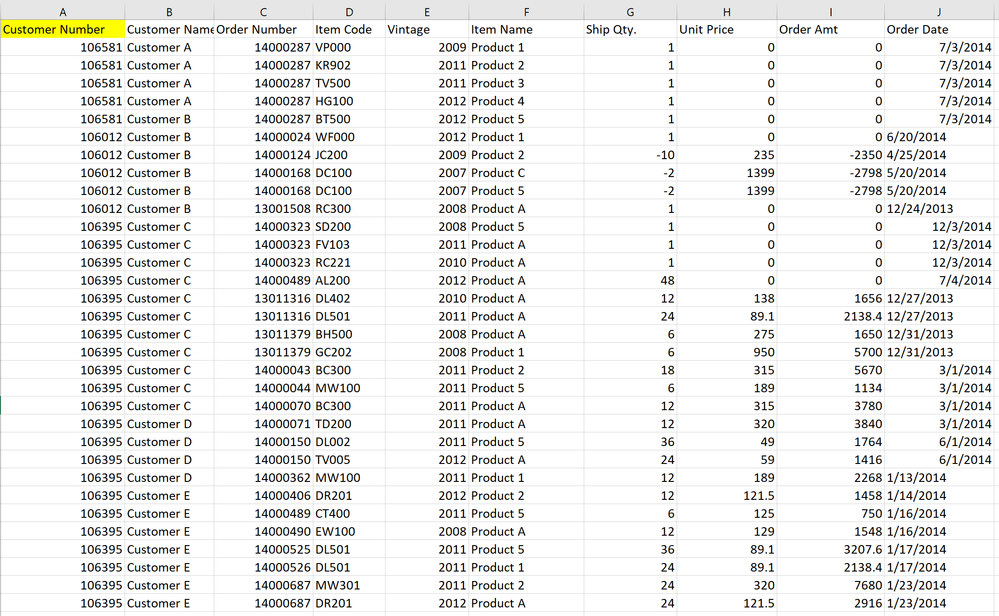
And please see below raw data and it is quite falt comparing with pivot table. 

If only used below calculated measure, it would only get the how many products are sold, right?


Can you please help me? Thanks 


 DP Raw Data.PNG

Helpful resources

Announcements
Join our Fabric User Panel

Join our Fabric User Panel

Share feedback directly with Fabric product managers, participate in targeted research studies and influence the Fabric roadmap.

February Power BI Update Carousel

Power BI Monthly Update - February 2026

Check out the February 2026 Power BI update to learn about new features.

FabCon Atlanta 2026 carousel

FabCon Atlanta 2026

Join us at FabCon Atlanta, March 16-20, for the ultimate Fabric, Power BI, AI and SQL community-led event. Save $200 with code FABCOMM.