Join us at FabCon Atlanta from March 16 - 20, 2026, for the ultimate Fabric, Power BI, AI and SQL community-led event. Save $200 with code FABCOMM.
Register now!Learn from the best! Meet the four finalists headed to the FINALS of the Power BI Dataviz World Championships! Register now
Hello,
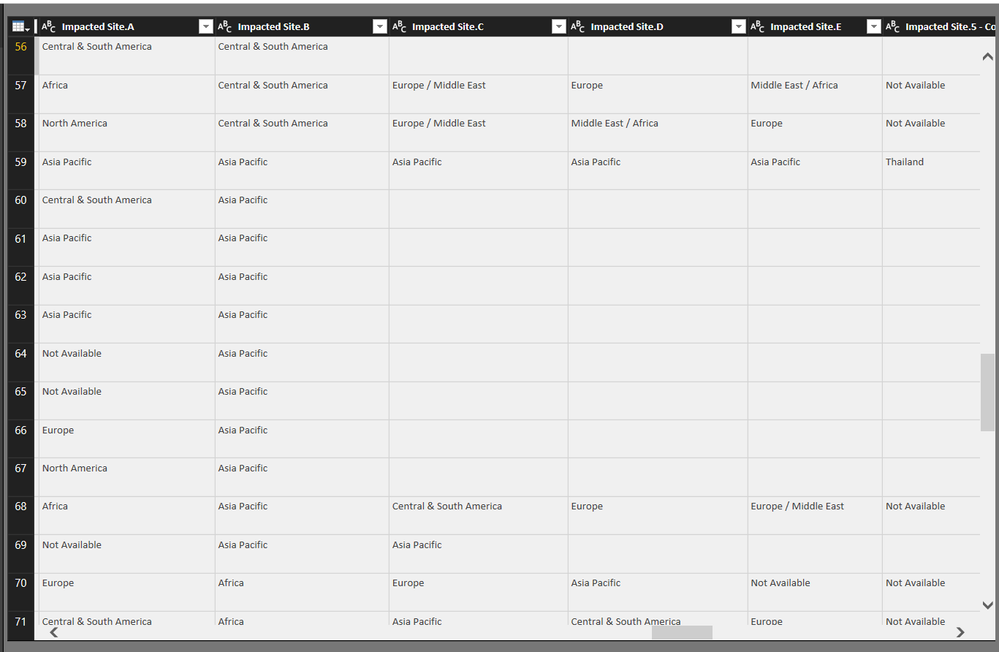
I have a scenario where need to list the distinct regions through multiple columns (Impacted Site.A, Impacted Site. B, etc) and also count how many times they show up in those columns. Can you please advise how it can be done with Power BI?
Thanks.
Solved! Go to Solution.
Hi @Krisztian,
In this scenario, please try this DAX formula to create a calculated table. Add a new column, specify a non-blank value for it.
Table =
UNION (
SELECTCOLUMNS ( Site, "SiteList", Site[Impacted Site.A] ),
SELECTCOLUMNS ( Site, "SiteList", Site[Impacted Site.B] ),
SELECTCOLUMNS ( Site, "SiteList", Site[Impacted Site.C] ),
SELECTCOLUMNS ( Site, "SiteList", Site[Impacted Site.D] ),
SELECTCOLUMNS ( Site, "SiteList", Site[Impacted Site.E] )
)
Column = 1
Then, drag a table visual in your report.
Thanks,
Yuliana Gu
Hi @Krisztian,
In this scenario, please try this DAX formula to create a calculated table. Add a new column, specify a non-blank value for it.
Table =
UNION (
SELECTCOLUMNS ( Site, "SiteList", Site[Impacted Site.A] ),
SELECTCOLUMNS ( Site, "SiteList", Site[Impacted Site.B] ),
SELECTCOLUMNS ( Site, "SiteList", Site[Impacted Site.C] ),
SELECTCOLUMNS ( Site, "SiteList", Site[Impacted Site.D] ),
SELECTCOLUMNS ( Site, "SiteList", Site[Impacted Site.E] )
)
Column = 1
Then, drag a table visual in your report.
Thanks,
Yuliana Gu
this works except, it's not being filtered by my report level filters, it seems since all the values come from a table that is being filtered it should work, any pointers on the filtering?
Thanks Yuliana, works perfectly, appreciate your assistance!
Share feedback directly with Fabric product managers, participate in targeted research studies and influence the Fabric roadmap.
Check out the February 2026 Power BI update to learn about new features.
| User | Count |
|---|---|
| 67 | |
| 59 | |
| 45 | |
| 19 | |
| 15 |