Get certified for free when you join Fabric Data Days 2026 and dive into Fabric, Power BI, SQL, AI, and other essential data skills.
Join nowJuly 7 - July 17 | Round 2 of the Power BI Dataviz World Championships. Don't miss your chance! Learn more
Hi,
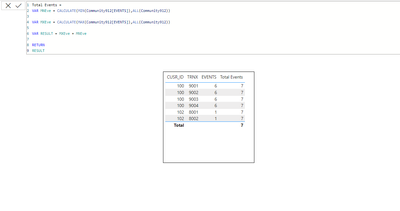
Please help figureout how to approach measure which will return distincted summary for the column values
Example
| USR_ID | TRNX | Events |
| 100 | 9001 | 6 |
| 100 | 9002 | 6 |
| 100 | 9003 | 6 |
| 100 | 9004 | 6 |
| 102 | 8001 | 1 |
| 102 | 8002 | 1 |
Measure should return distinct sum of Event column grouped by USR_ID
mean expected result of measure = 6+1 = 7
Solved! Go to Solution.
@mrslyfox911 , Try a measure like
Sumx(Distinct(Table[Events]), [Events])
or
sumx(summarize(Table, Table[User_id], Table[Events]) , [Events])
Hello @Mahesh0016
unfortunnatelly solluction not applicable for me, because I'm not looking for the summary of min and max values. target was to sum distinct value per sub category
@mrslyfox911 , Try a measure like
Sumx(Distinct(Table[Events]), [Events])
or
sumx(summarize(Table, Table[User_id], Table[Events]) , [Events])
thank you @amitchandak
that one working as expected
sumx(summarize(Table, Table[User_id], Table[Events]) , [Events])
Join us in Barcelona for FabCon and SQLCon, the Fabric, Power BI, SQL, and AI community event. Save €200 with code FABCMTY200.
Join Fabric Data Days 2026: 60 days of free live/on-demand sessions, challenges, study groups, and certification opportunities.
| User | Count |
|---|---|
| 23 | |
| 22 | |
| 18 | |
| 17 | |
| 13 |
| User | Count |
|---|---|
| 67 | |
| 50 | |
| 46 | |
| 41 | |
| 39 |