cancel
Showing results for 
Search instead for 
Did you mean: 

Join the FabCon + SQLCon recap series. Up next: Power BI, Real-Time Intelligence, IQ and AI, and Data Factory take center stage. All sessions are available on-demand after the live show. Register now

Reply
Anonymous
Not applicable

Distinct sum issue

I need to sum the distinct values in the headcount column and get the sum in  every row in another column , this is some data to work on. i'm using 

VAR myheadcount =

SUMMARIZE( Table, Table[Headcount],Table[Year])

RETURN

SUMX(myheadcount, Table[Headcount])
 
this returns the distinct sum of all months in the year for me , but i need the sum according to months.
Is there any easy way to achieve this? The data shown is for just one month.


AmountHeadcountDistinct sum headcount
                    11,970727
                       6,152727
                     6,552727
                     17,500727
                   13,678627
                      18,432627
                        5,161627
                           7900627
                           97400127
                           2666127
                        8989127
                        3,168127
                      1,0471327
                           28991327
                      19,1711327
                        6,7731327


1 ACCEPTED SOLUTION

Hi @Anonymous ,


You also need to add the year to the filtering:


Measure =
VAR temp_table =
    FILTER (
        SUMMARIZE ( ALL ( 'Table' ); 'Table'[DAte]; 'Table'[Headcount] );
        'Table'[Month] = SELECTEDVALUE ( 'Table'[Month] ) &&
        'Table'[Year] = SELECTEDVALUE ( 'Table'[Year] )
    )
RETURN
    CALCULATE ( SUMX ( temp_table; 'Table'[Headcount] ) )

Regards

Miguel Félix


Did I answer your question? Mark my post as a solution!

Proud to be a Super User!

Check out my blog: Power BI em Português


View solution in original post

4 REPLIES 4
MFelix
Super User
Super User

Hi @Anonymous ,


You can try the following measure:


Measure =
VAR temp_table =
    FILTER (
        SUMMARIZE ( ALL ( 'Table' ); 'Table'[DAte]; 'Table'[Headcount] );
        'Table'[DAte] = SELECTEDVALUE ( 'Table'[DAte] )
    )
RETURN
    CALCULATE ( SUMX ( temp_table; 'Table'[Headcount] ) )


Be aware that you don't refer if the date is based I have made an example with all dates being the same for the same period, but you can change the filtering to add the month / year if you have those columns instead of the date.


check PBIX file attach.


Regards

Miguel Félix


Did I answer your question? Mark my post as a solution!

Proud to be a Super User!

Check out my blog: Power BI em Português


Anonymous
Not applicable

@MFelix ,


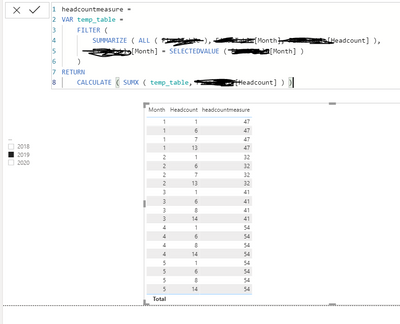
pbi8.PNG 

I just replaced date with month in my table. It's not summing up correctly

Hi @Anonymous ,


You also need to add the year to the filtering:


Measure =
VAR temp_table =
    FILTER (
        SUMMARIZE ( ALL ( 'Table' ); 'Table'[DAte]; 'Table'[Headcount] );
        'Table'[Month] = SELECTEDVALUE ( 'Table'[Month] ) &&
        'Table'[Year] = SELECTEDVALUE ( 'Table'[Year] )
    )
RETURN
    CALCULATE ( SUMX ( temp_table; 'Table'[Headcount] ) )

Regards

Miguel Félix


Did I answer your question? Mark my post as a solution!

Proud to be a Super User!

Check out my blog: Power BI em Português


amitchandak
Super User
Super User

@Anonymous , Not very clear with data

you can try

sumx(SUMMARIZE( Table, Table[Headcount],Table[Year],Table[Month]),[Headcount])

Share with Power BI Enthusiasts: Full Power BI Video (20 Hours) YouTube
Microsoft Fabric Series 60+ Videos YouTube
Microsoft Fabric Hindi End to End YouTube

Helpful resources

Announcements
April Power BI Update Carousel

Power BI Monthly Update - April 2026

Check out the April 2026 Power BI update to learn about new features.

New to Fabric survey Carousel

New to Fabric Survey

If you have recently started exploring Fabric, we'd love to hear how it's going. Your feedback can help with product improvements.

Power BI DataViz World Championships carousel

Power BI DataViz World Championships - June 2026

A new Power BI DataViz World Championship is coming this June! Don't miss out on submitting your entry.

FabCon and SQLCon Highlights Carousel

FabCon &SQLCon Highlights

Experience the highlights from FabCon & SQLCon, available live and on-demand starting April 14th.