Join us at FabCon Atlanta from March 16 - 20, 2026, for the ultimate Fabric, Power BI, AI and SQL community-led event. Save $200 with code FABCOMM.
Register now!The Power BI Data Visualization World Championships is back! It's time to submit your entry. Live now!
Hello Experts,
I have a situation where I need to calculate UNIQUE NUMBER OF ENGAGED USERS.
In my data model people can:
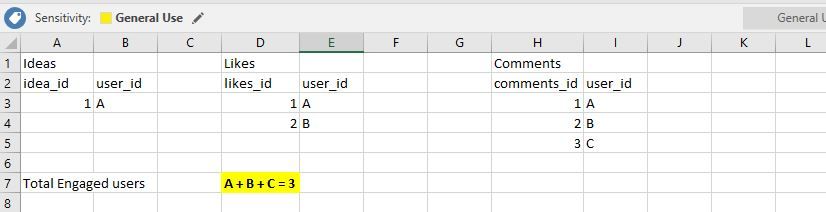
All of these activities are in diffrenet tables as follwoing image:
What I need is to calculate that number of unique numbers who were engaged. It means they have sumbited an idea / commented / liked.
If I filter on 1 idea I want to see if the somebody who sumbited and idea and at the same time liked and commented was calculated only once.
Please see following example for selection on IDEA = 1
Number of engaged users should be only 3. You can see eventhougt user A has been interacted 3 times he counts only 1 time.
I was thinking to somehow virually union all 3 tables together and then run DISTINCTCOUNT. But still it has to follow the filter context.
Thanks for your help
Cheers!
Martin-Prague
HI @Martin-Prague ,
Unfortunate, current dax formula not support auto calculate related table fields.
I'd like to suggest you create a bridge table to link and merge these tables fields and use id to manually summary and calculate on these tables.
Optimizing Many-to-Many Calculations in DAX with SUMMARIZE and Cross Table Filtering
Regards,
Xiaoxin Sheng
Thanks all, at the end I build a view in SQL that combines my data into one table and then I am able to do this calculation simply in Power BI.
Any ideas?
The Power BI Data Visualization World Championships is back! It's time to submit your entry.
Check out the January 2026 Power BI update to learn about new features.
| User | Count |
|---|---|
| 56 | |
| 40 | |
| 38 | |
| 21 | |
| 21 |
| User | Count |
|---|---|
| 141 | |
| 105 | |
| 63 | |
| 36 | |
| 35 |