cancel
Showing results for 
Search instead for 
Did you mean: 

We've captured the moments from FabCon & SQLCon that everyone is talking about, and we are bringing them to the community, live and on-demand. Starts on April 14th. Register now

Reply
Meenasubu
Frequent Visitor

Distinct count of applicants based on application stage

Hi All,


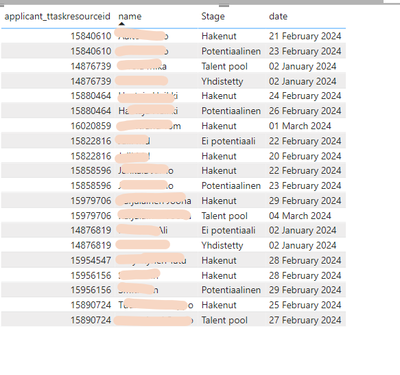
I have a table with applicant id, name, the application stage and date. I want to create a DAX measure that counts the number of applicants whose application stage is "Hakenut". For example, applicant 15840610 belongs to two stages - Hakenut and Poteniaalinen - then he should not be included in the calculation. Those applicants who are part of only Hakenut stage should be included in the count (like 16020859).


Meenasubu_2-1712131775091.png


In the above example, the result I want is as follows:


applicant_idstagedatecount
16020859Hakenut01/03/20241
15954547Hakenut28/02/20241


So the final result should be 2 applicants.


Any help would be appreciated. Thanks!

1 ACCEPTED SOLUTION
Fowmy
Super User
Super User

@Meenasubu 

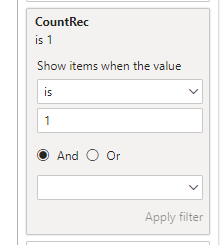
Create this meaure and change the table name as per your table. Assign this to visual filter and set it equal to 1 


CountRec = 
VAR __t1 = 
CALCULATETABLE(
    VALUES( table[stage] ),
    ALLEXCEPT( table , table[applicant_id] )
)
RETURN
    INT("E-mail" IN __t1 && COUNTROWS( __t1 ) = 1)

Fowmy_0-1712142034110.png


Did I answer your question? Mark my post as a solution! and hit thumbs up


Subscribe and learn Power BI from these videos

Website LinkedIn PBI User Group

View solution in original post

3 REPLIES 3
Fowmy
Super User
Super User

@Meenasubu 

Create this meaure and change the table name as per your table. Assign this to visual filter and set it equal to 1 


CountRec = 
VAR __t1 = 
CALCULATETABLE(
    VALUES( table[stage] ),
    ALLEXCEPT( table , table[applicant_id] )
)
RETURN
    INT("E-mail" IN __t1 && COUNTROWS( __t1 ) = 1)

Fowmy_0-1712142034110.png


Did I answer your question? Mark my post as a solution! and hit thumbs up


Subscribe and learn Power BI from these videos

Website LinkedIn PBI User Group

Meenasubu
Frequent Visitor

Hi @Anonymous , thanks for the reply. I tried the DAX measure but I am not able to use the function EXISTS in the calculation. Is tehre any other alternative?


Anonymous
Not applicable

Hi @Meenasubu ,

try below dax measure

HakenutApplicantsCount = CALCULATE(
    DISTINCTCOUNT('YourTableName'[applicant_id]),
    FILTER(
        ALL('YourTableName'),
        'YourTableName'[stage] = "Hakenut" &&
        NOT EXISTS(
            FILTER(
                'YourTableName',
                'YourTableName'[applicant_id] = EARLIER('YourTableName'[applicant_id]) &&
                'YourTableName'[stage] <> "Hakenut"
            )
        )
    )
)

Helpful resources

Announcements
New to Fabric survey Carousel

New to Fabric Survey

If you have recently started exploring Fabric, we'd love to hear how it's going. Your feedback can help with product improvements.

Power BI DataViz World Championships carousel

Power BI DataViz World Championships - June 2026

A new Power BI DataViz World Championship is coming this June! Don't miss out on submitting your entry.

Join our Fabric User Panel

Join our Fabric User Panel

Share feedback directly with Fabric product managers, participate in targeted research studies and influence the Fabric roadmap.

March Power BI Update Carousel

Power BI Community Update - March 2026

Check out the March 2026 Power BI update to learn about new features.