FabCon is coming to Atlanta
Join us at FabCon Atlanta from March 16 - 20, 2026, for the ultimate Fabric, Power BI, AI and SQL community-led event. Save $200 with code FABCOMM.
Register now!- Power BI forums
- Get Help with Power BI
- Desktop
- Service
- Report Server
- Power Query
- Mobile Apps
- Developer
- DAX Commands and Tips
- Custom Visuals Development Discussion
- Health and Life Sciences
- Power BI Spanish forums
- Translated Spanish Desktop
- Training and Consulting
- Instructor Led Training
- Dashboard in a Day for Women, by Women
- Galleries
- Data Stories Gallery
- Themes Gallery
- Contests Gallery
- QuickViz Gallery
- Quick Measures Gallery
- Visual Calculations Gallery
- Notebook Gallery
- Translytical Task Flow Gallery
- TMDL Gallery
- R Script Showcase
- Webinars and Video Gallery
- Ideas
- Custom Visuals Ideas (read-only)
- Issues
- Issues
- Events
- Upcoming Events
The Power BI Data Visualization World Championships is back! Get ahead of the game and start preparing now! Learn more
- Power BI forums
- Forums
- Get Help with Power BI
- Desktop
- Re: Distinct count customers by turnover tresholds
- Subscribe to RSS Feed
- Mark Topic as New
- Mark Topic as Read
- Float this Topic for Current User
- Bookmark
- Subscribe
- Printer Friendly Page

- Mark as New
- Bookmark
- Subscribe
- Mute
- Subscribe to RSS Feed
- Permalink
- Report Inappropriate Content
Distinct count customers by turnover tresholds
Hey Community,
Looking for a link or a hint to solve following issue:
I need to count the number of customers sorted by discount group and different tresholds of turnover.
F.ex:
Customer discount group A
- # customers with a TO < 1.5K
- # customers with a TO between 1.5K-5K
- # customers with a TO between 5K-15K
- # customers with a TO > 15K
Customer discount group B
- # customers with a TO < 1.5K
- # customers with a TO between 1.5K-5K
- # customers with a TO between 5K-15K
- # customers with a TO > 15K
And so on...
Available (and linked) tables:
- Customers containing discount group code (1 row per customer)
- Order values containing customer No and 1 order value per order row
- Centralised Calendar table
I have tried with and without a turnover measure per customer.
I have been struggling with distinctcounts, countrows, filters and so on but no correct result.
If I use summarize columns with customer # included it seems to work (I get '1' per customer) but as soon as I delete the this column, the totals are not correct anymore.
Thank you for you help or feedback.
David
Solved! Go to Solution.


- Mark as New
- Bookmark
- Subscribe
- Mute
- Subscribe to RSS Feed
- Permalink
- Report Inappropriate Content
Hi, @Daro68
Please correct me if I wrongly understood your question.
I tried to create a sample pbix file based on your explanation above.
Please check the below picture and the sample pbix file's link down below, whether it is what you are looking for.
All measures are in the sample pbix file.
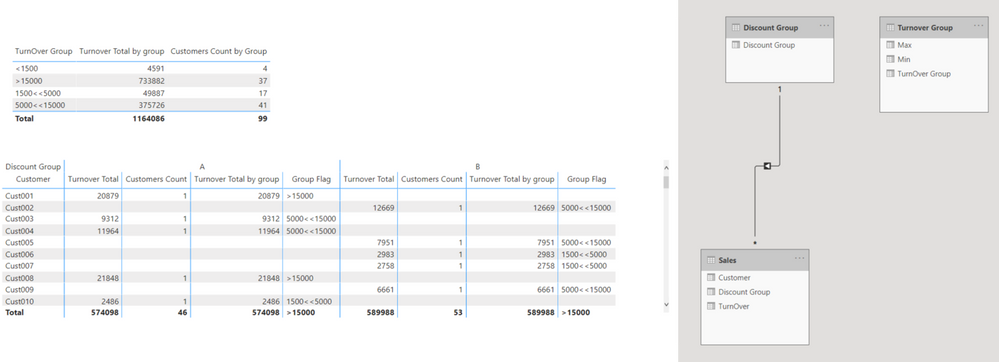
https://www.dropbox.com/s/taqnf4wry1efvfk/daro.pbix?dl=0
Hi, My name is Jihwan Kim.
If this post helps, then please consider accept it as the solution to help other members find it faster, and give a big thumbs up.
Linkedin: linkedin.com/in/jihwankim1975/
Twitter: twitter.com/Jihwan_JHKIM
If this post helps, then please consider accepting it as the solution to help other members find it faster, and give a big thumbs up.
Click here to visit my LinkedIn page
Click here to schedule a short Teams meeting to discuss your question.
- Mark as New
- Bookmark
- Subscribe
- Mute
- Subscribe to RSS Feed
- Permalink
- Report Inappropriate Content
Hi, @Daro68
Please correct me if I wrongly understood your question.
I tried to create a sample pbix file based on your explanation above.
Please check the below picture and the sample pbix file's link down below, whether it is what you are looking for.
All measures are in the sample pbix file.
https://www.dropbox.com/s/taqnf4wry1efvfk/daro.pbix?dl=0
Hi, My name is Jihwan Kim.
If this post helps, then please consider accept it as the solution to help other members find it faster, and give a big thumbs up.
Linkedin: linkedin.com/in/jihwankim1975/
Twitter: twitter.com/Jihwan_JHKIM
If this post helps, then please consider accepting it as the solution to help other members find it faster, and give a big thumbs up.
Click here to visit my LinkedIn page
Click here to schedule a short Teams meeting to discuss your question.
- Mark as New
- Bookmark
- Subscribe
- Mute
- Subscribe to RSS Feed
- Permalink
- Report Inappropriate Content
Dear Kim,
I realized that with my solution I wasn't able to filter the years, so I retried your solution with a clear point of view and your solution is finally the better one.
I am really thankfull to you. The crossfiltering did it... 😄
Kudo's to you Kim !
Kind regards,
David
- Mark as New
- Bookmark
- Subscribe
- Mute
- Subscribe to RSS Feed
- Permalink
- Report Inappropriate Content
Hello Kim,
I've been trying till late in the evening to get your formula to work but unfortunately it didn't. I have to admit we have a pretty complex data scheme. Information is retreived from NAVISION SQL. I will try to create a test file I can share.
- Mark as New
- Bookmark
- Subscribe
- Mute
- Subscribe to RSS Feed
- Permalink
- Report Inappropriate Content
Hi, @Daro68
Thank you for your message, and it will be helpful for me to look into your sample data to come up with more accurate measures.
Please share your sample file later if it is OK with you.
Thanks.
If this post helps, then please consider accepting it as the solution to help other members find it faster, and give a big thumbs up.
Click here to visit my LinkedIn page
Click here to schedule a short Teams meeting to discuss your question.
- Mark as New
- Bookmark
- Subscribe
- Mute
- Subscribe to RSS Feed
- Permalink
- Report Inappropriate Content
Dear Kim,
As I would not give up, I finally got it working in the most simplest way I imagined... I just added a new column (Turnover cumulated) to the customer table and from there on I created 5 different treshold measures (Distinctcount, filtered by treshold) and that's all I needed to do. The answer is sometimes so simple.
Anyway, I wish to thank you for your kindness and support and as I said before, you thought me about Crossjoin.
This is what I needed to obtain for this limited customer discount groups.

Have a nice day.
David
- Mark as New
- Bookmark
- Subscribe
- Mute
- Subscribe to RSS Feed
- Permalink
- Report Inappropriate Content
Hello Kim,
You understood me correctly. Your idea of working with a non linked table (Turnover Group) looks pretty amazing. Neither have I tried 'Crossjoin'. Let me see if I can insert this in my project. I'll definetely get back to you.

Helpful resources

Power BI Dataviz World Championships
The Power BI Data Visualization World Championships is back! Get ahead of the game and start preparing now!

Power BI Monthly Update - November 2025
Check out the November 2025 Power BI update to learn about new features.

FabCon Atlanta 2026
Join us at FabCon Atlanta, March 16-20, for the ultimate Fabric, Power BI, AI and SQL community-led event. Save $200 with code FABCOMM.

| User | Count |
|---|---|
| 59 | |
| 43 | |
| 42 | |
| 23 | |
| 17 |


| User | Count |
|---|---|
| 190 | |
| 122 | |
| 96 | |
| 66 | |
| 47 |


