Join us at FabCon Atlanta from March 16 - 20, 2026, for the ultimate Fabric, Power BI, AI and SQL community-led event. Save $200 with code FABCOMM.
Register now!The Power BI Data Visualization World Championships is back! Get ahead of the game and start preparing now! Learn more
Newbie here. I'm trying to figure out how to count the distinct number of people that have taken a training. I have two tables that would appear like below. Some people have been around a long time and taken the same training more than once.
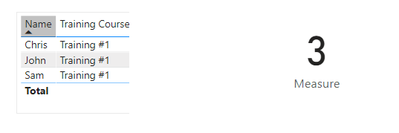
I need help figuring out "Distinct number of people who have taken training". For the data below I'd be looking for a return of three.
| Name | Training Course |
| Chris | Training #1 |
| Chris | Training #1 |
| Chris | Training #1 |
| Brad | |
| John | Training #1 |
| John | Training #1 |
| Tony | |
| Sam | Training #1 |
Has to be done in DAX as I don't have access to the dataset/power query.
Thank you.
Solved! Go to Solution.
@chris886
I guess you are using live connection mode so you can only create a measure for this.
@chris886
I guess you are using live connection mode so you can only create a measure for this.
The Power BI Data Visualization World Championships is back! Get ahead of the game and start preparing now!
| User | Count |
|---|---|
| 39 | |
| 37 | |
| 33 | |
| 32 | |
| 29 |
| User | Count |
|---|---|
| 133 | |
| 88 | |
| 85 | |
| 68 | |
| 64 |