This is best Fabric, Power BI, SQL and AI community event. How do we know? The last event sold out! Save €200 with code FABCMTY200.
Register nowA new Data Days event is coming soon! This time we’re going bigger than ever. Fabric, Power BI, SQL, AI and more. Don't miss out.
Trying to get a distinct count of category per year, but only where the cumulative value up to the end of the year is NOT zero. See data below.
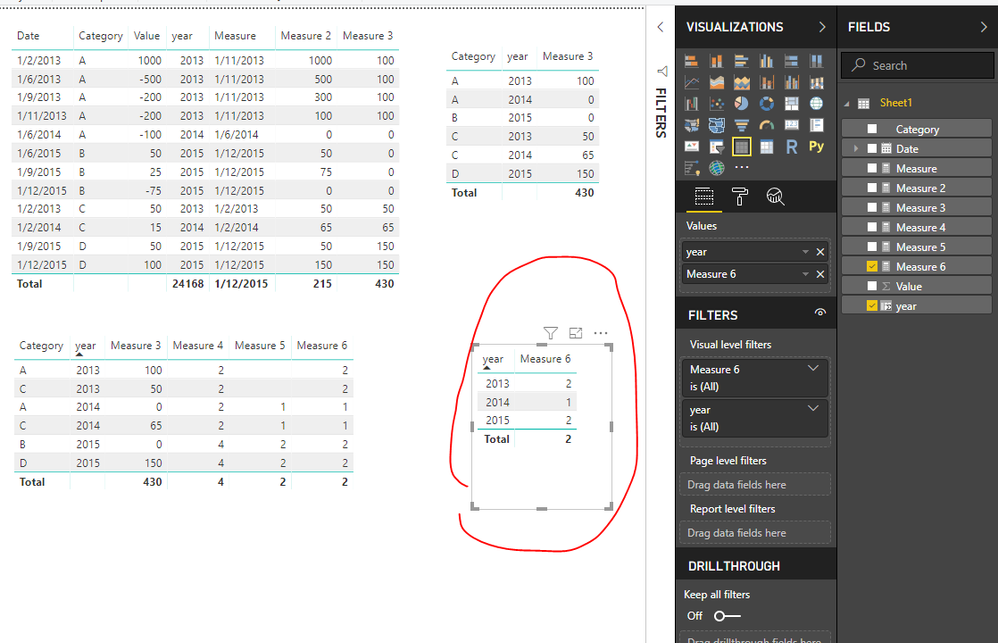
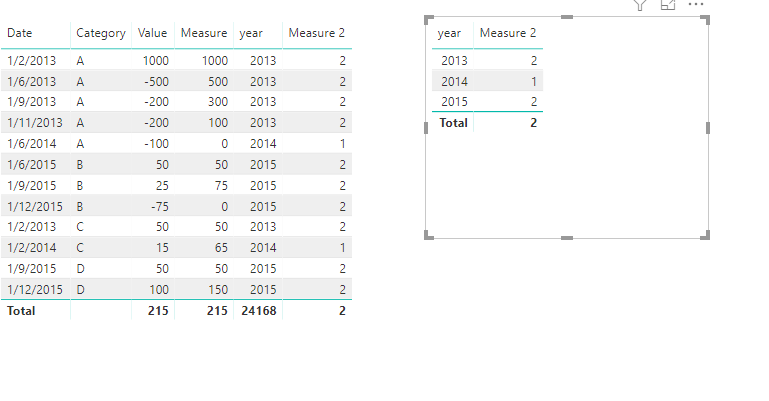
e.g the distinct count of Category at the end of 2013 is 2 (Category A and C), 1 for end 2014 (Category C) and 2 for end 2015 (Category C and D)
Have tried CALCULATE with FILTER but to no avail. Any help appreciated!
Thanks!
| Date | Value | Category |
| 01/02/2013 | 1000 | A |
| 01/02/2013 | 50 | C |
| 01/06/2013 | -500 | A |
| 01/09/2013 | -200 | A |
| 01/11/2013 | -200 | A |
| 01/02/2014 | 15 | C |
| 01/06/2014 | -100 | A |
| 01/06/2015 | 50 | B |
| 01/09/2015 | 25 | B |
| 01/09/2015 | 50 | D |
| 01/12/2015 | -75 | B |
| 01/12/2015 | 100 | D |
Modify with this
create a column year = YEAR(Sheet1[Date]) create measures Measure = CALCULATE(MAX(Sheet1[Date]),FILTER(ALLEXCEPT(Sheet1,Sheet1[Category]),Sheet1[year]=MAX(Sheet1[year]))) Measure 2 = CALCULATE(SUM(Sheet1[Value]),FILTER(ALLEXCEPT(Sheet1,Sheet1[Category]),Sheet1[Date]<=MAX(Sheet1[Date])&&Sheet1[Date]<=[Measure])) Measure 3 = SUMX(FILTER(ALLEXCEPT(Sheet1,Sheet1[Category]),Sheet1[year]=MAX(Sheet1[year])&&Sheet1[Date]=[Measure]),[Measure 2]) Measure 4 = CALCULATE(DISTINCTCOUNT(Sheet1[Category]),FILTER(ALL(Sheet1),Sheet1[year]<=MAX(Sheet1[year]))) Measure 5 = CALCULATE(DISTINCTCOUNT(Sheet1[Category]),FILTER(ALL(Sheet1),Sheet1[year]<=MAX(Sheet1[year])&&[Measure 3]=0)) Measure 6 = [Measure 4]-[Measure 5]
Best Regards
Maggie
Community Support Team _ Maggie Li
If this post helps, then please consider Accept it as the solution to help the other members find it more quickly.
Create a calculated column
year = YEAR([Date])
create measures
Measure =
CALCULATE (
SUM ( Sheet8[Value] ),
FILTER (
ALLEXCEPT ( Sheet8, Sheet8[Category] ),
Sheet8[Date] <= MAX ( Sheet8[Date] )
)
)
Measure 2 =
CALCULATE (
DISTINCTCOUNT ( Sheet8[Category] ),
FILTER ( ALL ( Sheet8 ), [year] = MAX ( Sheet8[year] ) && [Measure] <> 0 )
)
Best Regards
Maggie
Community Support Team _ Maggie Li
If this post helps, then please consider Accept it as the solution to help the other members find it more quickly.
Hi Thanks but this doesn't seem correct.........for YTD 2015 the count might be correct but it seems to be referring to Categories B and D, rather than C and D?
Check out the May 2026 Power BI update to learn about new features.
Sign up to receive a private message when registration opens and key events begin.
If you have recently started exploring Fabric, we'd love to hear how it's going. Your feedback can help with product improvements.
| User | Count |
|---|---|
| 29 | |
| 28 | |
| 25 | |
| 19 | |
| 14 |
| User | Count |
|---|---|
| 53 | |
| 47 | |
| 27 | |
| 20 | |
| 19 |