cancel
Showing results for 
Search instead for 
Did you mean: 

The Power BI Data Visualization World Championships is back! It's time to submit your entry. Live now!

Reply
Anonymous
Not applicable

Distinct Count for ID R12

Hi, Need help to make a measure for distinct count R12 months for each date.

Uploaded the file . https://drive.google.com/file/d/1KN6iygNNM-v0TfSlpqlhJQ6aNip7pD03/view?usp=sharinghttps://drive.goog...


Thx

1 ACCEPTED SOLUTION
v-kelly-msft
Community Support
Community Support

Hi  @Anonymous ,


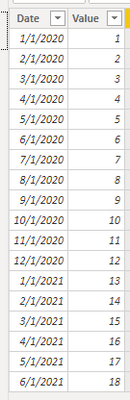
I made a simple table for example:

vkellymsft_1-1632298041794.png


First create a date table;

Then create a relationship between fact table and date table;

One method using "dateadd" function:

Create a calculated column as below:

Column = DATEADD('Table'[Date],-12,MONTH)

And a measure :

Distinct Count for ID R12 =
CALCULATE (
    DISTINCTCOUNT ( 'Table'[Value] ),
    FILTER (
        ALL ( 'Table' ),
        'Table'[Date] < =MAX ( 'Table'[Date] )
            && 'Table'[Date] > MAX ( 'Table'[Column] )
    )
)

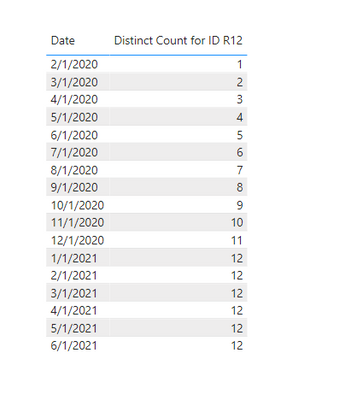
And you will see:

vkellymsft_0-1632298026623.png

Or you could use datesinperiod function instead;

Create a measure as below:

Distinct Count for ID R12 2 =
CALCULATE (
    DISTINCTCOUNT ( 'Table'[Value] ),
    DATESINPERIOD ( 'Date'[Date], MAX ( 'Date'[Date] ), -12, MONTH )
)

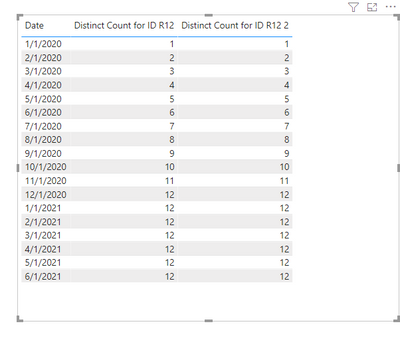
And you will see:

vkellymsft_2-1632298361518.png

For the related .pbix file,pls see attached.


Best Regards,
Kelly

Did I answer your question? Mark my reply as a solution!

View solution in original post

4 REPLIES 4
v-kelly-msft
Community Support
Community Support

Hi  @Anonymous ,


I made a simple table for example:

vkellymsft_1-1632298041794.png


First create a date table;

Then create a relationship between fact table and date table;

One method using "dateadd" function:

Create a calculated column as below:

Column = DATEADD('Table'[Date],-12,MONTH)

And a measure :

Distinct Count for ID R12 =
CALCULATE (
    DISTINCTCOUNT ( 'Table'[Value] ),
    FILTER (
        ALL ( 'Table' ),
        'Table'[Date] < =MAX ( 'Table'[Date] )
            && 'Table'[Date] > MAX ( 'Table'[Column] )
    )
)

And you will see:

vkellymsft_0-1632298026623.png

Or you could use datesinperiod function instead;

Create a measure as below:

Distinct Count for ID R12 2 =
CALCULATE (
    DISTINCTCOUNT ( 'Table'[Value] ),
    DATESINPERIOD ( 'Date'[Date], MAX ( 'Date'[Date] ), -12, MONTH )
)

And you will see:

vkellymsft_2-1632298361518.png

For the related .pbix file,pls see attached.


Best Regards,
Kelly

Did I answer your question? Mark my reply as a solution!

HotChilli
Community Champion
Community Champion

It still appears to be a big file.  Can you check please?

HotChilli
Community Champion
Community Champion

The file appears to be 94M (MB?) .  Any chance you could replace it with a smaller test file that illustrates the issue?

Anonymous
Not applicable

Sure, Now its smaller. The link is updated 🙂

Helpful resources

Announcements
Power BI DataViz World Championships

Power BI Dataviz World Championships

The Power BI Data Visualization World Championships is back! It's time to submit your entry.

December 2025 Power BI Update Carousel

Power BI Monthly Update - December 2025

Check out the December 2025 Power BI Holiday Recap!

FabCon Atlanta 2026 carousel

FabCon Atlanta 2026

Join us at FabCon Atlanta, March 16-20, for the ultimate Fabric, Power BI, AI and SQL community-led event. Save $200 with code FABCOMM.