Share feedback directly with Fabric product managers, participate in targeted research studies and influence the Fabric roadmap.
Sign up nowGet Fabric certified for FREE! Don't miss your chance! Learn more
Hi, Need help to make a measure for distinct count R12 months for each date.
Uploaded the file . https://drive.google.com/file/d/1KN6iygNNM-v0TfSlpqlhJQ6aNip7pD03/view?usp=sharinghttps://drive.goog...
Thx
Solved! Go to Solution.
Hi @Anonymous ,
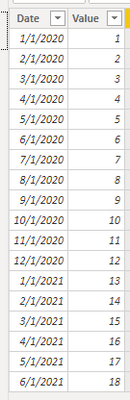
I made a simple table for example:
First create a date table;
Then create a relationship between fact table and date table;
One method using "dateadd" function:
Create a calculated column as below:
Column = DATEADD('Table'[Date],-12,MONTH)
And a measure :
Distinct Count for ID R12 =
CALCULATE (
DISTINCTCOUNT ( 'Table'[Value] ),
FILTER (
ALL ( 'Table' ),
'Table'[Date] < =MAX ( 'Table'[Date] )
&& 'Table'[Date] > MAX ( 'Table'[Column] )
)
)
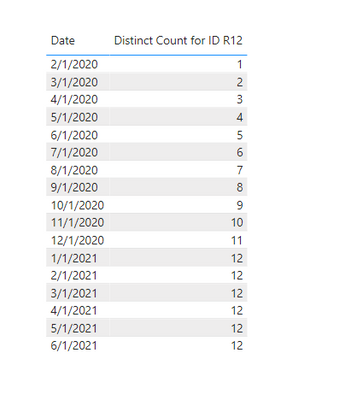
And you will see:
Or you could use datesinperiod function instead;
Create a measure as below:
Distinct Count for ID R12 2 =
CALCULATE (
DISTINCTCOUNT ( 'Table'[Value] ),
DATESINPERIOD ( 'Date'[Date], MAX ( 'Date'[Date] ), -12, MONTH )
)
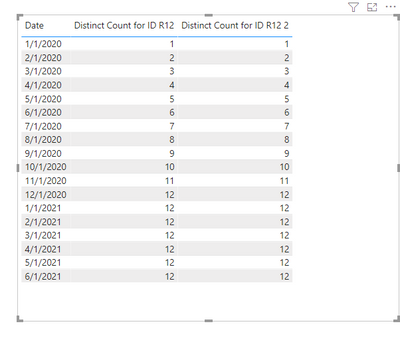
And you will see:
For the related .pbix file,pls see attached.
Best Regards,
Kelly
Did I answer your question? Mark my reply as a solution!
Hi @Anonymous ,
I made a simple table for example:
First create a date table;
Then create a relationship between fact table and date table;
One method using "dateadd" function:
Create a calculated column as below:
Column = DATEADD('Table'[Date],-12,MONTH)
And a measure :
Distinct Count for ID R12 =
CALCULATE (
DISTINCTCOUNT ( 'Table'[Value] ),
FILTER (
ALL ( 'Table' ),
'Table'[Date] < =MAX ( 'Table'[Date] )
&& 'Table'[Date] > MAX ( 'Table'[Column] )
)
)
And you will see:
Or you could use datesinperiod function instead;
Create a measure as below:
Distinct Count for ID R12 2 =
CALCULATE (
DISTINCTCOUNT ( 'Table'[Value] ),
DATESINPERIOD ( 'Date'[Date], MAX ( 'Date'[Date] ), -12, MONTH )
)
And you will see:
For the related .pbix file,pls see attached.
Best Regards,
Kelly
Did I answer your question? Mark my reply as a solution!
It still appears to be a big file. Can you check please?
The file appears to be 94M (MB?) . Any chance you could replace it with a smaller test file that illustrates the issue?
Sure, Now its smaller. The link is updated 🙂
If you love stickers, then you will definitely want to check out our Community Sticker Challenge!
Check out the January 2026 Power BI update to learn about new features.
| User | Count |
|---|---|
| 65 | |
| 64 | |
| 45 | |
| 21 | |
| 18 |
| User | Count |
|---|---|
| 115 | |
| 114 | |
| 38 | |
| 36 | |
| 26 |