Join us at FabCon Atlanta from March 16 - 20, 2026, for the ultimate Fabric, Power BI, AI and SQL community-led event. Save $200 with code FABCOMM.
Register now!Get Fabric certified for FREE! Don't miss your chance! Learn more
Hi,
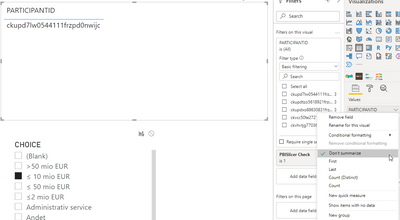
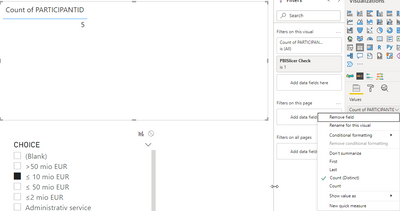
I want to make a KPI counting the Participants in a survey. When I have the participants in a table it shows correctly, but once I transform these into a count or distinct count it shows incorrectly.
You can see below what I mean:
Don't summarize:
Distinct Count:
I want to make a card showing the KPI of 1 instead of 5 - because you can see there's only one participant when I 'Don't Summarize'.
I have tried all three posibilities in terms of joins from the two tables (Both, table1 filters table 2 and table 2 filters table 1).
I hope someone can help.
Thank you! 🙂
Solved! Go to Solution.
The problem was fixed with creating a measure to filter the data instead of using the filter-panel.
So the measure was:
check the raw data itself and do the calculation manually cause that way you did it should wr=ork fine for what you asking
Proud to be a Super User!
The problem was fixed with creating a measure to filter the data instead of using the filter-panel.
So the measure was:
Share feedback directly with Fabric product managers, participate in targeted research studies and influence the Fabric roadmap.
Check out the February 2026 Power BI update to learn about new features.
| User | Count |
|---|---|
| 68 | |
| 60 | |
| 47 | |
| 20 | |
| 16 |
| User | Count |
|---|---|
| 109 | |
| 107 | |
| 39 | |
| 27 | |
| 27 |