Don't miss your chance to take the Fabric Data Engineer (DP-700) exam on us!
Learn moreWe've captured the moments from FabCon & SQLCon that everyone is talking about, and we are bringing them to the community, live and on-demand. Starts on April 14th. Register now
Hi,
I’m a newbie in DAX, and am using Excel 2016.
I made a dynamic ABC classification for my data using a pattern provided by Gerhard Brueckl on daxpatterns.com (https://www.daxpatterns.com/abc-classification-dynamic/). The pattern is really long, and I understand about 25% of it (if I’m generous) and so the best I can say is to go to the link I provided and download the Excel 2013 sample he provides at the end of the article. (I used the “Basic Pattern File” once I downloaded the folder.)
All went well in using his pattern for my data. But then I decided to make a measure to count how many products are in each class. You can add this measure to his sample to get the result:
ABC Count= IF(NOT(ISBLANK([Sales Amount ABC])), DISTINCTCOUNT([ProductModel]), BLANK())
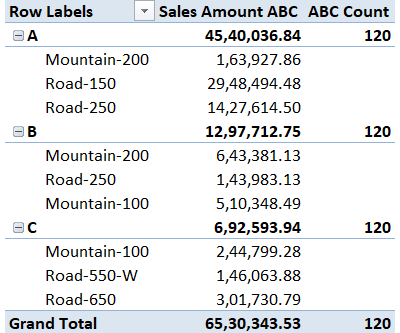
So once I had my ABC Count measure, I moved “Class” to the Rows field (above the ProductModel) and got the info as you see here, filtered for 2006 (excuse my poor copy-and-paste job. I don’t know how else to show it).
| Row Labels | Sales Amount ABC |
| A | 4,540,036.84 |
| Mountain-200 | 163,927.86 |
| Road-150 | 2,948,494.48 |
| Road-250 | 1,427,614.50 |
| B | 1,297,712.75 |
| Mountain-200 | 643,381.13 |
| Road-250 | 143,983.13 |
| Mountain-100 | 510,348.49 |
| C | 692,593.94 |
| Mountain-100 | 244,799.28 |
| Road-550-W | 146,063.88 |
| Road-650 | 301,730.79 |
| Grand Total | 6,530,343.53 |
But then I added my ABC Count measure to the values area. Chaos erupts on the subtotal level!
| Row Labels | Sales Amount ABC | ABC Count |
| A | 4,540,036.84 | 120 |
| Mountain-200 | 163,927.86 | 1 |
| Road-150 | 2,948,494.48 | 1 |
| Road-250 | 1,427,614.50 | 1 |
| B | 1,297,712.75 | 120 |
| Mountain-200 | 643,381.13 | 1 |
| Road-250 | 143,983.13 | 1 |
| Mountain-100 | 510,348.49 | 1 |
| C | 692,593.94 | 120 |
| Mountain-100 | 244,799.28 | 1 |
| Road-550-W | 146,063.88 | 1 |
| Road-650 | 301,730.79 | 1 |
| Grand Total | 6,530,343.53 | 120 |
I know how to turn off a measure of a subtotal row, using HASONEVALUE or something similar, but how does a person tell a DAX measure that you want a distinct count of only the items that are in the class showing on the subtotal row??
For my data it needs to be distinct count, because there’s a whole bunch of rows for every product in the data.
Thanks so much for helping out my floundering. Maybe I’m asking something that can’t be done?!
I hope not.
Thanks again.
William
Solved! Go to Solution.
Sorry I misunderstood your question. Try this measure
ABC Count =IF(NOT(HASONEVALUE(Products[ProductModel])),CALCULATE (
DISTINCTCOUNT(Products[ProductModel]),
VALUES ( 'Products'[ProductCode] ),
FILTER (
CALCULATETABLE (
ADDCOLUMNS (
ADDCOLUMNS (
VALUES ( 'Products'[ProductCode] ),
"OuterValue", [Sales Amount]
),
"CumulatedSalesPercentage", DIVIDE (
SUMX (
FILTER (
ADDCOLUMNS (
VALUES ( 'Products'[ProductCode] ),
"InnerValue", [Sales Amount]
),
[InnerValue] >= [OuterValue]
),
[InnerValue]
),
CALCULATE (
[Sales Amount],
VALUES ( 'Products'[ProductCode] )
)
)
),
ALL ( 'Products' )
),
[CumulatedSalesPercentage] > [MinLowerBoundary]
&& [CumulatedSalesPercentage] <= [MaxUpperBoundary]
)
))
Hi @Anonymous,
Please revise your ABC Count measure =IF(NOT(ISBLANK([Sales Amount ABC]))&&NOT(HASONEVALUE(Products[ProductModel])),DISTINCTCOUNT(Products[ProductModel]),BLANK())
I think this should work as you expected. Here is the snapshot
Hope it helps
Hi Chandeep, thanks for the reply. The problem is, I want the subtotals to be accurate. As of now, they count everything in the data model!
Sorry I misunderstood your question. Try this measure
ABC Count =IF(NOT(HASONEVALUE(Products[ProductModel])),CALCULATE (
DISTINCTCOUNT(Products[ProductModel]),
VALUES ( 'Products'[ProductCode] ),
FILTER (
CALCULATETABLE (
ADDCOLUMNS (
ADDCOLUMNS (
VALUES ( 'Products'[ProductCode] ),
"OuterValue", [Sales Amount]
),
"CumulatedSalesPercentage", DIVIDE (
SUMX (
FILTER (
ADDCOLUMNS (
VALUES ( 'Products'[ProductCode] ),
"InnerValue", [Sales Amount]
),
[InnerValue] >= [OuterValue]
),
[InnerValue]
),
CALCULATE (
[Sales Amount],
VALUES ( 'Products'[ProductCode] )
)
)
),
ALL ( 'Products' )
),
[CumulatedSalesPercentage] > [MinLowerBoundary]
&& [CumulatedSalesPercentage] <= [MaxUpperBoundary]
)
))
Thanks so much for taking the time to help!
William
If you have recently started exploring Fabric, we'd love to hear how it's going. Your feedback can help with product improvements.
A new Power BI DataViz World Championship is coming this June! Don't miss out on submitting your entry.
Share feedback directly with Fabric product managers, participate in targeted research studies and influence the Fabric roadmap.
| User | Count |
|---|---|
| 56 | |
| 40 | |
| 36 | |
| 20 | |
| 18 |
| User | Count |
|---|---|
| 74 | |
| 72 | |
| 38 | |
| 35 | |
| 26 |