Join us at FabCon Atlanta from March 16 - 20, 2026, for the ultimate Fabric, Power BI, AI and SQL community-led event. Save $200 with code FABCOMM.
Register now!The Power BI Data Visualization World Championships is back! Get ahead of the game and start preparing now! Learn more
Hi Community,
I have a calendar slice, with Quarters only and I would like to calculate the sum of the IDs that:
1) based on current selected Quarter - looks at Max date of this selection;
2) finds the MAX of the 'Date Demand' and subtracts 15 calendar days;
once the above step is done and those IDs are filtered out, I would like to get the average of days between:
1) Presentation Date and Demand Date;
| id | Date demand | Presentation date |
| FP#00009 | 22/03/2018 | 13/04/2018 |
| FP#00010 | 22/03/2018 | 17/04/2018 |
| FP#00011 | 22/03/2018 | 20/04/2018 |
| FP#00012 | 19/03/2018 | 20/04/2018 |
| FP#00013 | 19/03/2018 | 20/04/2018 |
| FP#00023 | 09/04/2018 | 16/04/2018 |
| FP#00024 | 09/04/2018 | 19/04/2018 |
| FP#00025 | 09/04/2018 | 19/04/2018 |
| FP#00026 | 09/04/2018 | 19/04/2018 |
| FP#00031 | 17/04/2018 | 23/04/2018 |
| FP#00033 | 17/04/2018 | 24/04/2018 |
| FP#00035 | 15/06/2018 | 10/07/2018 |
| FP#00036 | 21/06/2018 | 10/08/2018 |
| FP#00043 | 15/06/2018 | 24/07/2018 |
| FP#00044 | 21/06/2018 | 07/08/2018 |
| FP#00045 | 22/06/2018 | 16/07/2018 |
| FP#00046 | 13/06/2018 | |
| FP#00047 | 04/07/2018 | 26/07/2018 |
| FP#00048 | 21/06/2018 | 26/07/2018 |
| FP#00049 | 04/07/2018 | 19/07/2018 |
| FP#00050 | 04/07/2018 | 10/09/2018 |
| FP#00051 | 04/07/2018 | 17/10/2018 |
| FP#00052 | 09/07/2018 | 23/10/2018 |
| FP#00053 | 30/08/2018 | 13/09/2018 |
| FP#00054 | 30/08/2018 | 13/09/2018 |
| FP#00055 | 30/08/2018 | 08/11/2018 |
| FP#00056 | 30/08/2018 | 13/11/2018 |
| FP#00057 | 30/08/2018 | |
| FP#00058 | 04/10/2018 | 12/10/2018 |
| FP#00059 | 23/10/2018 | 22/11/2018 |
| FP#00060 | 23/10/2018 | 20/11/2018 |
| FP#00061 | 17/10/2018 | 13/11/2018 |
| FP#00062 | 17/10/2018 | 09/11/2018 |
| FP#00063 | 19/10/2018 | 20/11/2018 |
| FP#00064 | 23/10/2018 | |
| FP#00065 | 25/10/2018 | 02/11/2018 |
| FP#00066 | 25/10/2018 | 02/11/2018 |
| FP#00067 | 25/10/2018 | 02/11/2018 |
| FP#00068 | 06/11/2018 | |
| FP#00069 | 14/11/2018 | 20/11/2018 |
| FP#00070 | 14/11/2018 | 20/11/2018 |
| FP#00071 | 16/11/2018 | 20/11/2018 |
| FP#00072 | 21/11/2018 | 20/12/2018 |
| FP#00073 | 28/11/2018 | |
| FP#00074 | 05/12/2018 | 19/12/2018 |
| FP#00075 | 03/01/2019 | |
| FP#00076 | 14/01/2019 | |
| FP#00077 | 24/01/2019 | |
| FP#00078 | 24/01/2019 | |
| FP#00079 | 24/01/2019 | |
| FP#00080 | 24/01/2019 | |
| FP#00081 | 24/01/2019 | |
| FP#00082 | 28/01/2019 | |
| FP#00083 | 29/01/2019 |
I am finding difficulties in sharing data sample as I am in a closed environment.
Your help is much appreciated!
Thank you.
Solved! Go to Solution.
Hi @Anonymous ,
One sample for your reference. If it doesn't meet your requirement, kindly share your excepted result to me.
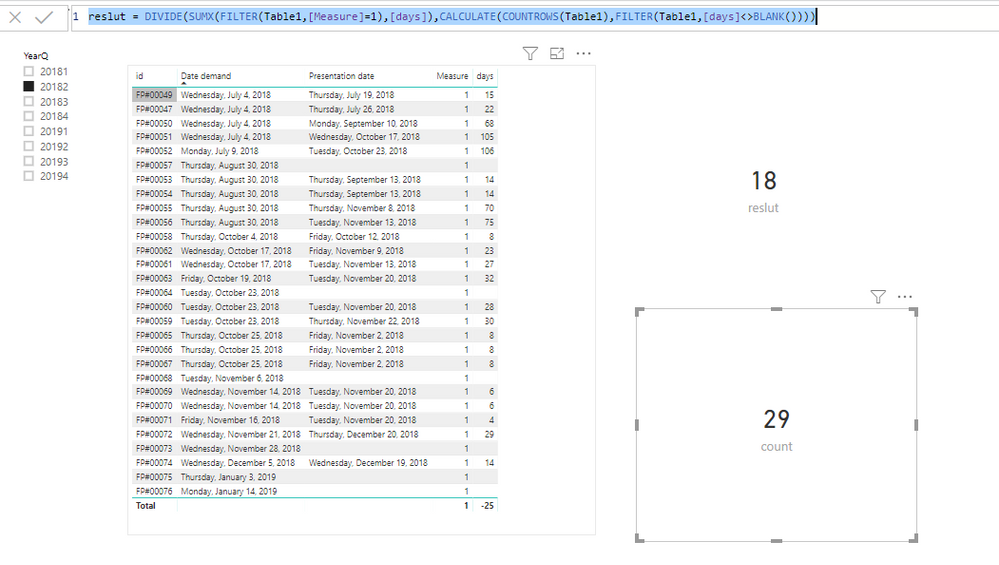
Here I created some measures to work on it.
Measure = var _maxsel = MAX('CALENDAR'[Date])
var _maxdateondemand = CALCULATE(MAX('Table1'[Date demand]),ALL(Table1))-15
return
IF(MAX('Table1'[Date demand])>=_maxsel && MAX('Table1'[Date demand])<=_maxdateondemand,1,0)
days = DATEDIFF(MAX('Table1'[Date demand]),MAX('Table1'[Presentation date]),DAY)
count = CALCULATE(COUNT(Table1[id]),FILTER(Table1,[Measure]=1))
reslut = DIVIDE(SUMX(FILTER(Table1,[Measure]=1),[days]),CALCULATE(COUNTROWS(Table1),FILTER(Table1,[days]<>BLANK())))
Pbix as attached.
Regards.
Frank
Hi @Anonymous ,
One sample for your reference. If it doesn't meet your requirement, kindly share your excepted result to me.
Here I created some measures to work on it.
Measure = var _maxsel = MAX('CALENDAR'[Date])
var _maxdateondemand = CALCULATE(MAX('Table1'[Date demand]),ALL(Table1))-15
return
IF(MAX('Table1'[Date demand])>=_maxsel && MAX('Table1'[Date demand])<=_maxdateondemand,1,0)
days = DATEDIFF(MAX('Table1'[Date demand]),MAX('Table1'[Presentation date]),DAY)
count = CALCULATE(COUNT(Table1[id]),FILTER(Table1,[Measure]=1))
reslut = DIVIDE(SUMX(FILTER(Table1,[Measure]=1),[days]),CALCULATE(COUNTROWS(Table1),FILTER(Table1,[days]<>BLANK())))
Pbix as attached.
Regards.
Frank
Hi Frank,
it worked perfectly!
Thank you for your help.
SUBJECT WRONG: "Distance" was a type. I would like to get the average days between those dates with those conditions.
Many thanks.
The Power BI Data Visualization World Championships is back! Get ahead of the game and start preparing now!
| User | Count |
|---|---|
| 40 | |
| 37 | |
| 33 | |
| 29 | |
| 27 |
| User | Count |
|---|---|
| 133 | |
| 104 | |
| 61 | |
| 59 | |
| 55 |