Join us at FabCon Atlanta from March 16 - 20, 2026, for the ultimate Fabric, Power BI, AI and SQL community-led event. Save $200 with code FABCOMM.
Register now!The Power BI Data Visualization World Championships is back! Get ahead of the game and start preparing now! Learn more
I have a column that is a duration in a time format, yet when I add to a table it shows as a decimal. For example, when looking in the query, the following value:
| 0.03:23:02.4000000 |
Is displayed as: 3.38 ... I would like it displayed as 3:23 ... any help? Thanks!
Solved! Go to Solution.
Hi @cumoczar ,
Duration represents a length of time. It’s converted into a Decimal Number Type when loaded into the model. It is as designed according to this document.
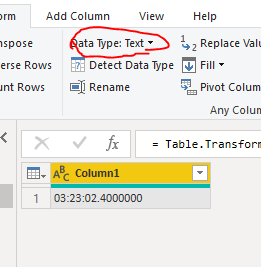
If you only want to show duration of time in a Table report, I think the easiest way is to change the Data Type from “Duration” to “Text” as below. Then it will keep the type as "Text" and can be showed correctly.
Hi @cumoczar ,
Duration represents a length of time. It’s converted into a Decimal Number Type when loaded into the model. It is as designed according to this document.
If you only want to show duration of time in a Table report, I think the easiest way is to change the Data Type from “Duration” to “Text” as below. Then it will keep the type as "Text" and can be showed correctly.
The Power BI Data Visualization World Championships is back! Get ahead of the game and start preparing now!
| User | Count |
|---|---|
| 37 | |
| 37 | |
| 33 | |
| 32 | |
| 29 |
| User | Count |
|---|---|
| 130 | |
| 88 | |
| 82 | |
| 68 | |
| 64 |