

Join us at FabCon Atlanta from March 16 - 20, 2026, for the ultimate Fabric, Power BI, AI and SQL community-led event. Save $200 with code FABCOMM.
Register now!The Power BI Data Visualization World Championships is back! Get ahead of the game and start preparing now! Learn more
I have Slicer on an invisible page that calculates a date range (last 12 full months), so today (feb 7, 2024), it displays from 2/1/2023 to 1/31/2024) as follows
I would like to display the date range being filtered in a text box on each of my dashboard's visible pages as follows:
The text in the above text box should match the from to in the slicer. Instead it is based on a Dax measure that queries the data in the dashboard. Is it possible to reference the slicer above and retrieve its From / To values and use them in my text box?
This way the filter is provided by the slicer and the displayed text box content is retrieved from the slicer so no chance of being out of sync. Thanks
Solved! Go to Solution.
my understanding is that you want to selected let us say , date range from 2023-01-01 till 2023-12-31
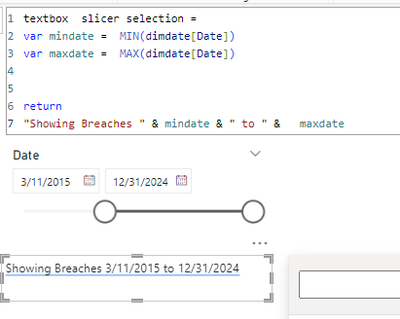
so you want the textbox to show : Showing Breaches 2023-01-01 to 2023-12-31
use the following dax code:
you can play with the format of the date with the format() function .
let me know if this helps.
If my answer helped sort things out for you, i would appreciate a thumbs up 👍 and mark it as the solution ✅
It makes a difference and might help someone else too. Thanks for spreading the good vibes! 🤠
my understanding is that you want to selected let us say , date range from 2023-01-01 till 2023-12-31
so you want the textbox to show : Showing Breaches 2023-01-01 to 2023-12-31
use the following dax code:
you can play with the format of the date with the format() function .
let me know if this helps.
If my answer helped sort things out for you, i would appreciate a thumbs up 👍 and mark it as the solution ✅
It makes a difference and might help someone else too. Thanks for spreading the good vibes! 🤠
Check out the November 2025 Power BI update to learn about new features.
Advance your Data & AI career with 50 days of live learning, contests, hands-on challenges, study groups & certifications and more!
| User | Count |
|---|---|
| 58 | |
| 43 | |
| 41 | |
| 23 | |
| 17 |
| User | Count |
|---|---|
| 190 | |
| 121 | |
| 96 | |
| 65 | |
| 46 |