cancel
Showing results for 
Search instead for 
Did you mean: 

The Power BI Data Visualization World Championships is back! Get ahead of the game and start preparing now! Learn more

Reply
samanthamirae
Resolver I
Resolver I

Displaying run out on Power BI?

Hi everyone,


I am trying to display something very similar like this on Power BI but I'm not quite sure if it's possible. Does anyone have any suggestions on where I may be able to start? This chart shows when a certain part inventory is projected to run out.


Thank you!

1 ACCEPTED SOLUTION
Anonymous
Not applicable

Hi @samanthamirae


You can use the conditional formatting.


Click on the Table/ Matrix visual -> Go to Visualizations- > Go to Format Tab -> Conditional Formatting, Check Background colur 'ON', Make sure you select the Inventory measure in the dropdown there. Click on the Advance Controls - > Select colour by rules, set the colour as needed there.


Thanks

Raj

View solution in original post

5 REPLIES 5
Anonymous
Not applicable

Hi @samanthamirae


You can use the conditional formatting.


Click on the Table/ Matrix visual -> Go to Visualizations- > Go to Format Tab -> Conditional Formatting, Check Background colur 'ON', Make sure you select the Inventory measure in the dropdown there. Click on the Advance Controls - > Select colour by rules, set the colour as needed there.


Thanks

Raj

Thank you for helping! I am running into one more issue. As you can see in the screenshot, PBI is only letting me apply color to "Device + Board/Strategy" and not the actual numbers of each month. Also, if I want to add the conditional formatting to every cell like the Excel screenshot above, will I have to manually select conditional formatting for every column? Is there an easier way to do this?


Thank you. I am still new to Power BI.

Anonymous
Not applicable

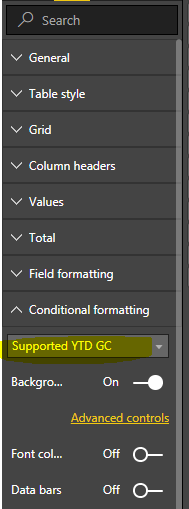
As i mentioend earleir, you need to select the field in Format page before you go to advanced controls. I have highlighted below the place where you need to do this.


COnditional Formatting.PNG 


Thanks
Raj

Hey,


Sorry I figured that part out. The last thing I am wondering is if I am able to apply conditional formatting on all my month and quarter columns at once? Because as of now, I have to type and apply the conditional formatting for every column (month/Quarter) separately which is very inefficient now and in the future.

I appreciate the help!

screenshot 3.PNG

Anonymous
Not applicable

I am afraid that we dont have the option to do it in one shot for all columns.Conditional formatting is applicable to column level, so each column should be selected individually to format.


Thanks
Raj

Helpful resources

Announcements
Power BI DataViz World Championships

Power BI Dataviz World Championships

The Power BI Data Visualization World Championships is back! Get ahead of the game and start preparing now!

December 2025 Power BI Update Carousel

Power BI Monthly Update - December 2025

Check out the December 2025 Power BI Holiday Recap!

FabCon Atlanta 2026 carousel

FabCon Atlanta 2026

Join us at FabCon Atlanta, March 16-20, for the ultimate Fabric, Power BI, AI and SQL community-led event. Save $200 with code FABCOMM.