cancel
Showing results for 
Search instead for 
Did you mean: 

The Power BI Data Visualization World Championships is back! Get ahead of the game and start preparing now! Learn more

Reply
Anonymous
Not applicable

Displaying measure used as a slicer on ArcGIS map

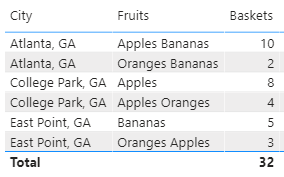
My issue is that I need to use a substring of a text column as one of the filters on a map. I have the measure but can't make it appear on its own without the "real" column field. I've created a set of demo data to illustrate my problem. Suppose I have City, Fruits, and how many Baskets of that fruit combination in my data source. 

cmbellah_0-1602869295089.png


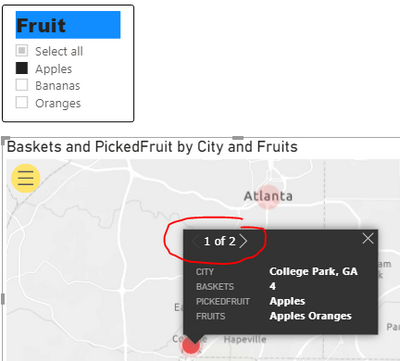
Then I've created a slicer for one or more fruits which uses SEARCH to determine if that fruit type is present in the baskets - and filters the resutls on my map. PickedFruit is a measure which shows the selected fruit(s) from the slicer, and Fruit is the actual column. I can get the Fruit slicer to work on the map by adding it to the Time area in the Visualizations pane of the report. My issue is that I can't use PickedFruit instead of Fruits, so when I select a city that has the selected fruit in more than one type of basket, my city will have its total divided into all of the various Fruits lists. For my real work report that is a lot of pages and doesn't give the users a real total per city. 

cmbellah_2-1602869904423.png

Is there anything I can do to get just the substring PickedFruit so I'd get the total of all baskets that have apples in them? Thanks in advance - I'm a self-taught beginner here! 🙂


1 ACCEPTED SOLUTION

I am able to download the file, please let me know the output you want 


Baskets 3 = CALCULATE ( SUM(FruitBaskets[Baskets] ), ALL( FruitBaskets ))
Baskets 2 = 
var selValue = SELECTEDVALUE(Fruits[Fruit]) 
var t = if (ISFILTERED(Fruits[Fruit])
                      , CALCULATE( SUM( FruitBaskets[Baskets] ), ALLSELECTED(Fruits[Fruit]), ALLselected(FruitBaskets)) 
                      , CALCULATE( SUM( FruitBaskets[Baskets]), all(FruitBaskets) ))

return t 


Baskets 1 = CALCULATE( SUM(FruitBaskets[Baskets]), Filter (ALL(FruitBaskets[Fruits]), CONTAINSSTRING(FruitBaskets[Fruits], SELECTEDVALUE(Fruits[Fruit])) 
))


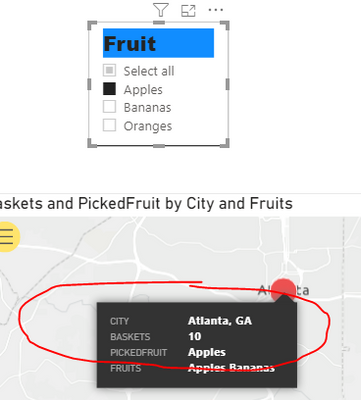
I added all three to the tooltip of the map, snapshot image looks as, when I selected the Apples:

sevenhills_0-1602886956430.png


View solution in original post

4 REPLIES 4
sevenhills
Super User
Super User
Anonymous
Not applicable

Thanks for your reply! I'd like to be able to have one total number of baskets by PickedFruit (instead of the Fruits column) displayed for each city on the map. The pbix file is in Google drive here .

cmbellah_0-1602872494005.png


I am able to download the file, please let me know the output you want 


Baskets 3 = CALCULATE ( SUM(FruitBaskets[Baskets] ), ALL( FruitBaskets ))
Baskets 2 = 
var selValue = SELECTEDVALUE(Fruits[Fruit]) 
var t = if (ISFILTERED(Fruits[Fruit])
                      , CALCULATE( SUM( FruitBaskets[Baskets] ), ALLSELECTED(Fruits[Fruit]), ALLselected(FruitBaskets)) 
                      , CALCULATE( SUM( FruitBaskets[Baskets]), all(FruitBaskets) ))

return t 


Baskets 1 = CALCULATE( SUM(FruitBaskets[Baskets]), Filter (ALL(FruitBaskets[Fruits]), CONTAINSSTRING(FruitBaskets[Fruits], SELECTEDVALUE(Fruits[Fruit])) 
))


I added all three to the tooltip of the map, snapshot image looks as, when I selected the Apples:

sevenhills_0-1602886956430.png


Anonymous
Not applicable

That's what I needed. Thank you so much!

Helpful resources

Announcements
Power BI DataViz World Championships

Power BI Dataviz World Championships

The Power BI Data Visualization World Championships is back! Get ahead of the game and start preparing now!

December 2025 Power BI Update Carousel

Power BI Monthly Update - December 2025

Check out the December 2025 Power BI Holiday Recap!

FabCon Atlanta 2026 carousel

FabCon Atlanta 2026

Join us at FabCon Atlanta, March 16-20, for the ultimate Fabric, Power BI, AI and SQL community-led event. Save $200 with code FABCOMM.