cancel
Showing results for 
Search instead for 
Did you mean: 

Learn from the best! Meet the four finalists headed to the FINALS of the Power BI Dataviz World Championships! Register now

Reply
Anonymous
Not applicable

Displaying Role + Count as different Visual Card

Hi,


I trying to do something which I was easily able to when I was using an excel as a data source but now we are using live data from the database and I really need some help.

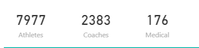
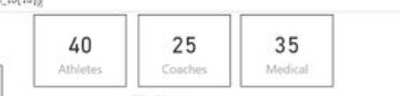
I am trying to get a similar layout which I had when using excel sheet (these were different columns in my excel sheet so it was easy to create individual visual cards)


example.PNG


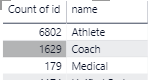
This is the output from the database - I have to get this using two tables

1. Roles = names

2. Prsn_ID = Counts of those roles.


example 2.PNG


I really cant figure out how to have an individual visual card for each role and have the count for it like I could when my data source was just an excel sheet. Maybe need to create a measure? any suggestions and details on how to achieve this.

1 ACCEPTED SOLUTION
affan
Solution Sage
Solution Sage

Hi @Anonymous


I don't think that you will need to create measures to achevie what you have explained in you post.


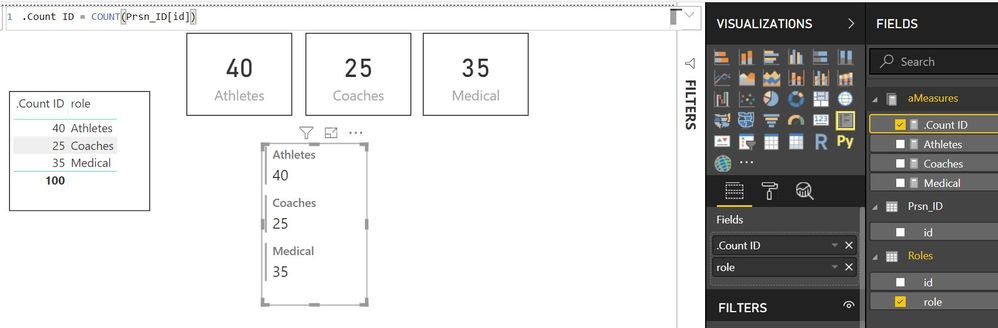
You can see the solution demonstration below.


If this helped you, please mark this post as an accepted solution and like to give KUDOS .


Regards,

Affan

View solution in original post

4 REPLIES 4
v-yulgu-msft
Microsoft Employee
Microsoft Employee

Hi @Anonymous,


For measures, you can try this:

Athletes =
CALCULATE (
    COUNT ( table[Prsn_ID] ),
    FILTER ( table, table[Roles] = "Athletes" )
)


Best regards,

Yuliana Gu

Community Support Team _ Yuliana Gu
If this post helps, then please consider Accept it as the solution to help the other members find it more quickly.
affan
Solution Sage
Solution Sage

Hi @Anonymous


I don't think that you will need to create measures to achevie what you have explained in you post.


You can see the solution demonstration below.


If this helped you, please mark this post as an accepted solution and like to give KUDOS .


Regards,

Affan

Anonymous
Not applicable

Hi Rexra,

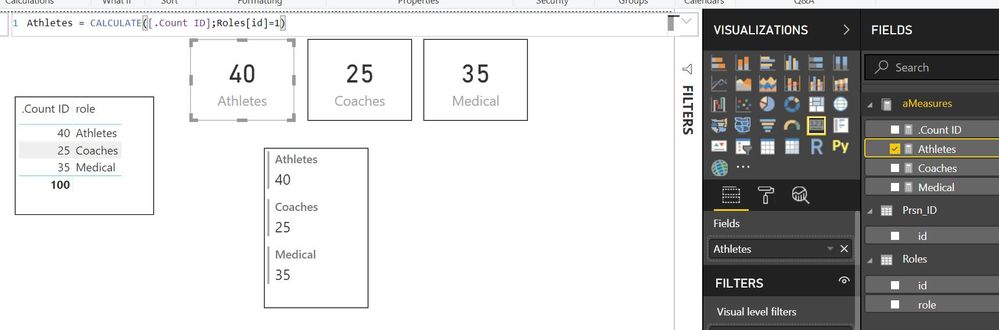
See these images and tell us if works for you.


Captura1.JPG


Captura2.JPG


Anonymous
Not applicable

This would be amazing if I can display the data like this...It is exactly how Im trying to display them individually in boxes 


What would I need to do for this?


example.PNG

Helpful resources

Announcements
Join our Fabric User Panel

Join our Fabric User Panel

Share feedback directly with Fabric product managers, participate in targeted research studies and influence the Fabric roadmap.

February Power BI Update Carousel

Power BI Monthly Update - February 2026

Check out the February 2026 Power BI update to learn about new features.

FabCon Atlanta 2026 carousel

FabCon Atlanta 2026

Join us at FabCon Atlanta, March 16-20, for the ultimate Fabric, Power BI, AI and SQL community-led event. Save $200 with code FABCOMM.