FabCon is coming to Atlanta
Join us at FabCon Atlanta from March 16 - 20, 2026, for the ultimate Fabric, Power BI, AI and SQL community-led event. Save $200 with code FABCOMM.
Register now!- Power BI forums
- Get Help with Power BI
- Desktop
- Service
- Report Server
- Power Query
- Mobile Apps
- Developer
- DAX Commands and Tips
- Custom Visuals Development Discussion
- Health and Life Sciences
- Power BI Spanish forums
- Translated Spanish Desktop
- Training and Consulting
- Instructor Led Training
- Dashboard in a Day for Women, by Women
- Galleries
- Data Stories Gallery
- Themes Gallery
- Contests Gallery
- QuickViz Gallery
- Quick Measures Gallery
- Visual Calculations Gallery
- Notebook Gallery
- Translytical Task Flow Gallery
- TMDL Gallery
- R Script Showcase
- Webinars and Video Gallery
- Ideas
- Custom Visuals Ideas (read-only)
- Issues
- Issues
- Events
- Upcoming Events
Get Fabric Certified for FREE during Fabric Data Days. Don't miss your chance! Request now
- Power BI forums
- Forums
- Get Help with Power BI
- Desktop
- Re: Display two fact tables that are related by on...
- Subscribe to RSS Feed
- Mark Topic as New
- Mark Topic as Read
- Float this Topic for Current User
- Bookmark
- Subscribe
- Printer Friendly Page


- Mark as New
- Bookmark
- Subscribe
- Mute
- Subscribe to RSS Feed
- Permalink
- Report Inappropriate Content
Display two fact tables that are related by one dimension but differing times
I have two fact tables:
Emails sent
Email responses
Emails Sent
| Contact | Customer | Date Sent |
| Russ's id | Customer1's id | July 7, 2022 |
| John's id | Customer2's id | July 7, 2022 |
| Russ's id | Customer1's id | July 15, 2022 |
Email Responses
| Contact | Customer | Response Date | Note |
| Russ's id | Customer1's ID | July 10, 2022 | I looked at the record |
| N/A | Customer2's ID | July 11, 2022 | Called customer |
| Russ's id | Customer1's ID | July 12, 2022 | Left voicemail |
| Steve's id | Customer1's ID | July 13, 2022 | Resent email |
The results that I would like are the following (actually, I would have values from the Contact and Customer Dimensions):
| Contact | Customer | Date Sent | Response date | Note |
| Russ's id | Customer1's id | July 7, 2022 | July 10, 2022 | I looked at the record |
| Russ's id | Customer1's id | July 7, 2022 | July 13, 2022 | Resent email |
| Russ's id | Customer1's id | July 7, 2022 | July 12, 2022 | Left voicemail |
| John's id | Customer2's id | July 7, 2022 | July 11, 2022 | Called customer |
| Russ's id | Customer1's id | July 15, 2022 |
There is nothing in the source to identify the emails sent that the email response is to. I am assuming that if there is an email response after an email is sent for a customer or contact, then assign it to the previous email send record.
Here's the rules (as I have thought them through so far):
- Each email response is assigned to zero or one email send, the one that was the last email sent before the response.
- The customer on the email send must match the customer in the email response.
- If the contact is not N/A and matches the contact for a recent email send, then associate the response to the email send
- If the contact is N/A in the response, then assoicate the email response to the most recent email send for the customer, assigning it to multiple contacts.
- If the most recent email for the customer is not associated with the contact in the email response, then treat the contact as if it is N/A and associate the response to all of the emails that were sent to that company.
I am not sure the best way to model this.
Solved! Go to Solution.


- Mark as New
- Bookmark
- Subscribe
- Mute
- Subscribe to RSS Feed
- Permalink
- Report Inappropriate Content
Conflate both tables into one.
Contact|Customer|Date|Sent or Received|Note
That will make the rest of the process a bit easier.
sort the table by Customer, Contact, Date. Add an index column for better lookup performance.

- Mark as New
- Bookmark
- Subscribe
- Mute
- Subscribe to RSS Feed
- Permalink
- Report Inappropriate Content
Hi @rloski-public ,
Here are the steps you can follow:
1. Create calculated table.
True =
var _table1=
SUMMARIZE('Email Responses', 'Email Responses'[Contact],'Email Responses'[Customer],'Email Responses'[Response Date],
"Date Sent",CALCULATE(MIN('Emails Sent'[Date Sent]),FILTER(ALL('Emails Sent'),
'Emails Sent'[Customer]='Email Responses'[Customer])))
var _table2=
SUMMARIZE(_table1,[Contact],[Customer],[Date Sent],[Response Date])
var _table3=
FILTER(ALL('Emails Sent'),'Emails Sent'[Date Sent]=MAX('Emails Sent'[Date Sent]))
var _table4=
ADDCOLUMNS(_table3,"Response date",BLANK())
var _table5=
UNION(_table2,_table4)
return
_table5
2. Create calculated column.
Note =
MAXX(FILTER(ALL('Email Responses'),
'Email Responses'[Response Date]='True'[Response Date]),[Note])
Contact_True =
SWITCH(
    TRUE(),
    'True'[Contact]<>"N/A"&&'True'[Response Date]=BLANK(),CALCULATE(MAX('True'[Contact]),FILTER(ALL('True'),
    'True'[Customer]=EARLIER('True'[Customer])&&
    'True'[Response Date]=MinX(FILTER(ALL('True'),[Customer]=EARLIER('True'[Customer])),[Response Date]))),
    'True'[Contact]<>"N/A",
    CALCULATE(MAX('True'[Contact]),FILTER(ALL('True'),
    'True'[Customer]=EARLIER('True'[Customer])&&
    'True'[Response Date]<EARLIER('True'[Response Date]))),
    'True'[Contact]="N/A",
    CALCULATE(MAX('Emails Sent'[Contact]),FILTER(ALL('Emails Sent'),'Emails Sent'[Customer]='True'[Customer])
    ))
3. Create calculated table.
True_Table =
SUMMARIZE('True',
[Contact_True],[Customer],[Date Sent],[Response Date],[Note])
4. Result:
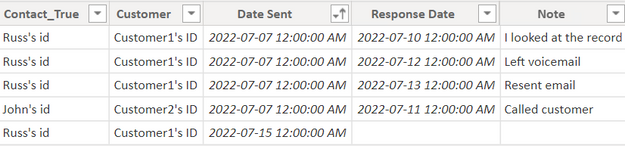
If you need pbix, please click here.
Best Regards,
Liu Yang
If this post helps, then please consider Accept it as the solution to help the other members find it more quickly
- Mark as New
- Bookmark
- Subscribe
- Mute
- Subscribe to RSS Feed
- Permalink
- Report Inappropriate Content
Hi @rloski-public ,
Here are the steps you can follow:
1. Create calculated table.
True =
var _table1=
SUMMARIZE('Email Responses', 'Email Responses'[Contact],'Email Responses'[Customer],'Email Responses'[Response Date],
"Date Sent",CALCULATE(MIN('Emails Sent'[Date Sent]),FILTER(ALL('Emails Sent'),
'Emails Sent'[Customer]='Email Responses'[Customer])))
var _table2=
SUMMARIZE(_table1,[Contact],[Customer],[Date Sent],[Response Date])
var _table3=
FILTER(ALL('Emails Sent'),'Emails Sent'[Date Sent]=MAX('Emails Sent'[Date Sent]))
var _table4=
ADDCOLUMNS(_table3,"Response date",BLANK())
var _table5=
UNION(_table2,_table4)
return
_table5
2. Create calculated column.
Note =
MAXX(FILTER(ALL('Email Responses'),
'Email Responses'[Response Date]='True'[Response Date]),[Note])
Contact_True =
SWITCH(
    TRUE(),
    'True'[Contact]<>"N/A"&&'True'[Response Date]=BLANK(),CALCULATE(MAX('True'[Contact]),FILTER(ALL('True'),
    'True'[Customer]=EARLIER('True'[Customer])&&
    'True'[Response Date]=MinX(FILTER(ALL('True'),[Customer]=EARLIER('True'[Customer])),[Response Date]))),
    'True'[Contact]<>"N/A",
    CALCULATE(MAX('True'[Contact]),FILTER(ALL('True'),
    'True'[Customer]=EARLIER('True'[Customer])&&
    'True'[Response Date]<EARLIER('True'[Response Date]))),
    'True'[Contact]="N/A",
    CALCULATE(MAX('Emails Sent'[Contact]),FILTER(ALL('Emails Sent'),'Emails Sent'[Customer]='True'[Customer])
    ))
3. Create calculated table.
True_Table =
SUMMARIZE('True',
[Contact_True],[Customer],[Date Sent],[Response Date],[Note])
4. Result:
If you need pbix, please click here.
Best Regards,
Liu Yang
If this post helps, then please consider Accept it as the solution to help the other members find it more quickly
- Mark as New
- Bookmark
- Subscribe
- Mute
- Subscribe to RSS Feed
- Permalink
- Report Inappropriate Content
I am going to look at how this works and whether I can use this in another solution.
It might use a little more space than the other approach, though my tables are under about 3,000 rows.
- Mark as New
- Bookmark
- Subscribe
- Mute
- Subscribe to RSS Feed
- Permalink
- Report Inappropriate Content
I will look at this solution later today. It addresses several major questions I have about this situation that I need to learn.
- Mark as New
- Bookmark
- Subscribe
- Mute
- Subscribe to RSS Feed
- Permalink
- Report Inappropriate Content
Conflate both tables into one.
Contact|Customer|Date|Sent or Received|Note
That will make the rest of the process a bit easier.
sort the table by Customer, Contact, Date. Add an index column for better lookup performance.
- Mark as New
- Bookmark
- Subscribe
- Mute
- Subscribe to RSS Feed
- Permalink
- Report Inappropriate Content
What I ended up doing was to create a calculated column that had the identifier (which I left out of my sample) for the row that I needed. I chose to simplify for my first pass to get the first row by date for the customer. I then created a relationship between the tables on that column That addresses at least 80 % of the cases.
Helpful resources

Power BI Monthly Update - November 2025
Check out the November 2025 Power BI update to learn about new features.

Fabric Data Days
Advance your Data & AI career with 50 days of live learning, contests, hands-on challenges, study groups & certifications and more!

FabCon Atlanta 2026
Join us at FabCon Atlanta, March 16-20, for the ultimate Fabric, Power BI, AI and SQL community-led event. Save $200 with code FABCOMM.


