cancel
Showing results for 
Search instead for 
Did you mean: 

Next up in the FabCon + SQLCon recap series: The roadmap for Microsoft SQL and Maximizing Developer experiences in Fabric. All sessions are available on-demand after the live show. Register now

Reply
joeydeacan
Regular Visitor

Display the date

Morning all,


I wonder if someone could help, I been experimenting with Power BI and Ive got to say I love, Im fairly new to both BI and SQL tho.


I am linking directly to a SQL direct Query, everything on my dashboard is perfect, apart for the Date is displayed without the day of the week, I have tried going into the formatting but DDDD is not aviable just DD.


Below is an example of what I have got :-


If anyone could walk me through it I would be most grateful. everything I have tried says cannot be performed on a Direct Query.


deliveredTotal_UnitsTriplesTghTghAreaLamFloatFloatAreaShapesGeoQLeadQSix_mmSix_mmUnitAreaOver_199

29/08/2017 00:00:00656null337657.2930289235.062824171732.8931
01/09/2017 00:00:0046033196223.41null259187.55null834nullnullnull
24/08/2017 00:00:00921null422709.59169335260.76324718921.3515
30/08/2017 00:00:001197null450671.7859688535.644223425.1823
25/08/2017 00:00:00110161549859.0884469385.04831133295.0219
31/08/2017 00:00:007592327489.6720412332.962236625.793
6 REPLIES 6
mede
Resolver I
Resolver I

Calculated Column:

Day = FORMAT(Dim_Date[Date], "dddd")

Thanks,


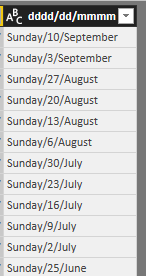
Any chance you could walk me through a little, ideally i would like to format to be dddd/dd/mmm


So day, then date then month ?

Hi @joeydeacan


I am not 100% sure if you are able to add calculated column in direct query mode.

But normally, you can get that format by simply adding calculated column:

 = FORMAT(Dim_Date[Date], "dddd/dd/mmm")

Cheers mate , but I dont think I can do that on DirectQuery Mode.


Maybe I can do something with the Query, but Im not that good either.

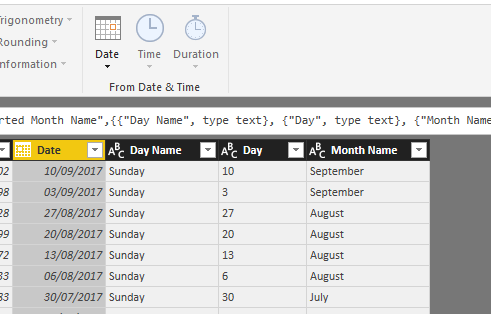
This is also easy to achieve in query editor.


Select your date column; go to "Add Column" tab; Date dropdown; you generate three new columns: Day Name, Day, Month Name

image.png


Then, simply merge those three new columns using a delimiter such as "/" to get the format you need:

image.png


Let me know if this works.


If query editor is also not allowed, then you are supposed to do it in SQL directly in the data source.

**bleep** thanks man , it does work, but not in DirectQuery tho, wont let me add it in.


Arrrgggghhhh so close, thanks for your help tho .

Helpful resources

Announcements
New to Fabric survey Carousel

New to Fabric Survey

If you have recently started exploring Fabric, we'd love to hear how it's going. Your feedback can help with product improvements.

Power BI DataViz World Championships carousel

Power BI DataViz World Championships - June 2026

A new Power BI DataViz World Championship is coming this June! Don't miss out on submitting your entry.

FabCon and SQLCon Highlights Carousel

FabCon &SQLCon Highlights

Experience the highlights from FabCon & SQLCon, available live and on-demand starting April 14th.

March Power BI Update Carousel

Power BI Community Update - March 2026

Check out the March 2026 Power BI update to learn about new features.