Join us at FabCon Atlanta from March 16 - 20, 2026, for the ultimate Fabric, Power BI, AI and SQL community-led event. Save $200 with code FABCOMM.
Register now!The Power BI Data Visualization World Championships is back! Get ahead of the game and start preparing now! Learn more
Dear friends
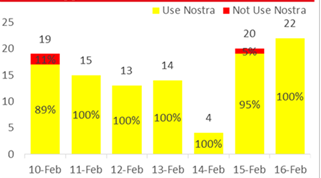
how can i display percentage value as cluster (seperated by legend) and height are upon total value,
example like visual in screenshot.
Hi @Anonymous ,
Could you tell me if your problem has been solved?
If it is, kindly Accept it as the solution. More people will benefit from it.
Or you are still confused about it, please provide me with more details about your problem.
Best Regards,
Stephen Tao
@Pragati11 thank for you suggestion,but i need to set it height as Total value (whole number)
Hi @Anonymous ,
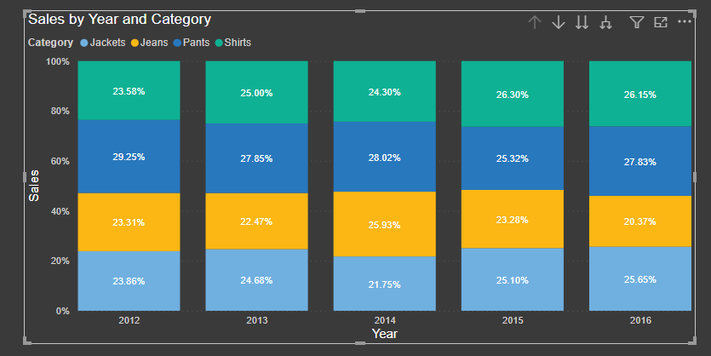
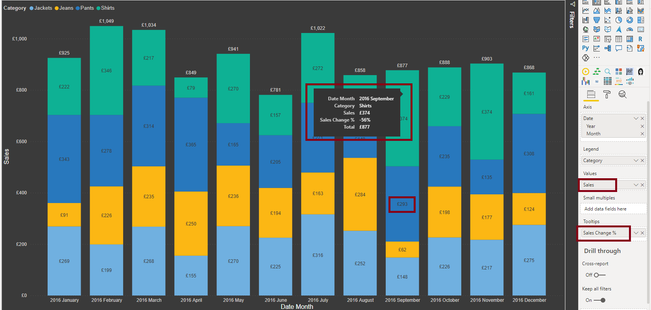
You can't get both percentage and Whole numer value as a data label on a clustered column chart.
You have to move either of them as a tooltip like below where I have moved %-age value on a tooltip and Whole value on the column chart bars:
Thanks,
Pragati
@Anonymous , refer if this old solution can help
The Power BI Data Visualization World Championships is back! Get ahead of the game and start preparing now!
Check out the November 2025 Power BI update to learn about new features.
| User | Count |
|---|---|
| 59 | |
| 43 | |
| 42 | |
| 23 | |
| 17 |
| User | Count |
|---|---|
| 190 | |
| 122 | |
| 96 | |
| 66 | |
| 47 |