Join us at FabCon Atlanta from March 16 - 20, 2026, for the ultimate Fabric, Power BI, AI and SQL community-led event. Save $200 with code FABCOMM.
Register now!The Power BI Data Visualization World Championships is back! Get ahead of the game and start preparing now! Learn more
Hi,
I am trying to show just Top 3 values from a calculated % column in a table and hide or do not show other values in the table.
(A) How to display only the Top 3 values from the % column in a table?
(B) Is table the right visualization to achieve this or do you have any other visualization suggestions?
(C) Is it possible to display just the % column with only Top 3 values in them?
Please see the image, I need to display the last 3 values on the top and hide or remove the rest of the rows.
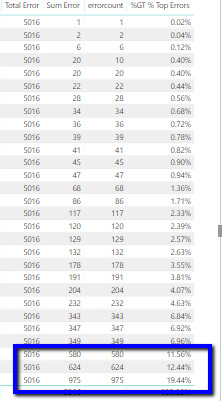
I have only two fields from the orginal query which are 'errorcount' and 'rulecode'.
On top of this I have created calculated column and Measures.
1) Calculated Column:
Total Error
Total Error = SUM('L2 Errors'[errorcount])2) Calculated Measures
Sum Error
Sum Error = CALCULATE(SUM('L2 Errors'[errorcount]))3) % Top Errors
% Top Errors = CALCULATE (DIVIDE([Sum Error], VALUES('L2 Errors'[Total Error])))
I tried TopN but I think I am doing something wrong here.
Top 3 Error = CALCULATE([Total_Error_M], TOPN(3, 'L2 Errors', 'L2 Errors'[rulecode], ASC ) )
Mostly for my solution (C) is preferred. Any help is appreciated. Thanks!
Solved! Go to Solution.
Hello, yes this can be achieved i did it myself just this morning. So here goes:
On the visual you already have:
1. go to the viual level filters
2. click on the down arrow for the field that generates all the rows
3. change the filter type to Top N
4. change to the second to fields to Top and 3
5. in the by value field drop in the calculated column %GT % Top Errors
6. Click apply
This will now give you a nice list of just the
As far as the correct visualisation goes that decision is a result of what you are wanting to show. Maybe a column chart will show the difference between the top 3 in a better way but could take up more room. play around and take some different solutions back to your consumers.
// if this is an answer please mark as such
Hello, yes this can be achieved i did it myself just this morning. So here goes:
On the visual you already have:
1. go to the viual level filters
2. click on the down arrow for the field that generates all the rows
3. change the filter type to Top N
4. change to the second to fields to Top and 3
5. in the by value field drop in the calculated column %GT % Top Errors
6. Click apply
This will now give you a nice list of just the
As far as the correct visualisation goes that decision is a result of what you are wanting to show. Maybe a column chart will show the difference between the top 3 in a better way but could take up more room. play around and take some different solutions back to your consumers.
// if this is an answer please mark as such
Sure. Thanks @samdthompson, your solution works well.
One more question, Is it possible to keep just the '%Top Errors' column and remove 'errorcount' column from the table?
When I tried do that only the Total 43.44% is getting displayed. Thanks again!
The table needs some sort of context for which to show the top 3 things, in your case its the column of data to the left of Total Error I think? Its cutt off but I suspect there is something there, perhaps its a date or time? Thats the column to leave in.
Cheers,
Sam
// if this is a answer please mark as such
Thought so. @samdthompson .Yes, it the 'errorcount' column and no other columns reside in that table.
Much appreciate your inputs!
Check out the November 2025 Power BI update to learn about new features.
Advance your Data & AI career with 50 days of live learning, contests, hands-on challenges, study groups & certifications and more!