Join us at FabCon Atlanta from March 16 - 20, 2026, for the ultimate Fabric, Power BI, AI and SQL community-led event. Save $200 with code FABCOMM.
Register now!The Power BI Data Visualization World Championships is back! Get ahead of the game and start preparing now! Learn more
Hi everone
I have a two KPIs
this is their table
KPI Actual Planned
Revenue % 20% 30%
Saving Value 2454 3000
I want to use a table and have the values in both Percentage and Numbers but its not working i can only choose one !
can you help me please ?
Solved! Go to Solution.
hi, @Anonymous
After my test, you could do these as below:
Add two calculate measure for each column
New Actual = IF(SEARCH("%",SELECTEDVALUE('Table1'[KPI]),1,0)>0,FORMAT(CALCULATE(SUM('Table1'[Actual])),"0%"),CALCULATE(SUM('Table1'[Actual])))
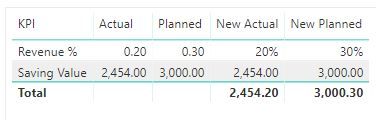
New Planned = IF(SEARCH("%",SELECTEDVALUE('Table1'[KPI]),1,0)>0,FORMAT(CALCULATE(SUM('Table1'[Planned])),"0%"),CALCULATE(SUM('Table1'[Planned])))Result:
here is pbix, please try it.
Best Regards,
Lin
hi, @Anonymous
After my test, you could do these as below:
Add two calculate measure for each column
New Actual = IF(SEARCH("%",SELECTEDVALUE('Table1'[KPI]),1,0)>0,FORMAT(CALCULATE(SUM('Table1'[Actual])),"0%"),CALCULATE(SUM('Table1'[Actual])))
New Planned = IF(SEARCH("%",SELECTEDVALUE('Table1'[KPI]),1,0)>0,FORMAT(CALCULATE(SUM('Table1'[Planned])),"0%"),CALCULATE(SUM('Table1'[Planned])))Result:
here is pbix, please try it.
Best Regards,
Lin
This is Perfect,
Thanks alot Lin it worked like magic.
Hope you have a great day 🙂
Regards,
Abdulkareem
Check out the November 2025 Power BI update to learn about new features.
Advance your Data & AI career with 50 days of live learning, contests, hands-on challenges, study groups & certifications and more!
| User | Count |
|---|---|
| 58 | |
| 45 | |
| 42 | |
| 21 | |
| 18 |