
cancel
Showing results for 
Search instead for 
Did you mean: 

July 7 - July 17 | Round 2 of the Power BI Dataviz World Championships. Don't miss your chance! Learn more

Reply
GeorgW
Helper II
Helper II

Display/insert data from one table into another

Hello,

I have two tables; the "Employees" table and the "Additional Information" table. I now want to copy from the "Additional Information" table the values from the fields "Company", "Contract" and "Contract type" to the "Employees" table, where the fields "Employee ID", "Year" and "Month" are identical.


Employees table:

employees.jpg


Additional Information table:

Additional Information.jpg


What is the formula for the "Employees" table?

1 ACCEPTED SOLUTION
GeorgW
Helper II
Helper II

I have solved it now with "CONCATENATE" (the Employee ID, Year and Month) and then with "LOOKUPVALUE". And it works 🙂

View solution in original post

5 REPLIES 5
GeorgW
Helper II
Helper II

I have solved it now with "CONCATENATE" (the Employee ID, Year and Month) and then with "LOOKUPVALUE". And it works 🙂

GeorgW
Helper II
Helper II

unfortunately this does not work either. Employee ID (= identifier for the employee) cannot be in a 1:1 relationship, because every month the employees are added.
So Brad Pitt always has employee ID 2, and then it does not work with this solution.


What I think that it must be work, there should be three new calculated columns (one each for "Company", "Contract" and "Contract type") in the table "Employee Table", where the three fields "Employee ID", "Year" and "Month" are used to find a match in the other table ("Additional Information table") and then the respective value (Company, Contract and Contract type) is transferred to each calculated column.


but what is the formula for this?

Anonymous
Not applicable

Hi  @GeorgW ,

Here are the steps you can follow:

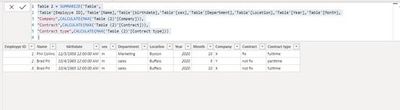
1. Create calculated table.

Table 2 = SUMMARIZE('Table',
'Table'[Employye ID],'Table'[Name],'Table'[birthdate],'Table'[sex],'Table'[Department],'Table'[Location],'Table'[Year],'Table'[Month],
"Company",CALCULATE(MAX('Table (2)'[Company])),
"Contract",CALCULATE(MAX('Table (2)'[Contract])),
"Contract type",CALCULATE(MAX('Table (2)'[Contract type]))
)

2. Result.

v-yangliu-msft_0-1605862057584.jpeg

You can downloaded PBIX file from here.


Best Regards,

Liu Yang

If this post helps, then please consider Accept it as the solution to help the other members find it more quickly.


amitchandak
Super User
Super User

@GeorgW , You can merge in power Query and keep the required columns

https://radacad.com/append-vs-merge-in-power-bi-and-power-query

Video: https://www.youtube.com/watch?v=zNrmbagO0Oo


Dax you can do column by column: https://www.youtube.com/watch?v=czNHt7UXIe8


Share with Power BI Enthusiasts: Full Power BI Video (20 Hours) YouTube
Microsoft Fabric Series 60+ Videos YouTube
Microsoft Fabric Hindi End to End YouTube

Thank you very much. But that is - I think - not the solution. I have presented the two tables in a very simplified way; they are already combined tables with much more information, so another combination won't work. Besides, I have several "key columns" (employee ID, year AND month). Can't I solve it with a formula?

Helpful resources

Announcements
FabCon and SQLCon Barcelona 2026

FabCon & SQLCon – Barcelona 2026

Join us in Barcelona for FabCon and SQLCon, the Fabric, Power BI, SQL, and AI community event. Save €200 with code FABCMTY200.

60 days of Data Days Carousel

Data Days 2026

Join Data Days 2026: 60 days of free live/on-demand sessions, challenges, study groups, and certification opportunities.

Power BI DataViz World Championships carousel

Power BI DataViz World Championships - June 2026

A new Power BI DataViz World Championship is coming this June! Don't miss out on submitting your entry.

Top Solution Authors