Join us at FabCon Atlanta from March 16 - 20, 2026, for the ultimate Fabric, Power BI, AI and SQL community-led event. Save $200 with code FABCOMM.
Register now!The Power BI Data Visualization World Championships is back! Get ahead of the game and start preparing now! Learn more
I have a column chart which displays metrics for each market in my dataset. I'd like to also include in this chart, the metrics for all these markets together in one and call it 'global' for example.
So in my chart it'll show UK, US, DE and Global where global is the sum of UK, US and DE.
Is this possible?
Thanks
afk
Solved! Go to Solution.
If you want the 'All' to be in the same table, one way is to use Power Query.
Duplicate the table.
Turn the table into a summary table (with following M code)
et
Source = Table.FromRows(Json.Document(Binary.Decompress(Binary.FromText("i45WMjIwtFTSUQr1BhKOQGxoamCgFKuDKuEExEYGaBLBMB3mWCTAOtCMcnGF6jDDIg7SYGgEkogFAA==", BinaryEncoding.Base64), Compression.Deflate)), let _t = ((type text) meta [Serialized.Text = true]) in type table [Year = _t, Market = _t, #"Customer segment" = _t, #"Number of customers" = _t]),
#"Changed Type" = Table.TransformColumnTypes(Source,{{"Year", Int64.Type}, {"Market", type text}, {"Customer segment", type text}, {"Number of customers", Int64.Type}}),
#"Grouped Rows" = Table.Group(#"Changed Type", {"Customer segment"}, {{"Number of customers", each List.Sum([Number of customers]), type number}, {"All", each _, type table [Year=number, Market=text, Customer segment=text, Number of customers=number]}}),
#"Expanded All" = Table.ExpandTableColumn(#"Grouped Rows", "All", {"Year"}, {"All.Year"}),
#"Removed Duplicates" = Table.Distinct(#"Expanded All"),
#"Renamed Columns" = Table.RenameColumns(#"Removed Duplicates",{{"All.Year", "Year"}}),
#"Added Custom" = Table.AddColumn(#"Renamed Columns", "Market", each "All")
in
#"Added Custom"Then Append this table to the original table.
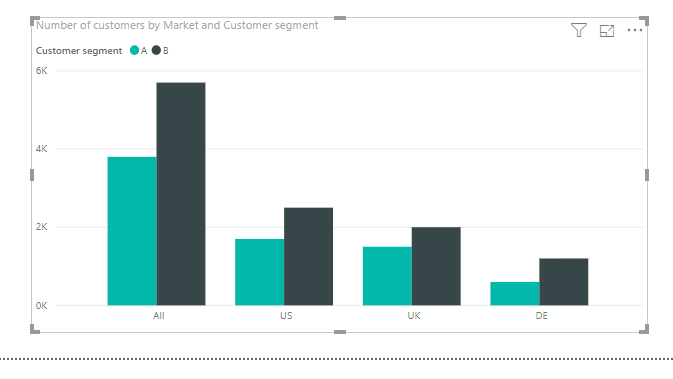
You'll then be able to produce a chart like this
Yes, it's possible. You will have to use DAX to define the 'Global' as a column or a measure.
Post some sample data(not a picture) and maybe a picture of the data model
Hi @HotChilli
See below a sample of the dataset. There is only one table in the model.
| Year | Market | Customer segment | Number of customers |
| 2019 | UK | A | 1500 |
| 2019 | UK | B | 2000 |
| 2019 | US | A | 1700 |
| 2019 | US | B | 2500 |
| 2019 | DE | A | 600 |
| 2019 | DE | B | 1200 |
If you want the 'All' to be in the same table, one way is to use Power Query.
Duplicate the table.
Turn the table into a summary table (with following M code)
et
Source = Table.FromRows(Json.Document(Binary.Decompress(Binary.FromText("i45WMjIwtFTSUQr1BhKOQGxoamCgFKuDKuEExEYGaBLBMB3mWCTAOtCMcnGF6jDDIg7SYGgEkogFAA==", BinaryEncoding.Base64), Compression.Deflate)), let _t = ((type text) meta [Serialized.Text = true]) in type table [Year = _t, Market = _t, #"Customer segment" = _t, #"Number of customers" = _t]),
#"Changed Type" = Table.TransformColumnTypes(Source,{{"Year", Int64.Type}, {"Market", type text}, {"Customer segment", type text}, {"Number of customers", Int64.Type}}),
#"Grouped Rows" = Table.Group(#"Changed Type", {"Customer segment"}, {{"Number of customers", each List.Sum([Number of customers]), type number}, {"All", each _, type table [Year=number, Market=text, Customer segment=text, Number of customers=number]}}),
#"Expanded All" = Table.ExpandTableColumn(#"Grouped Rows", "All", {"Year"}, {"All.Year"}),
#"Removed Duplicates" = Table.Distinct(#"Expanded All"),
#"Renamed Columns" = Table.RenameColumns(#"Removed Duplicates",{{"All.Year", "Year"}}),
#"Added Custom" = Table.AddColumn(#"Renamed Columns", "Market", each "All")
in
#"Added Custom"Then Append this table to the original table.
You'll then be able to produce a chart like this
The Power BI Data Visualization World Championships is back! Get ahead of the game and start preparing now!
| User | Count |
|---|---|
| 41 | |
| 38 | |
| 36 | |
| 30 | |
| 28 |
| User | Count |
|---|---|
| 128 | |
| 88 | |
| 79 | |
| 67 | |
| 62 |