Join us at FabCon Atlanta from March 16 - 20, 2026, for the ultimate Fabric, Power BI, AI and SQL community-led event. Save $200 with code FABCOMM.
Register now!View all the Fabric Data Days sessions on demand. View schedule
I have a date column in my table:
| Date |
| 1/1/2022 |
| 2/1/2022 |
| 3/1/2022 |
| 4/1/2022 |
I want to display the date in a matrix visual as "MMM-YY". I don't see that format as a choice in the format display options. If I use FORMAT(Date,"MMM/YY"), I lose the sorting by date as the column becomes text.
It seems like this is an easy problem to solve. Is there any way to add a custom format type to the date Format drop down?
Thanks.
Solved! Go to Solution.
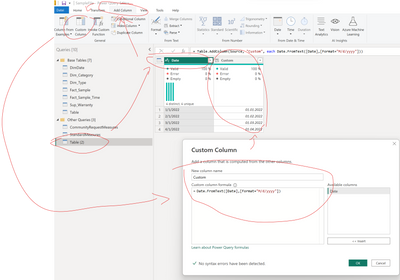
you can transform the data in Power Query when you load the data into POwer BI.
Date.FromText([Date],[Format="M/d/yyyy"])
Please make sure to write months in capital M and the restr in small letters.
Date.FromText - PowerQuery M | Microsoft Learn
Best regards
Michael
-----------------------------------------------------
If this post helps, then please consider Accept it as the solution to help the other members find it more quickly.
Appreciate your thumbs up!
@ me in replies or I'll lose your thread.
-----------------------------------------------------
Awesome! I never knew you could do that. Thank you!
you can transform the data in Power Query when you load the data into POwer BI.
Date.FromText([Date],[Format="M/d/yyyy"])
Please make sure to write months in capital M and the restr in small letters.
Date.FromText - PowerQuery M | Microsoft Learn
Best regards
Michael
-----------------------------------------------------
If this post helps, then please consider Accept it as the solution to help the other members find it more quickly.
Appreciate your thumbs up!
@ me in replies or I'll lose your thread.
-----------------------------------------------------
Check out the November 2025 Power BI update to learn about new features.
Advance your Data & AI career with 50 days of live learning, contests, hands-on challenges, study groups & certifications and more!