Join us at FabCon Atlanta from March 16 - 20, 2026, for the ultimate Fabric, Power BI, AI and SQL community-led event. Save $200 with code FABCOMM.
Register now!The Power BI Data Visualization World Championships is back! Get ahead of the game and start preparing now! Learn more
Hi,
I want to display data for the last 12 months from the selected month from the month slicer.
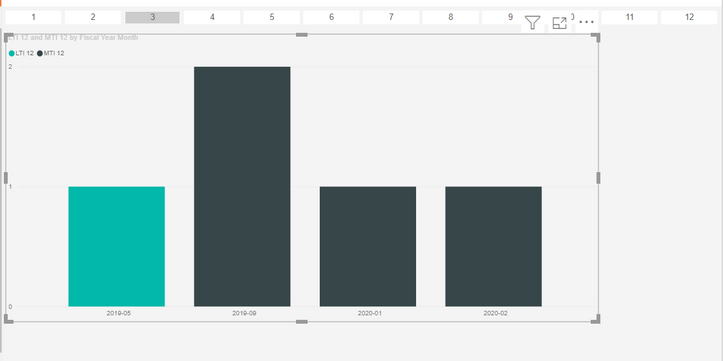
In the image I have selected the month 3 in the slicer and the graph displays the data for last 12 months only when there is data.
Now, on x axis I want all 12 months to be displayed from 03-2020 to 03-2019.
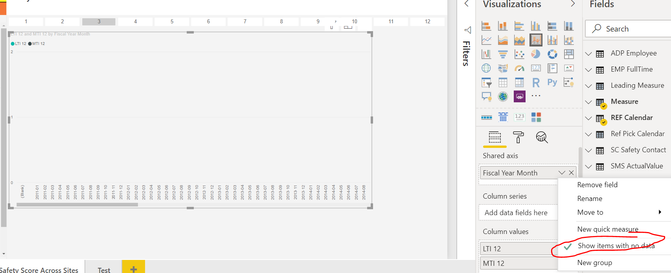
If I select "Show data with no data" then it will display all the months and all the years. It means the month slicer on the top doesn't work.
I have attached the PBIX, can anyone help me please. Please find the PBIX
Thank you
Solved! Go to Solution.
Hi,
Please try to change your original two measures to these:
LTI 123 = IF(MAX('SMS Incident'[Incident Date])>EDATE([Max Ref Pick Date],-12)&&MAX('SMS Incident'[Incident Date])<=[Max Ref Pick Date],CALCULATE([LTI], DATESBETWEEN('SMS Incident'[Incident Date], EDATE([Max Ref Pick Date],-12), [Max Ref Pick Date])),-1)
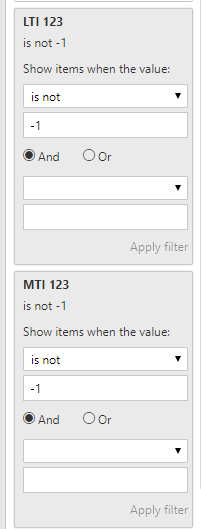
MTI 123 = IF(MAX('SMS Incident'[Incident Date])>EDATE([Max Ref Pick Date],-12)&&MAX('SMS Incident'[Incident Date])<=[Max Ref Pick Date],CALCULATE([MTI], DATESBETWEEN('SMS Incident'[Incident Date], EDATE([Max Ref Pick Date],-12), [Max Ref Pick Date])),-1)Then apply filters to original visual:
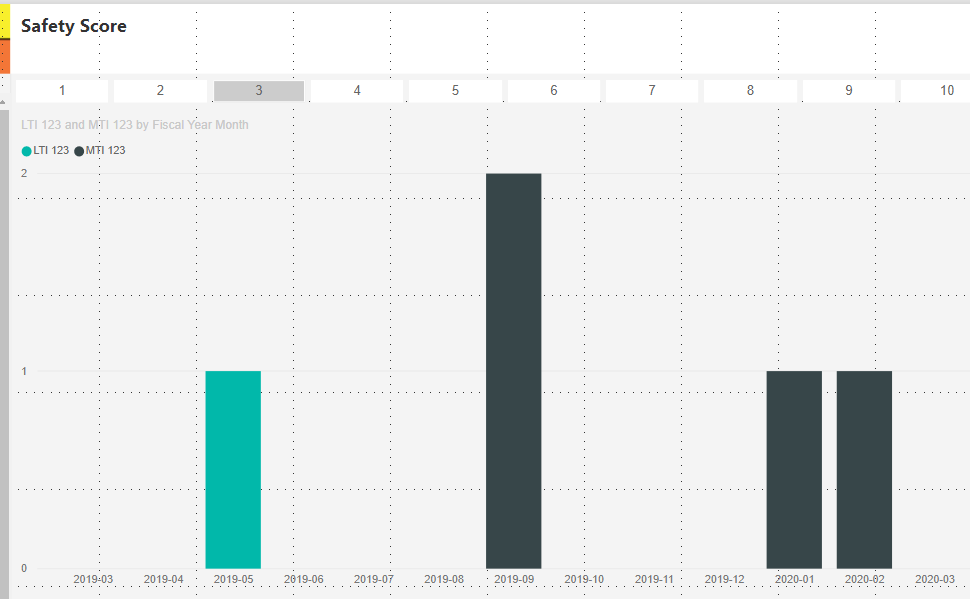
The result shows:
Here is the changed pbix file:
Hope this helps.
Best Regards,
Giotto Zhi
Hi,
Please try to change your original two measures to these:
LTI 123 = IF(MAX('SMS Incident'[Incident Date])>EDATE([Max Ref Pick Date],-12)&&MAX('SMS Incident'[Incident Date])<=[Max Ref Pick Date],CALCULATE([LTI], DATESBETWEEN('SMS Incident'[Incident Date], EDATE([Max Ref Pick Date],-12), [Max Ref Pick Date])),-1)
MTI 123 = IF(MAX('SMS Incident'[Incident Date])>EDATE([Max Ref Pick Date],-12)&&MAX('SMS Incident'[Incident Date])<=[Max Ref Pick Date],CALCULATE([MTI], DATESBETWEEN('SMS Incident'[Incident Date], EDATE([Max Ref Pick Date],-12), [Max Ref Pick Date])),-1)Then apply filters to original visual:
The result shows:
Here is the changed pbix file:
Hope this helps.
Best Regards,
Giotto Zhi
Hi,
Sorry, again am asking a question this solution.
If you look at the solution it actually display last 13 months rather than 12. If I tried to change the month count from 12 to 11 in your dax then it display last 11 months not 12.
Not understanding what's going on. Can you help me?
I wanted it to display for last 12 months.
Hi,
Please try these measures:
LTI 123 = IF(MAX('SMS Incident'[Incident Date])>EDATE([Max Ref Pick Date],-12)&&MAX('SMS Incident'[Incident Date])<[Max Ref Pick Date],CALCULATE([LTI], DATESBETWEEN('SMS Incident'[Incident Date], EDATE([Max Ref Pick Date],-12), [Max Ref Pick Date])),-1)
MTI 123 = IF(MAX('SMS Incident'[Incident Date])>EDATE([Max Ref Pick Date],-12)&&MAX('SMS Incident'[Incident Date])<[Max Ref Pick Date],CALCULATE([MTI], DATESBETWEEN('SMS Incident'[Incident Date], EDATE([Max Ref Pick Date],-12), [Max Ref Pick Date])),-1)
Hope these can help.
Best Regards,
Giotto
The Power BI Data Visualization World Championships is back! Get ahead of the game and start preparing now!
Check out the November 2025 Power BI update to learn about new features.
| User | Count |
|---|---|
| 59 | |
| 43 | |
| 42 | |
| 23 | |
| 17 |
| User | Count |
|---|---|
| 190 | |
| 122 | |
| 96 | |
| 66 | |
| 47 |