Get Fabric or SQL Certified for Free.
Get certified for free when you join Fabric Data Days 2026 and dive into Fabric, Power BI, SQL, AI, and other essential data skills.
Join now- Power BI forums
- Get Help with Power BI
- Desktop
- Service
- Report Server
- Power Query
- Mobile Apps
- Developer
- DAX Commands and Tips
- Custom Visuals Development Discussion
- Health and Life Sciences
- Power BI Spanish forums
- Translated Spanish Desktop
- Training and Consulting
- Instructor Led Training
- Dashboard in a Day for Women, by Women
- Galleries
- Data Stories Gallery
- Themes Gallery
- Contests Gallery
- QuickViz Gallery
- Quick Measures Gallery
- Visual Calculations Gallery
- Notebook Gallery
- Translytical Task Flow Gallery
- TMDL Gallery
- R Script Showcase
- Webinars and Video Gallery
- Ideas
- Custom Visuals Ideas (read-only)
- Issues
- Issues
- Events
- Upcoming Events
Try your skills in the Power BI Dataviz World Championship! Round one ends June 26. Join now
- Power BI forums
- Forums
- Get Help with Power BI
- Desktop
- Re: Display current year months data
- Subscribe to RSS Feed
- Mark Topic as New
- Mark Topic as Read
- Float this Topic for Current User
- Bookmark
- Subscribe
- Printer Friendly Page


- Mark as New
- Bookmark
- Subscribe
- Mute
- Subscribe to RSS Feed
- Permalink
- Report Inappropriate Content
Display current year months data
Hello,
I need some help with how to display Current YTD totals by Month. If you look at the picture I have Months as my columns. The values are a created measure using TotalYTD. But I would expected to only see Jan, Feb, Mar, Apr, and May. The other months listed are from last year which I only want data from current year. Does anyone have any ideas on how to do this?
Thanks!
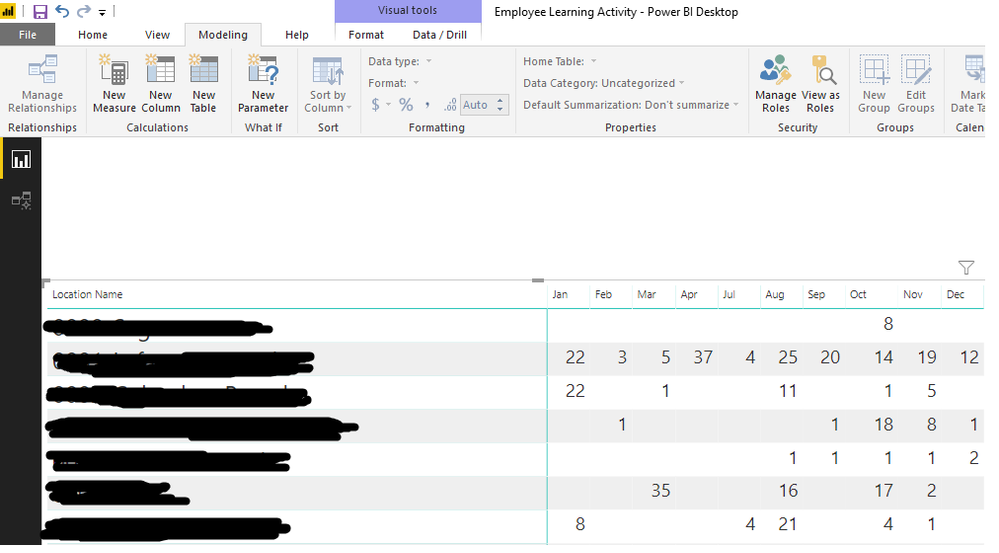
Solved! Go to Solution.


- Mark as New
- Bookmark
- Subscribe
- Mute
- Subscribe to RSS Feed
- Permalink
- Report Inappropriate Content
Hi @nleuck
I can reproduce your problem.
To slove this , create a measure
Total Mtd = TOTALMTD(SUM(Sheet1[Value]),Sheet1[date],YEAR(Sheet1[date])=YEAR(TODAY()))
 or
Total Ytd = TOTALYTD(SUM(Sheet1[Value]),Sheet1[date],YEAR(Sheet1[date])=YEAR(TODAY()))
(they show same results in a matrix)
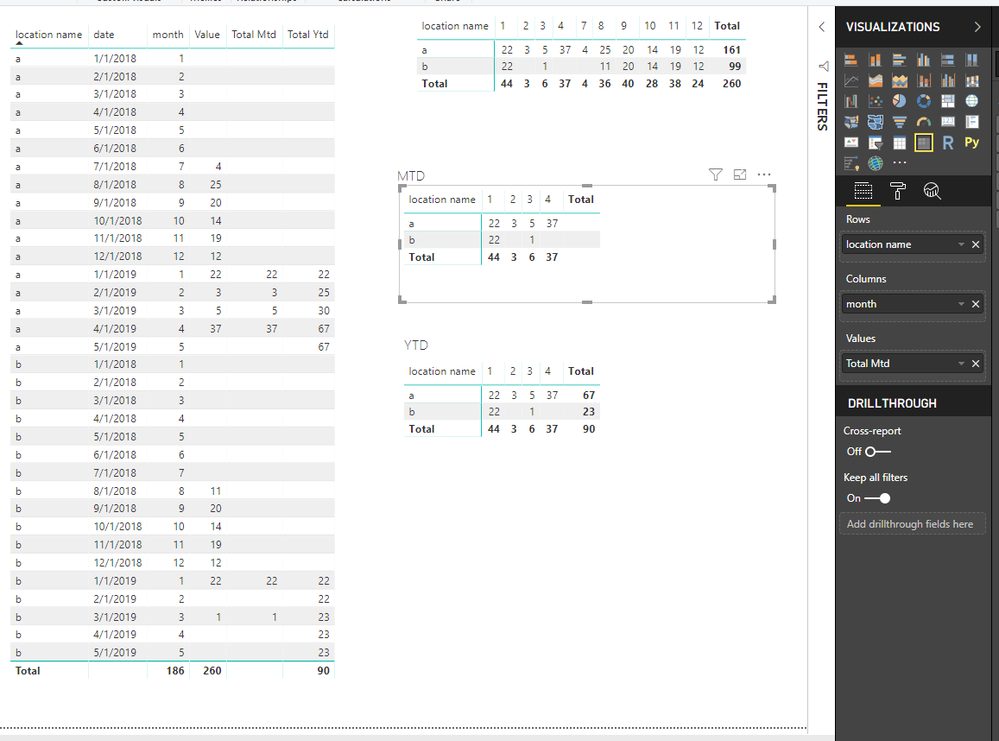
Best Regards
Maggie
Community Support Team _ Maggie Li
If this post helps, then please consider Accept it as the solution to help the other members find it more quickly.
- Mark as New
- Bookmark
- Subscribe
- Mute
- Subscribe to RSS Feed
- Permalink
- Report Inappropriate Content
Thank you for your responses, but my biggest problem is I don't have one specific date column. I have two DateAssigned and DateCompleted. If I want to find the how many classes were completed in a month I can get two different answers depending on which column my created Month column is associated to (either DateAssigned or DateCompleted). This then has the opposite affect on a measure when I'm trying to find out the completion percentage for the current month. Unfortnately, I'm beginning to feel like this may be too complicated even though it should be straight forward calculations.
If you have any other ideas let me know.
Thanks again!
- Mark as New
- Bookmark
- Subscribe
- Mute
- Subscribe to RSS Feed
- Permalink
- Report Inappropriate Content
Hi @nleuck
Since you want to find the how many classes were completed in a month,
please create Month column associated to DateCompleted.
Is this problem sloved?
If it is sloved, could you kindly accept it as a solution to close this case?
If not, please let me know.
Best Regards
Maggie
Community Support Team _ Maggie Li
If this post helps, then please consider Accept it as the solution to help the other members find it more quickly.


- Mark as New
- Bookmark
- Subscribe
- Mute
- Subscribe to RSS Feed
- Permalink
- Report Inappropriate Content
You have to decide which column need to use.
- Mark as New
- Bookmark
- Subscribe
- Mute
- Subscribe to RSS Feed
- Permalink
- Report Inappropriate Content
Hi,
Please check this.
Total Mtd = TOTALMTD(SUM(Sales[Sales]),Sales[Date],YEAR(Sales[Date])=YEAR(TODAY()))
Total Mtd Current Month = TOTALMTD(SUM(Sales[Sales]),Sales[Date],Month(Sales[Date])=Month(TODAY()))
Total Ytd = TOTALYTD(SUM(Sales[Sales]),Sales[Date],YEAR(Sales[Date])=YEAR(TODAY()))
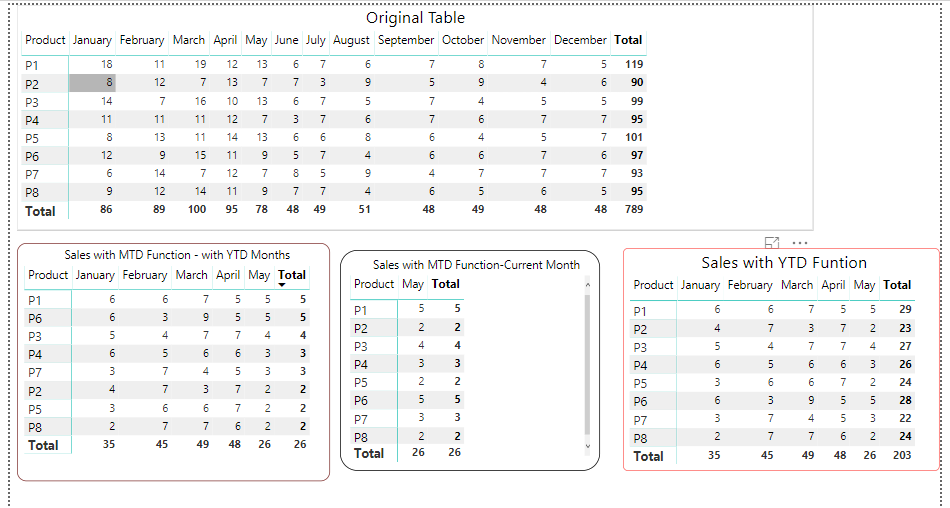
Download:
https://drive.google.com/open?id=1HxhA3ntDvEUQOSkMJD7DqKLll2QpLhhu


- Mark as New
- Bookmark
- Subscribe
- Mute
- Subscribe to RSS Feed
- Permalink
- Report Inappropriate Content
Hi,
To your matrix visual, drag Year from the Calendar Table to the Column section.
Regards,
Ashish Mathur
http://www.ashishmathur.com
https://www.linkedin.com/in/excelenthusiasts/
- Mark as New
- Bookmark
- Subscribe
- Mute
- Subscribe to RSS Feed
- Permalink
- Report Inappropriate Content
Hi @nleuck
I can reproduce your problem.
To slove this , create a measure
Total Mtd = TOTALMTD(SUM(Sheet1[Value]),Sheet1[date],YEAR(Sheet1[date])=YEAR(TODAY()))
 or
Total Ytd = TOTALYTD(SUM(Sheet1[Value]),Sheet1[date],YEAR(Sheet1[date])=YEAR(TODAY()))
(they show same results in a matrix)
Best Regards
Maggie
Community Support Team _ Maggie Li
If this post helps, then please consider Accept it as the solution to help the other members find it more quickly.

Helpful resources

Fabric Data Days 2026
Don't miss out on Data Days, June 15 through August 7. Learn Fabric, Power BI, SQL, AI and more.

Power BI Monthly Update - May 2026
Check out the May 2026 Power BI update to learn about new features.

Power BI DataViz World Championships - June 2026
A new Power BI DataViz World Championship is coming this June! Don't miss out on submitting your entry.

| User | Count |
|---|---|
| 21 | |
| 21 | |
| 21 | |
| 19 | |
| 11 |


| User | Count |
|---|---|
| 59 | |
| 53 | |
| 40 | |
| 31 | |
| 26 |


