Don't miss your chance to take the Fabric Data Engineer (DP-600) exam for FREE! Find out how by attending the DP-600 session on April 23rd (pacific time), live or on-demand.
Learn moreJoin the FabCon + SQLCon recap series. Up next: Power BI, Real-Time Intelligence, IQ and AI, and Data Factory take center stage. All sessions are available on-demand after the live show. Register now
Currently have a DimProducts table with the following columns: Accounting Class, Product ID.
Also, I have a DimOrder table with the following column: Cancellation Reason
I need to bring the cancellation reason with the accounting class into one column and have the COUNT of product ID's adjust per the cancellation amounts.
For instance, I am going to create a stacked bar chart showing the number of products by type…and I need cancellations to show as one of the types(accountingclass). So if accounting class had
Wrap 50
Solo 25
Preprint 10
and 5 of each were cancelled…
I would need it to show:
Wrap 45
Solo 20
Preprint 5
Cancellations 15
How can I handle this?
Solved! Go to Solution.
Hi @Anonymous
I don't know how to calcuate the "Cancellations" value.
So I make a test as "Cancellations" is 5 by default.
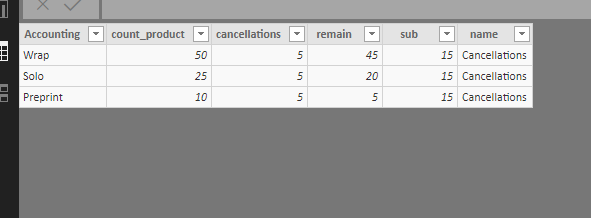
1.could you create a column in your table to define "Cancellations"=5? if not, please let me know.
If you could, go on->
2.create a column of the count of product id, if you have problem doing this, let me know.
3.create columns
remain = [count_product]-[cancellations]
sub = SUM(DimProducts[cancellations])
name = "Cancellations"
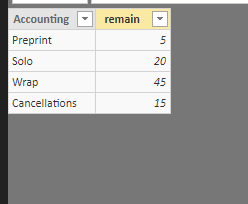
4.finally create a new table
Table 2 =
UNION (
SUMMARIZE ( DimProducts, DimProducts[Accounting], DimProducts[remain] ),
SUMMARIZE ( DimProducts, DimProducts[name], DimProducts[sub] )
)
If my formula doesn't work for your scenario, please share sone example datasets for me to test.
“
Community Support Team _ Maggie Li
If this post helps, then please consider Accept it as the solution to help the other members find it more quickly.
“
Best regards,
Maggie
Hi @Anonymous
I don't know how to calcuate the "Cancellations" value.
So I make a test as "Cancellations" is 5 by default.
1.could you create a column in your table to define "Cancellations"=5? if not, please let me know.
If you could, go on->
2.create a column of the count of product id, if you have problem doing this, let me know.
3.create columns
remain = [count_product]-[cancellations]
sub = SUM(DimProducts[cancellations])
name = "Cancellations"
4.finally create a new table
Table 2 =
UNION (
SUMMARIZE ( DimProducts, DimProducts[Accounting], DimProducts[remain] ),
SUMMARIZE ( DimProducts, DimProducts[name], DimProducts[sub] )
)
If my formula doesn't work for your scenario, please share sone example datasets for me to test.
“
Community Support Team _ Maggie Li
If this post helps, then please consider Accept it as the solution to help the other members find it more quickly.
“
Best regards,
Maggie
Can you post a better representation of your source data? I'm not sure how your tables are related to one another. Please see this post regarding How to Get Your Question Answered Quickly: https://community.powerbi.com/t5/Community-Blog/How-to-Get-Your-Question-Answered-Quickly/ba-p/38490
Based on the current table structure there is no way to bring in the the SUM of CancellationReasons and add it as a row to the AccountingClass column.
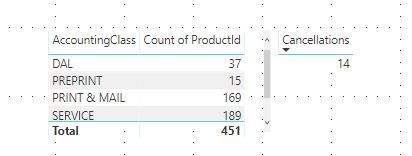
Ideally if I can bring in the Cancellation Reasons as it's own row with the sum of cancellations. As well, in the same table the COUNT to reflect dynamically the returns.
Check out the April 2026 Power BI update to learn about new features.
If you have recently started exploring Fabric, we'd love to hear how it's going. Your feedback can help with product improvements.
A new Power BI DataViz World Championship is coming this June! Don't miss out on submitting your entry.
| User | Count |
|---|---|
| 48 | |
| 40 | |
| 38 | |
| 20 | |
| 16 |
| User | Count |
|---|---|
| 68 | |
| 67 | |
| 30 | |
| 26 | |
| 26 |