Party with Power BI’s own Guy in a Cube
Power BI is turning 10! Tune in for a special live episode on July 24 with behind-the-scenes stories, product evolution highlights, and a sneak peek at what’s in store for the future.
Save the date- Power BI forums
- Get Help with Power BI
- Desktop
- Service
- Report Server
- Power Query
- Mobile Apps
- Developer
- DAX Commands and Tips
- Custom Visuals Development Discussion
- Health and Life Sciences
- Power BI Spanish forums
- Translated Spanish Desktop
- Training and Consulting
- Instructor Led Training
- Dashboard in a Day for Women, by Women
- Galleries
- Webinars and Video Gallery
- Data Stories Gallery
- Themes Gallery
- Contests Gallery
- Quick Measures Gallery
- Notebook Gallery
- Translytical Task Flow Gallery
- R Script Showcase
- Ideas
- Custom Visuals Ideas (read-only)
- Issues
- Issues
- Events
- Upcoming Events
Enhance your career with this limited time 50% discount on Fabric and Power BI exams. Ends August 31st. Request your voucher.
- Power BI forums
- Forums
- Get Help with Power BI
- Desktop
- Re: Display Text type column data for the selected...
- Subscribe to RSS Feed
- Mark Topic as New
- Mark Topic as Read
- Float this Topic for Current User
- Bookmark
- Subscribe
- Printer Friendly Page


- Mark as New
- Bookmark
- Subscribe
- Mute
- Subscribe to RSS Feed
- Permalink
- Report Inappropriate Content
Display Text type column data for the selected filter value in Power BI Desktop using DAX
Dear Community,
Hope all are doing well and safe.
I'm trying to display the text type column data for the filters user selects in report.
For example I have two columns called Color and Type,When the user select Type from the slicer then the color for that selected type should display in Multi-row card visual. If nothing got filtered then the card should display blank
Color | Type
A | 1
B| 1
C | 2
D | 2
E | 2
P | 3
L | 4
Here when I select the type 2 and 3 it should show the related color value but initialy without any filters got selected the card visual should display blank.
I have tried isfiltered,allselected functions but getting an error saying cannot compare type text with True/False.
Kindly please help me acheive this.
Thanks in advance
Solved! Go to Solution.


- Mark as New
- Bookmark
- Subscribe
- Mute
- Subscribe to RSS Feed
- Permalink
- Report Inappropriate Content
ColorFilter= IF(ISFILTERED(table[type]), 1, 0)
Add the new ColorFilter measure to the filters for the card visual and filter forColorFilter is 1
Please @mention me in your reply if you want a response.
Copying DAX from this post? Click here for a hack to quickly replace it with your own table names
Has this post solved your problem? Please Accept as Solution so that others can find it quickly and to let the community know your problem has been solved.
If you found this post helpful, please give Kudos C
I work as a Microsoft trainer and consultant, specialising in Power BI and Power Query.
www.excelwithallison.com
- Mark as New
- Bookmark
- Subscribe
- Mute
- Subscribe to RSS Feed
- Permalink
- Report Inappropriate Content
ColorFilter= IF(ISFILTERED(table[type]), 1, 0)
Add the new ColorFilter measure to the filters for the card visual and filter forColorFilter is 1
Please @mention me in your reply if you want a response.
Copying DAX from this post? Click here for a hack to quickly replace it with your own table names
Has this post solved your problem? Please Accept as Solution so that others can find it quickly and to let the community know your problem has been solved.
If you found this post helpful, please give Kudos C
I work as a Microsoft trainer and consultant, specialising in Power BI and Power Query.
www.excelwithallison.com
- Mark as New
- Bookmark
- Subscribe
- Mute
- Subscribe to RSS Feed
- Permalink
- Report Inappropriate Content
#Lifesaver
I tried your solutions and It works as expected,Thank you so much for your timely support.
- Mark as New
- Bookmark
- Subscribe
- Mute
- Subscribe to RSS Feed
- Permalink
- Report Inappropriate Content
Glad it worked!
Please mark the solution that helped you so others in the community can find it more easily and know that your problem has been solved.
Please @mention me in your reply if you want a response.
Copying DAX from this post? Click here for a hack to quickly replace it with your own table names
Has this post solved your problem? Please Accept as Solution so that others can find it quickly and to let the community know your problem has been solved.
If you found this post helpful, please give Kudos C
I work as a Microsoft trainer and consultant, specialising in Power BI and Power Query.
www.excelwithallison.com

- Mark as New
- Bookmark
- Subscribe
- Mute
- Subscribe to RSS Feed
- Permalink
- Report Inappropriate Content
Hi @Charu ,
You need to create the following measure:
Colours =
IF (
    ISFILTERED('Table'[Type] ),


    CONCATENATEX ( 'Table', 'Table'[Color], ", " )
)
Pbix File attach
Regards
Miguel Félix
Did I answer your question? Mark my post as a solution!
Proud to be a Super User!
Check out my blog: Power BI em Português- Mark as New
- Bookmark
- Subscribe
- Mute
- Subscribe to RSS Feed
- Permalink
- Report Inappropriate Content
Hi @MFelix
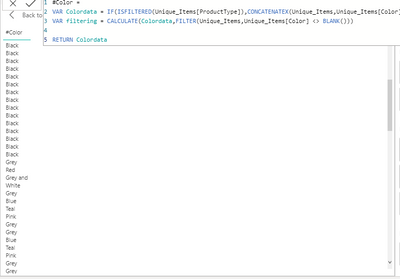
I did try your measure which is working fine with my sample data but with the real data I'm getting the duplicates.
Here I have attached the screenshots for your reference.
Screenshot 1 : original column from the table
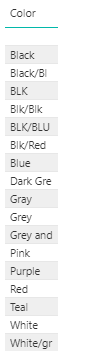
Screenshot 2 : For the original data the measure returns duplicated data but the expected result is Same as screenshot 1
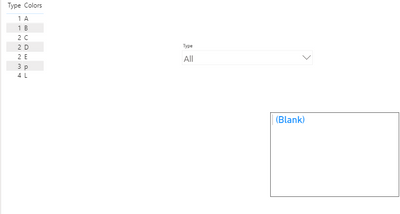
Screenshot 3: With the sample data everything works fine.with out any filters visua appears blank and when we select it shows the related color data
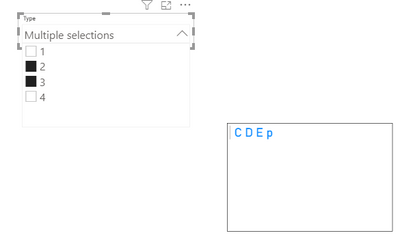
Any thoughts why the screenshot2 returns data in such a way?
Thanks inadvance
- Mark as New
- Bookmark
- Subscribe
- Mute
- Subscribe to RSS Feed
- Permalink
- Report Inappropriate Content
Hi @Charu ,
Does your original table has duplicate values on the lines? the concatanex uses the full table so it's not checking if there is duplicates or not you can redo your measure to:
Colours =
IF (
    ISFILTERED('Table'[Type] ),


    CONCATENATEX ( DISTINCT('Table'[Color]), 'Table'[Color], ", " )
)
Basically just concateate the distinct values of the colours.
Regards
Miguel Félix
Did I answer your question? Mark my post as a solution!
Proud to be a Super User!
Check out my blog: Power BI em Português- Mark as New
- Bookmark
- Subscribe
- Mute
- Subscribe to RSS Feed
- Permalink
- Report Inappropriate Content
Hi @MFelix
Original data has no duplicates,you could take a look at screenshot 1 which is the original data for specific type filtered.
- Mark as New
- Bookmark
- Subscribe
- Mute
- Subscribe to RSS Feed
- Permalink
- Report Inappropriate Content
Hi @Charu,
Sorry for insisting on this but when I ask if there is duplicates is on the data itself not on the values.
In the sample data I have tested duplicating a row and got the same result has you did so additional color with the same value, making use of the second formula error dissappear.
Regards
Miguel Félix
Did I answer your question? Mark my post as a solution!
Proud to be a Super User!
Check out my blog: Power BI em Português
Helpful resources

Power BI Monthly Update - July 2025
Check out the July 2025 Power BI update to learn about new features.

Join our Fabric User Panel
This is your chance to engage directly with the engineering team behind Fabric and Power BI. Share your experiences and shape the future.

Fabric Community Update - June 2025
Find out what's new and trending in the Fabric community.

| User | Count |
|---|---|
| 63 | |
| 63 | |
| 53 | |
| 39 | |
| 25 |


| User | Count |
|---|---|
| 85 | |
| 57 | |
| 45 | |
| 43 | |
| 38 |


