
cancel
Showing results for 
Search instead for 
Did you mean: 

The Power BI Data Visualization World Championships is back! Get ahead of the game and start preparing now! Learn more

Reply
PBI3000
Frequent Visitor

Display Measures on Each Row in Matrix

Hello,

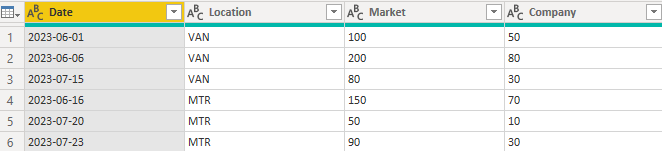
I have a request regarding the calculation of Month to Month sales growth for company and the whole market for a certain product in different cities, Here is an example.

PBI3000_0-1686539053708.png

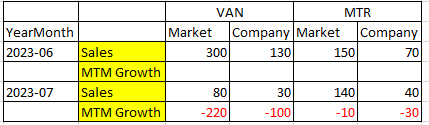
The final report should be like this

PBI3000_1-1686539819704.png

Please note that the question is how the high lighted part is created and calculated.
I tried and found that the measures (highlighted part) can be set up on the columns, but cannot be set up on rows.

PBI3000_3-1686540220695.png

Can someone assist and explain to me?

Thanks in advance!


2 REPLIES 2
PBI3000
Frequent Visitor

Thank you so much for your solution and DAX  amitchandak
I still have a question regarding columns in the matrix.

This is actually the painpoint I have.

The columns should display at location level and market share level (e.g. market and company) and meantime the rows have to display the date and the difference (this month - last month)
I don't think the regular matrix can handle this situation.

And your DAX is clear and correct, very helpful. thanks again!

amitchandak
Super User
Super User

@PBI3000 , Create a date tanle join with you table and then have measure like


MTD Sales = CALCULATE(SUM(Sales[Sales Amount]),DATESMTD('Date'[Date]))
last MTD Sales = CALCULATE(SUM(Sales[Sales Amount]),DATESMTD(dateadd('Date'[Date],-1,MONTH)))
last month Sales = CALCULATE(SUM(Sales[Sales Amount]),previousmonth('Date'[Date]))


diff = [MTD Sales]-[last MTD Sales]
diff % = divide([MTD Sales]-[last MTD Sales],[last MTD Sales])


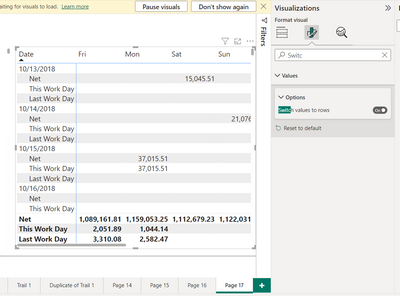
and you can use option in Matrix Switch Value to rows


amitchandak_0-1686541628734.png


Share with Power BI Enthusiasts: Full Power BI Video (20 Hours) YouTube
Microsoft Fabric Series 60+ Videos YouTube
Microsoft Fabric Hindi End to End YouTube

Helpful resources

Announcements
November Power BI Update Carousel

Power BI Monthly Update - November 2025

Check out the November 2025 Power BI update to learn about new features.

Fabric Data Days Carousel

Fabric Data Days

Advance your Data & AI career with 50 days of live learning, contests, hands-on challenges, study groups & certifications and more!

FabCon Atlanta 2026 carousel

FabCon Atlanta 2026

Join us at FabCon Atlanta, March 16-20, for the ultimate Fabric, Power BI, AI and SQL community-led event. Save $200 with code FABCOMM.

Top Kudoed Authors