cancel
Showing results for 
Search instead for 
Did you mean: 

Get Fabric Certified for FREE during Fabric Data Days. Don't miss your chance! Request now

Reply
laundryplease
New Member

Display Issue: Screen is Offset

Man, really frustrating experience so far. Not only having issues with PowerBI, but in trying to post a question about my issue here in the forum, it has been deleted twice! Trying again now.


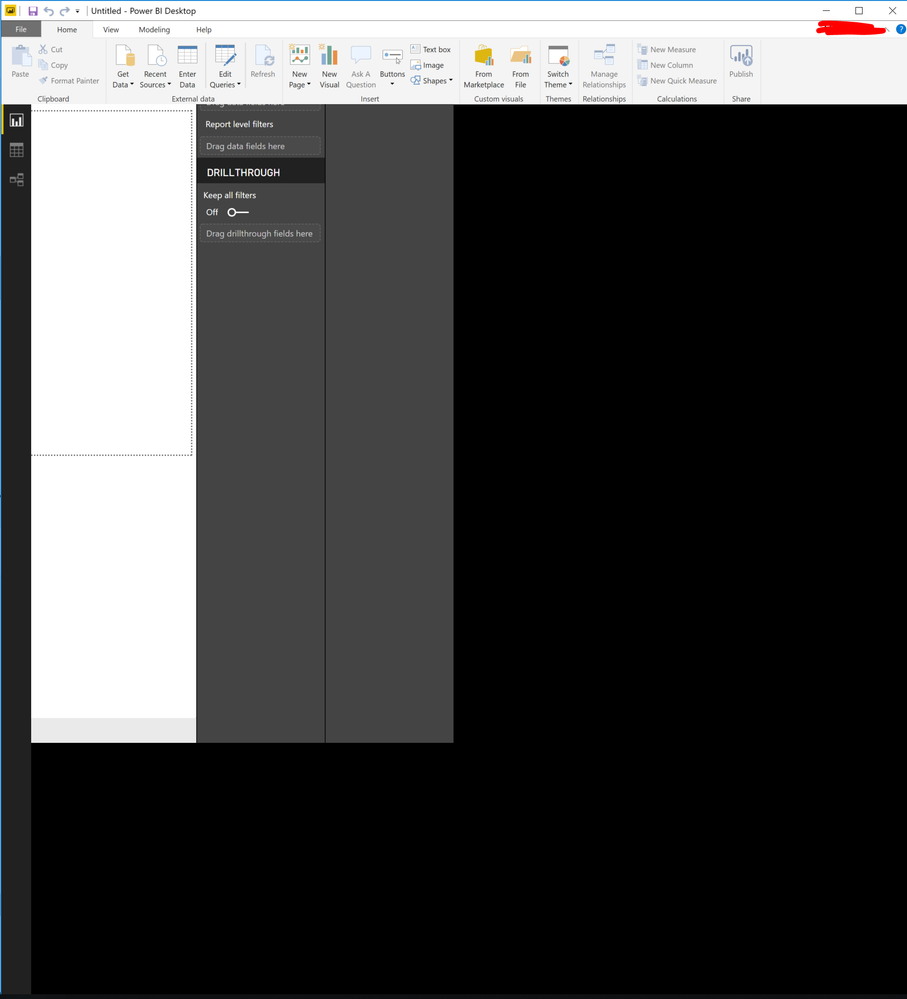
I have just installed (and uninstalled and reinstalled) Power BI Desktop, but the display is offset, so that many of the buttons/a majority of the UI is off the screen. I can't seem to find any settings or view options to correct the issue. Screenshot here for reference.


PowerBi Display Issue.PNG


I tried a cursory search, but couldn't find anything to help me troubleshoot. If I move my cursor through all of the black space, I will at one point hit a line where the cursor image changes to two arrows, the kind used to adjust the border of a Window, but clicking and dragging produces no change.


Thoughts? Thanks in advance!

2 REPLIES 2
Anonymous
Not applicable

Hi, I had the same issue using in my laptop with an external monitor.


What fixed for me was to unplug the external monitor, open PowerBI and after plug the external monitor back

Looks like a problem on how PowerBI handles multiple screens

v-cherch-msft
Microsoft Employee
Microsoft Employee

Hi @laundryplease


You may try to open a different existing .pbix file to check whether this issue occurs. It looks like this problem is affected by your machine environment. If possible, install the desktop on a different machine to see whether issue persists. Here are some similar posts for you.


https://community.powerbi.com/t5/Desktop/Black-Screen-on-Power-BI/td-p/433631

https://community.powerbi.com/t5/Desktop/Black-screen-power-bi-desktop-won-t-launch/td-p/121510


Regards,

Cherie


Community Support Team _ Cherie Chen
If this post helps, then please consider Accept it as the solution to help the other members find it more quickly.

Helpful resources

Announcements
November Power BI Update Carousel

Power BI Monthly Update - November 2025

Check out the November 2025 Power BI update to learn about new features.

Fabric Data Days Carousel

Fabric Data Days

Advance your Data & AI career with 50 days of live learning, contests, hands-on challenges, study groups & certifications and more!

FabCon Atlanta 2026 carousel

FabCon Atlanta 2026

Join us at FabCon Atlanta, March 16-20, for the ultimate Fabric, Power BI, AI and SQL community-led event. Save $200 with code FABCOMM.

Top Solution Authors
Top Kudoed Authors