We've captured the moments from FabCon & SQLCon that everyone is talking about, and we are bringing them to the community, live and on-demand. Starts on April 14th. Register now
Man, really frustrating experience so far. Not only having issues with PowerBI, but in trying to post a question about my issue here in the forum, it has been deleted twice! Trying again now.
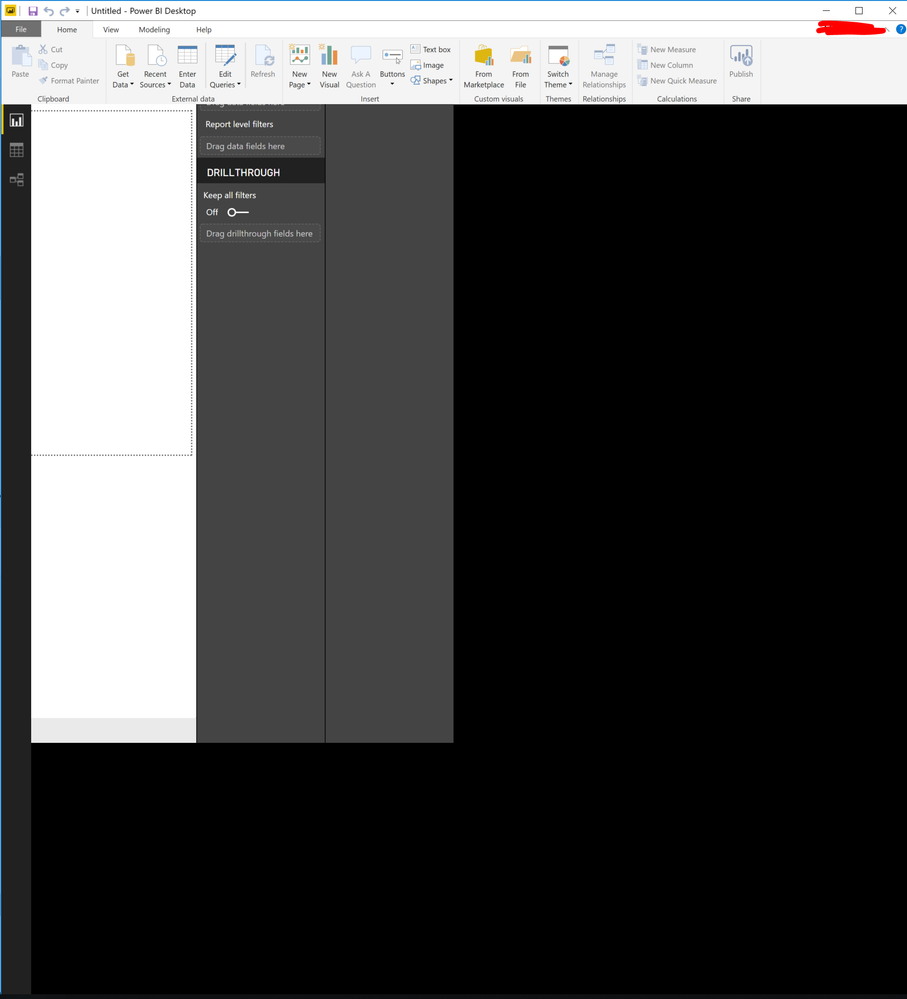
I have just installed (and uninstalled and reinstalled) Power BI Desktop, but the display is offset, so that many of the buttons/a majority of the UI is off the screen. I can't seem to find any settings or view options to correct the issue. Screenshot here for reference.
I tried a cursory search, but couldn't find anything to help me troubleshoot. If I move my cursor through all of the black space, I will at one point hit a line where the cursor image changes to two arrows, the kind used to adjust the border of a Window, but clicking and dragging produces no change.
Thoughts? Thanks in advance!
Hi, I had the same issue using in my laptop with an external monitor.
What fixed for me was to unplug the external monitor, open PowerBI and after plug the external monitor back
Looks like a problem on how PowerBI handles multiple screens
You may try to open a different existing .pbix file to check whether this issue occurs. It looks like this problem is affected by your machine environment. If possible, install the desktop on a different machine to see whether issue persists. Here are some similar posts for you.
https://community.powerbi.com/t5/Desktop/Black-Screen-on-Power-BI/td-p/433631
https://community.powerbi.com/t5/Desktop/Black-screen-power-bi-desktop-won-t-launch/td-p/121510
Regards,
Cherie
If you have recently started exploring Fabric, we'd love to hear how it's going. Your feedback can help with product improvements.
A new Power BI DataViz World Championship is coming this June! Don't miss out on submitting your entry.
Share feedback directly with Fabric product managers, participate in targeted research studies and influence the Fabric roadmap.
| User | Count |
|---|---|
| 53 | |
| 38 | |
| 33 | |
| 17 | |
| 17 |
| User | Count |
|---|---|
| 67 | |
| 62 | |
| 38 | |
| 34 | |
| 22 |