cancel
Showing results for 
Search instead for 
Did you mean: 

Learn from the best! Meet the four finalists headed to the FINALS of the Power BI Dataviz World Championships! Register now

Reply
ffzhang2396
Regular Visitor

Display Column data as rows

Hi everyone,

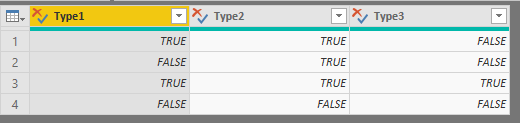
I have run into an issue with displaying data in a certain way on powerBI. I have several columns of boolean data type with the column headers being the type i want to display by. However, I am unable to get the column headers to display as rows with the count of the number of TRUE for that column. I have included some example data and expected output below.

My table looks like this:

C8jx8WU


When I try to create a table with this data, the output is this:
wAUH85L


However, I want to display the table like such:

NsCnL0c

I have tried to use a matrix to display the data, but it does not let me sort by Types or by number of True.


Any help is appreciated!

1 ACCEPTED SOLUTION
Anonymous
Not applicable

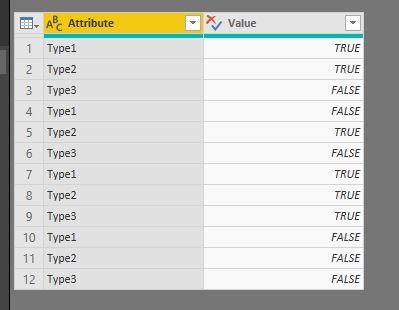
I've achieved this by:


-unpivoting all the colums, creating this:

pic1.JPG

then in a table or matrix with a visual filter for TRUE, I created this:pic2.JPG


View solution in original post

1 REPLY 1
Anonymous
Not applicable

I've achieved this by:


-unpivoting all the colums, creating this:

pic1.JPG

then in a table or matrix with a visual filter for TRUE, I created this:pic2.JPG


Helpful resources

Announcements
Power BI DataViz World Championships carousel

Power BI DataViz World Championships - June 2026

A new Power BI DataViz World Championship is coming this June! Don't miss out on submitting your entry.

Join our Fabric User Panel

Join our Fabric User Panel

Share feedback directly with Fabric product managers, participate in targeted research studies and influence the Fabric roadmap.

March Power BI Update Carousel

Power BI Community Update - March 2026

Check out the March 2026 Power BI update to learn about new features.