Share feedback directly with Fabric product managers, participate in targeted research studies and influence the Fabric roadmap.
Sign up nowGet Fabric certified for FREE! Don't miss your chance! Learn more
Hi All,
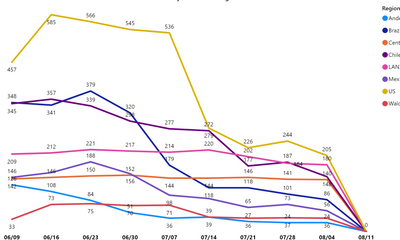
I currently have a line chart with x-axis displaying weekly data and would like to display Every 2 weeks data instead of weekly. Please suggest some ideas to achieve this requirement.
From the below chart, I want to show only 06/16, 06/30, and so on.
Thank You!
Solved! Go to Solution.
@Anonymous
In your calendar table you could add a column like this to group the dates into 14 day buckets.
Bi-Weekly Date =
VAR _Date = 'Date'[Date]
VAR _WkNum = WEEKNUM ( _Date )
VAR _WkDay = WEEKDAY ( _Date ) - 1
VAR _SoY = STARTOFYEAR ( 'Date'[Date] )
VAR _WkStart = IF ( ISODD ( _WkNum ) , _Date - _WkDay, _Date - ( _WkDay + 7 ) )
RETURN
MAX ( _SoY , _WkStart )
@Anonymous
In your calendar table you could add a column like this to group the dates into 14 day buckets.
Bi-Weekly Date =
VAR _Date = 'Date'[Date]
VAR _WkNum = WEEKNUM ( _Date )
VAR _WkDay = WEEKDAY ( _Date ) - 1
VAR _SoY = STARTOFYEAR ( 'Date'[Date] )
VAR _WkStart = IF ( ISODD ( _WkNum ) , _Date - _WkDay, _Date - ( _WkDay + 7 ) )
RETURN
MAX ( _SoY , _WkStart )
You should create a calendar table that has a column the groups the weeks together. Call it what you like, Ie "period". It would be something like
week, period
1,1
2,1
3,2
4,2
5,3
etc.
Or you can put the period ending date if you prefer.
Here are some of my articles that may help you
https://exceleratorbi.com.au/power-pivot-calendar-tables/
https://exceleratorbi.com.au/build-reusable-calendar-table-power-query/
If you love stickers, then you will definitely want to check out our Community Sticker Challenge!
Check out the January 2026 Power BI update to learn about new features.
| User | Count |
|---|---|
| 62 | |
| 61 | |
| 42 | |
| 21 | |
| 18 |
| User | Count |
|---|---|
| 122 | |
| 117 | |
| 37 | |
| 34 | |
| 30 |