cancel
Showing results for 
Search instead for 
Did you mean: 

Learn from the best! Meet the four finalists headed to the FINALS of the Power BI Dataviz World Championships! Register now

Reply
Anonymous
Not applicable

Display Averages

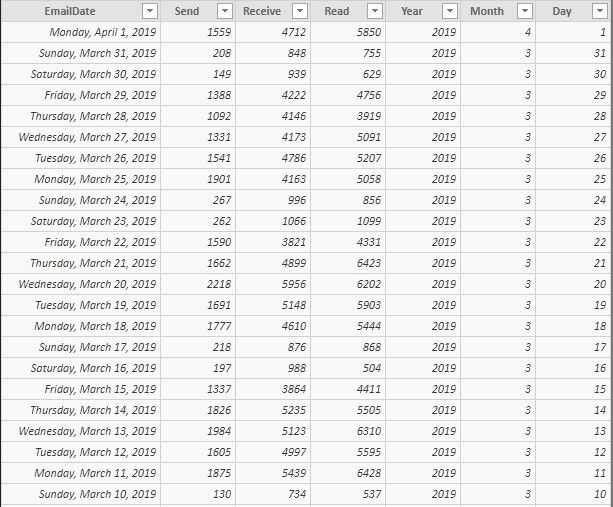
I am trying to show average emails sent, received and read by month.   I have a query with the columns being Date, Send, Receive, Read.   I have read a number of different posts on here but I can't seem to find one that meets exactly what I need.   And everything I have tried from the information I did find didn't work.   


I know I need to add the "send" column and then divide it by the number of days in the month.    So I did create columns for Year, Month and Day.   But still can't figure out what measure I need to perform to make this happen.   Average2Display.jpg

1 ACCEPTED SOLUTION
MattAllington
Community Champion
Community Champion

You should add a calendar table and delete the extra columns you added in your data table.

https://exceleratorbi.com.au/power-pivot-calendar-tables/


Then add the month from the calendar table to your matrix (eg YYYY-MM or similar)


I also recommend unpivoting your data so you have 

Date/Attribute/Qty


then you can write measures like this

Total Qty = SUM(Table[Qty])

and put the attribute column as a column in a matrix to see the results.

I guess a formula you could use would look like this

Average Emails =
VAR DaysSelected =
    COUNTROWS ( calendar )
VAR TotalEmails =
    SUM ( Table[Qty] )
RETURN
    DIVIDE ( TotalEmails, DaysSelected )


* Matt is an 8 times Microsoft MVP (Power BI) and author of the Power BI Book Supercharge Power BI.
I will not give you bad advice, even if you unknowingly ask for it.

View solution in original post

1 REPLY 1
MattAllington
Community Champion
Community Champion

You should add a calendar table and delete the extra columns you added in your data table.

https://exceleratorbi.com.au/power-pivot-calendar-tables/


Then add the month from the calendar table to your matrix (eg YYYY-MM or similar)


I also recommend unpivoting your data so you have 

Date/Attribute/Qty


then you can write measures like this

Total Qty = SUM(Table[Qty])

and put the attribute column as a column in a matrix to see the results.

I guess a formula you could use would look like this

Average Emails =
VAR DaysSelected =
    COUNTROWS ( calendar )
VAR TotalEmails =
    SUM ( Table[Qty] )
RETURN
    DIVIDE ( TotalEmails, DaysSelected )


* Matt is an 8 times Microsoft MVP (Power BI) and author of the Power BI Book Supercharge Power BI.
I will not give you bad advice, even if you unknowingly ask for it.

Helpful resources

Announcements
Join our Fabric User Panel

Join our Fabric User Panel

Share feedback directly with Fabric product managers, participate in targeted research studies and influence the Fabric roadmap.

February Power BI Update Carousel

Power BI Monthly Update - February 2026

Check out the February 2026 Power BI update to learn about new features.

FabCon Atlanta 2026 carousel

FabCon Atlanta 2026

Join us at FabCon Atlanta, March 16-20, for the ultimate Fabric, Power BI, AI and SQL community-led event. Save $200 with code FABCOMM.