cancel
Showing results for 
Search instead for 
Did you mean: 

The Power BI Data Visualization World Championships is back! Get ahead of the game and start preparing now! Learn more

Reply
sheap069
Helper III
Helper III

Display All Intervals for x-Axis in Timeline

Hello, 


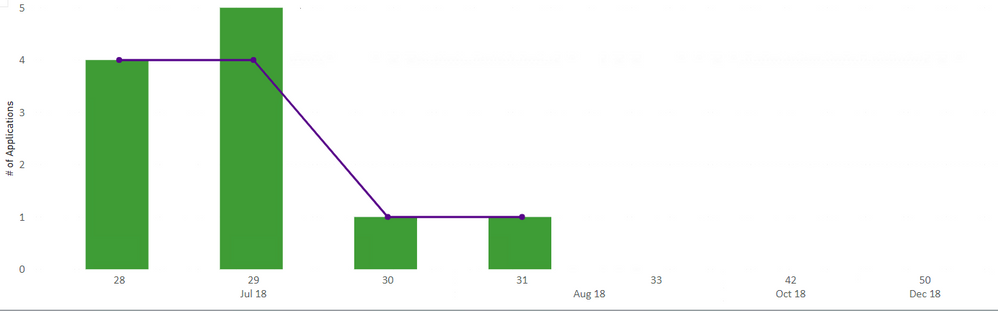
I have a timeline in a bar and line chart as shown below.


Capture.PNG


I made a measure to get the weeks in the months, and I have these numbers displayed as you can see. However, why aren't the weekly intervals all appearing? For instance, why is the 32nd week not appearing on the axis, and then after the 33rd the chart jumps to the 43rd? 


If I can't show all the weeks, is it possible for me to have a bar for the past 18 or 24 months from today's date? I just want all the values to be displayed on the chart.


Thank you. 

5 REPLIES 5
sheap069
Helper III
Helper III

Hello @Anonymous 

I am just writing to ask if you had a chance to look at the data and if this is making sense. 


Thank you.

amitchandak
Super User
Super User

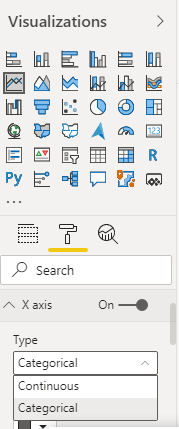
@sheap069 , Your axis type might be continuous . make it categorical and check

Axis_type.png

Share with Power BI Enthusiasts: Full Power BI Video (20 Hours) YouTube
Microsoft Fabric Series 60+ Videos YouTube
Microsoft Fabric Hindi End to End YouTube

Hi, I don't see this option under x-axis.


Capture.PNG

Anonymous
Not applicable

Hi @sheap069 ,

The Type option with value Continuous and Categorical only show up in Format pane when you put the field with numeric or date data type... How did you set your line and column chart? Which field be put on X axis? Could you please provide some sample data(exclude sensitive data) include in your visual? Thank you.

Best Regards

@Anonymous Hello,


Sorry for the delay, it took some time to make fake data for you. You can find it here


You will see three tabs. I have Groups, Applications, and then I unpivoted the Applications table to have the dates. I want a count of applications for each group based on the type of Date. I have 2 different group IDs to show you what's wrong.


I want the timeline to show the past 12 months, assuming the current time was February 2020. Group ID 1 has no data from 2019, and while the table is blank, there is oddly Jun 2019 showing up in the axis. 
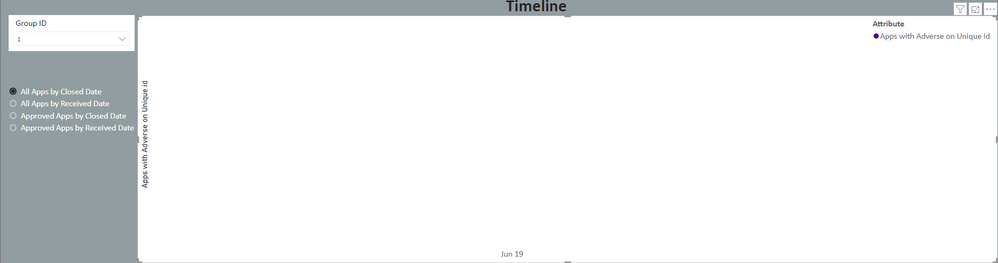
Capture.PNG


For Group ID 10, there are all the bars except March 2019. Why is there nothing in March?
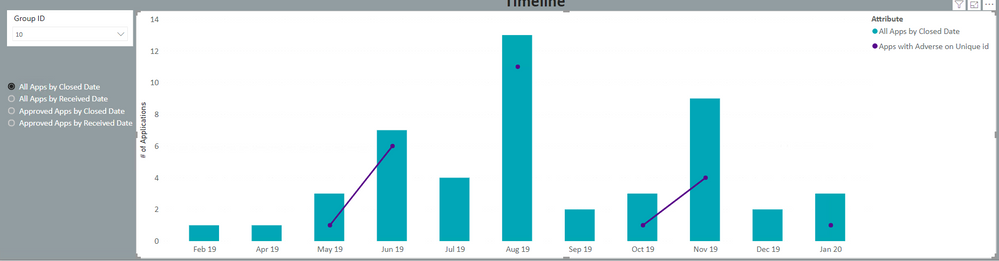
Capture1.PNG

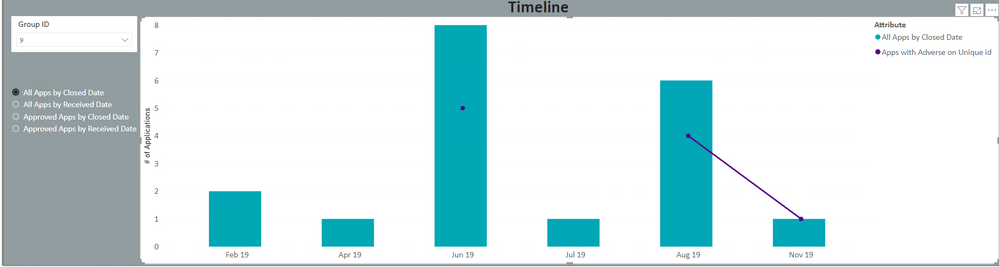
Also, I would like to have the axis always show all the months. Here is another Group ID, and you can see the months are not all showing.
Capture2.PNG

I really need to have all months displayed on the axis, whether or not there is data.


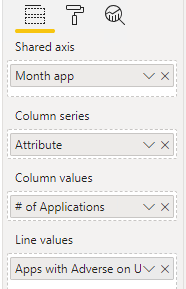
I made a custom column for the months and made a sort order so the months show up correctly on the chart.

Here are my fields for the chart. The line graph is for a separate value.
Capture3.PNG


Sorry if this is complex. Let me know if I can clarify anything, but I need to have Jan 2019 to Jan 2020 (later I can set 12 months from today) always appear on the graph and not have the x axis change dynamically.

Thank you

Helpful resources

Announcements
Power BI DataViz World Championships

Power BI Dataviz World Championships

The Power BI Data Visualization World Championships is back! Get ahead of the game and start preparing now!

December 2025 Power BI Update Carousel

Power BI Monthly Update - December 2025

Check out the December 2025 Power BI Holiday Recap!

FabCon Atlanta 2026 carousel

FabCon Atlanta 2026

Join us at FabCon Atlanta, March 16-20, for the ultimate Fabric, Power BI, AI and SQL community-led event. Save $200 with code FABCOMM.