cancel
Showing results for 
Search instead for 
Did you mean: 

A new Data Days event is coming soon! This time we’re going bigger than ever. Fabric, Power BI, SQL, AI and more. Don't miss out.

Reply
hansei
Helper V
Helper V

Discrepancy with Distinct

I am a bit perplexed by how DAX is reporting distinct values for a column. I have a list of patients, and grouped them in PowerQuery to get a count of duplicate names. Using Table.Group should be perfectly sufficient to distinguish distinct values. e.g.


let source = Patients
in  Table.Group(Source, {"Full Name"}, {{"Count", each Table.RowCount(_), Int64.Type}})


However PBI desktop is asserting that there are duplicate values in "Full Name".


I tried a bunch of things, like eliminating spaces, and even re-asserting using Distinct. However, the discrepancy persists e.g.


let
    Source = Patients,
    #"Trimmed Text" = Table.TransformColumns(Source, {{"Full Name", Text.Trim, type text}}),
    #"Grouped Rows" = Table.Group(#"Trimmed Text", {"Full Name"}, {{"Count", each Table.RowCount(_), type number}}),
    #"Sorted Rows" = Table.Buffer(Table.Sort(#"Grouped Rows", {{"Count", Order.Descending}, {"Full Name", Order.Ascending}})), 
    Counts = { Table.RowCount(#"Sorted Rows"), Table.RowCount(#"Removed Duplicates") }, 
    #"Removed Duplicates" = Table.Distinct(#"Sorted Rows", {"Full Name"})  
    
in
    #"Removed Duplicates"
 

distinct.png

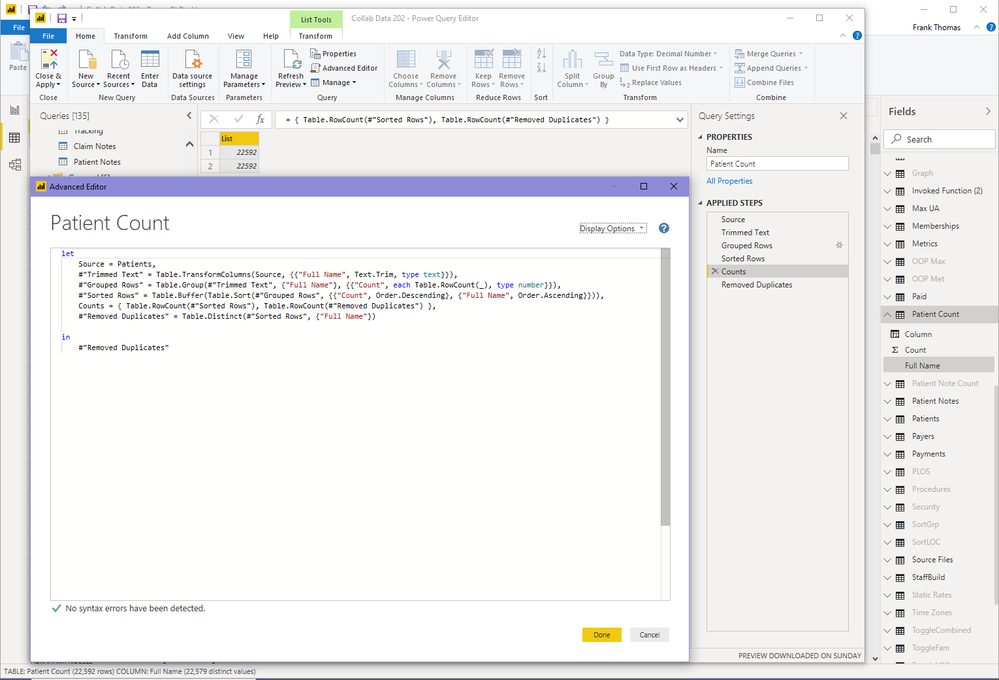
So PowerQuery shows 22592 rows before and after call to Distinct. Yet desktop (see status bar at bottom) shows 13 duplicate values.


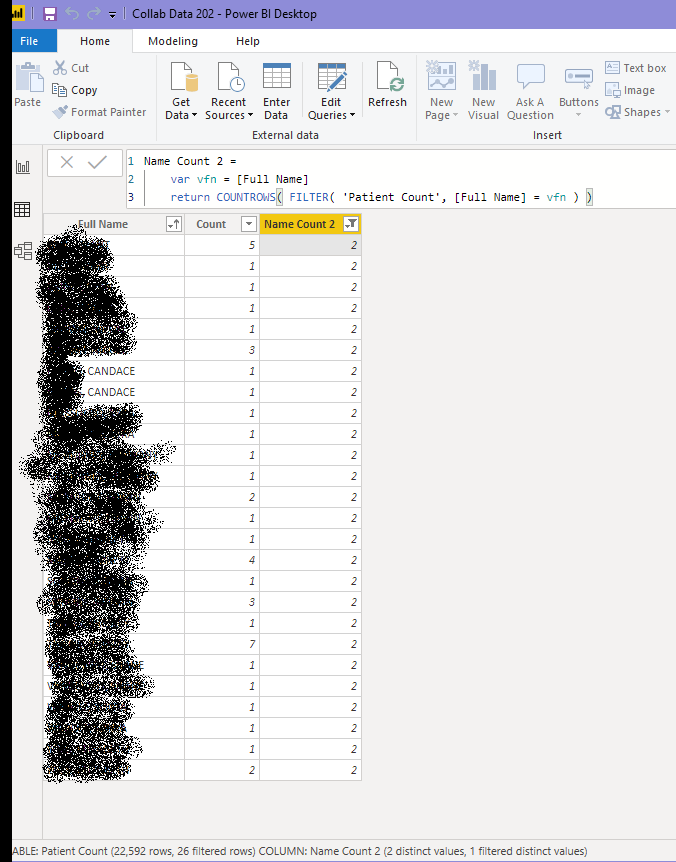
I have to hide the names below, but I can tell you that if I filter on the table in power query using one of the names like CANDACE that there is only a single entry in the table when in the query editor, although 2 appear after loaded in the desktop.
duplicates.png

1 ACCEPTED SOLUTION
vanessafvg
Community Champion
Community Champion

@hansei  have you made sure they are all the same case?   power query sees difference cases as unique, but dax doesn't.  Change them all to upper  or  lower case


If I took the time to answer your question and I came up with a solution, please mark my post as a solution and /or give kudos freely for the effort 🙂 Thank you!

Proud to be a Super User!


View solution in original post

2 REPLIES 2
vanessafvg
Community Champion
Community Champion

@hansei  have you made sure they are all the same case?   power query sees difference cases as unique, but dax doesn't.  Change them all to upper  or  lower case


If I took the time to answer your question and I came up with a solution, please mark my post as a solution and /or give kudos freely for the effort 🙂 Thank you!

Proud to be a Super User!


Thanks for that @vanessafvg . For some reason, everything was the same case when viewed in the desktop Data tab, so that was not occurring to me.

Helpful resources

Announcements
May Power BI Update Carousel

Power BI Monthly Update - May 2026

Check out the May 2026 Power BI update to learn about new features.

Fabric SQL PBI Data Days

Data Days 2026 coming soon!

Sign up to receive a private message when registration opens and key events begin.

New to Fabric survey Carousel

New to Fabric Survey

If you have recently started exploring Fabric, we'd love to hear how it's going. Your feedback can help with product improvements.

Power BI DataViz World Championships carousel

Power BI DataViz World Championships - June 2026

A new Power BI DataViz World Championship is coming this June! Don't miss out on submitting your entry.