FabCon is coming to Atlanta
Join us at FabCon Atlanta from March 16 - 20, 2026, for the ultimate Fabric, Power BI, AI and SQL community-led event. Save $200 with code FABCOMM.
Register now!- Power BI forums
- Get Help with Power BI
- Desktop
- Service
- Report Server
- Power Query
- Mobile Apps
- Developer
- DAX Commands and Tips
- Custom Visuals Development Discussion
- Health and Life Sciences
- Power BI Spanish forums
- Translated Spanish Desktop
- Training and Consulting
- Instructor Led Training
- Dashboard in a Day for Women, by Women
- Galleries
- Data Stories Gallery
- Themes Gallery
- Contests Gallery
- QuickViz Gallery
- Quick Measures Gallery
- Visual Calculations Gallery
- Notebook Gallery
- Translytical Task Flow Gallery
- TMDL Gallery
- R Script Showcase
- Webinars and Video Gallery
- Ideas
- Custom Visuals Ideas (read-only)
- Issues
- Issues
- Events
- Upcoming Events
The Power BI Data Visualization World Championships is back! Get ahead of the game and start preparing now! Learn more
- Power BI forums
- Forums
- Get Help with Power BI
- Desktop
- Re: Disconnected Slicer to slice a table
- Subscribe to RSS Feed
- Mark Topic as New
- Mark Topic as Read
- Float this Topic for Current User
- Bookmark
- Subscribe
- Printer Friendly Page


- Mark as New
- Bookmark
- Subscribe
- Mute
- Subscribe to RSS Feed
- Permalink
- Report Inappropriate Content
Disconnected Slicer to slice a table
So I have a table that contains some information about services, like this:
| Service | Value Chain | Service Level |
| ABC | Ops, HR | Bronze |
| DEF | IT, Ops | Gold |
| GHI | IT, HR | Silver |
| JKL | HR, Ops | Bronze |
| MNO | Ops, HR, IT | Gold |
I need to be able to filter it, for example, to show only Service that contains "HR" in Value Chain.
Now, I know your first instinct would be to split the columns, do some pivoting, creating multiple rows for each Service, with a single value chain per service, but elsewhere this changes my relationships into Many to Many, screws my averages and other measures, etc.
So, I decided I'd probably need to resort to a disconnected slicer, which has all the distinct, comma separated values in Value Chain (IT, Ops, HR). However, how do I make that slicer impact a Table to show only Services which, for instance, contain IT in the value chain?
This question was asked before, but not answered: Link
Solved! Go to Solution.


- Mark as New
- Bookmark
- Subscribe
- Mute
- Subscribe to RSS Feed
- Permalink
- Report Inappropriate Content
Hi @pmay ,
Please try this, provided your disconnected slicer looks like

1) Create a measure that captures the selected value from your disconnected slicer
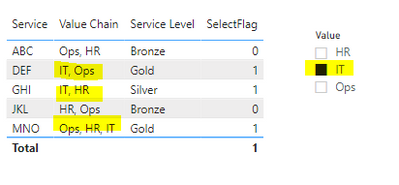
In the final step, add measure "SelectFlag" as a visual level filter to the table and set value to 1. This will show you only those rows that have values "IT"
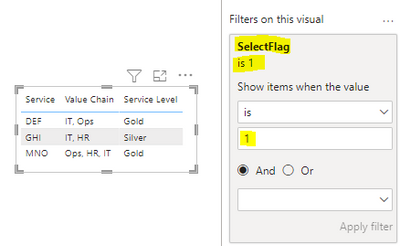
Kind regards,
Rohit
Please mark this answer as the solution if it resolves your issue.
Appreciate your kudos! 😊
- Mark as New
- Bookmark
- Subscribe
- Mute
- Subscribe to RSS Feed
- Permalink
- Report Inappropriate Content
Hi @pmay ,
Please try this, provided your disconnected slicer looks like
1) Create a measure that captures the selected value from your disconnected slicer
In the final step, add measure "SelectFlag" as a visual level filter to the table and set value to 1. This will show you only those rows that have values "IT"
Kind regards,
Rohit
Please mark this answer as the solution if it resolves your issue.
Appreciate your kudos! 😊

- Mark as New
- Bookmark
- Subscribe
- Mute
- Subscribe to RSS Feed
- Permalink
- Report Inappropriate Content
Good afternoon,
I have a followup question to the above, if I may. I have gotten the original solution working as intended, many thanks for that. I am trying to modify the query a bit and have gotten stuck for quite a while now.
I have a main table containing the columns (amongst others):
- [DATE]
- [CLIENT]
- [REP]
- [TICKET ID]
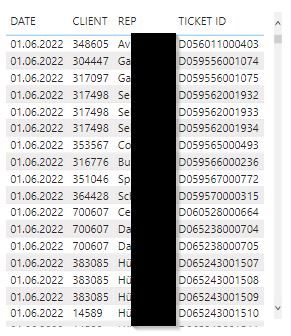
I have a disconnected slicer which allows for the selection of the [TICKET ID], which is unique. The goal is to filter the main table by only showing those entries that share the same [DATE], [CLIENT] and [REP] as the row with the selected [TICKET ID] -> so show ALL [TICKET ID]s of the given [DATE], [CLIENT] and [REP].
I have tried using LOOKUPVALUE to retrieve the corresponding values from the other columns and then setting flags for them as well like in the given solution, but I seem to be fundamentally misunderstanding things about the interaction of filters.
Any help would be greatly appreciated.
Regards
Andreas
- Mark as New
- Bookmark
- Subscribe
- Mute
- Subscribe to RSS Feed
- Permalink
- Report Inappropriate Content
Never mind, I have finally got it. I guess at some point I had accidentally reconnected the disconnected slicer to the main table, which caused all sorts of headaches.
- Mark as New
- Bookmark
- Subscribe
- Mute
- Subscribe to RSS Feed
- Permalink
- Report Inappropriate Content
Thanks - I really thought this would work, but sadly not.
The column I added seems to never see the content of the slicer, it returns 1 on every single row, regardless of what I pick in the disconnected slicer
- Mark as New
- Bookmark
- Subscribe
- Mute
- Subscribe to RSS Feed
- Permalink
- Report Inappropriate Content
Hi @pmay ,
Apologies. selectflag must be a measure and not a calculated column.
Also, could you please verify if you're capturing the slicer value correctly?
- Mark as New
- Bookmark
- Subscribe
- Mute
- Subscribe to RSS Feed
- Permalink
- Report Inappropriate Content
Yup this works.
So my error was misunderstanding this part:
SelectedChain = SELECTEDVALUE(dim_slicer[Value])
I was putting the same disconnected slicer in there, rather than the field to search through. Thank you very much!
In my initial post, I linked to another user who had asked the same question, you can probably just give them the same answer.
- Mark as New
- Bookmark
- Subscribe
- Mute
- Subscribe to RSS Feed
- Permalink
- Report Inappropriate Content
Hppy to hear that it's working for you @pmay . I will put a link to this solution in the other post as well.
- Mark as New
- Bookmark
- Subscribe
- Mute
- Subscribe to RSS Feed
- Permalink
- Report Inappropriate Content
I've no idea why I misread that last time. I even wondered why it would be a calculated column.
I've added the SelectFlag to my table visual, but every row still returns a 1.
My SelectedChain measure:
- Mark as New
- Bookmark
- Subscribe
- Mute
- Subscribe to RSS Feed
- Permalink
- Report Inappropriate Content
Think I've just spotted my error this time - give me a moment
- Mark as New
- Bookmark
- Subscribe
- Mute
- Subscribe to RSS Feed
- Permalink
- Report Inappropriate Content
You might be able to use the Custom Text filter from the marketplace
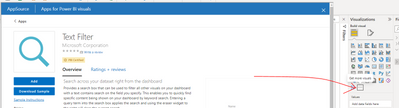
- Mark as New
- Bookmark
- Subscribe
- Mute
- Subscribe to RSS Feed
- Permalink
- Report Inappropriate Content
This works, but relies on my users knwoing the correct value chain acronym. I'll have a think for a few hours to see if I can put that responsibility on them, to spell a few letters correctly.
Regardless, this is a great add-in to know about!


- Mark as New
- Bookmark
- Subscribe
- Mute
- Subscribe to RSS Feed
- Permalink
- Report Inappropriate Content
@pmay , You can use containsstring or search, but when you select more than one value that will be a big challenge
example
countrows(filter(Table, search(selectedvalue(Value[Value]) , Table[Value],,0)>0))
- Mark as New
- Bookmark
- Subscribe
- Mute
- Subscribe to RSS Feed
- Permalink
- Report Inappropriate Content
Thank you for taking the time to try to help.
I'm OK with limiting to Single Select (or All).
Your measure would return me a count of the rows, but I don't need a count, I want all the values in all the columns. There are actually a bunch more columns, but I guess the logic will be the same regardless (if it's possible at all).
I can make it work for a single value, easily enough:

Helpful resources

Power BI Dataviz World Championships
The Power BI Data Visualization World Championships is back! Get ahead of the game and start preparing now!

Power BI Monthly Update - December 2025
Check out the December 2025 Power BI Holiday Recap!

FabCon Atlanta 2026
Join us at FabCon Atlanta, March 16-20, for the ultimate Fabric, Power BI, AI and SQL community-led event. Save $200 with code FABCOMM.

| User | Count |
|---|---|
| 38 | |
| 38 | |
| 37 | |
| 28 | |
| 28 |


| User | Count |
|---|---|
| 124 | |
| 89 | |
| 73 | |
| 66 | |
| 65 |


