


cancel
Showing results for 
Search instead for 
Did you mean: 

Get Fabric Certified for FREE during Fabric Data Days. Don't miss your chance! Request now

Reply
Anonymous
Not applicable

Disconnect Table for slicing a measure

Hello,


I've read and watched a lot a videos on how to do that but my context is a little different. I want to be able to extract or not a condition, created by a measure.


I have a measure Qty Forecast. I want to be able to extract or not qty 0 or empty. To do so, I have created a measure 

1. 

valgecko_0-1603985248013.png

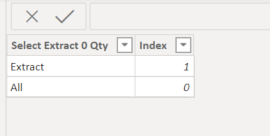
2. I have created a disconnect table

valgecko_1-1603985323502.png

3. I have started my main measure in ordre to be able to link my slicer with desired condition. 

valgecko_2-1603985489653.png

The selection works just fine when I put this last measure into a card et use the table created as a slicer

valgecko_3-1603985565366.png

Now my challenge is to be able to filter (extract) one of the result of my measure from my visual with a slicer, condition 1. I am not able to conclude my measure. Doesn't work. Anyone know?


valgecko_4-1603986513328.png

I am trying to do something like that but not selection a different measure but selection a result of a meau

1 REPLY 1
mahoneypat
Microsoft Employee
Microsoft Employee

Since you just have two conditions (1 or 0), I would just use an IF but you can just have something like this in the Return part of your measure to return either of two expressions.


Return IF(selection=1, SUM(Table[Column1]), CALCULATE(SUM(Table[Column1]), Table[Column2] = "Some Value"))


Regards,

Pat


Did I answer your question? Mark my post as a solution! Kudos are also appreciated!

To learn more about Power BI, follow me on Twitter or subscribe on YouTube.


@mahoneypa HoosierBI on YouTube


Helpful resources

Announcements
November Power BI Update Carousel

Power BI Monthly Update - November 2025

Check out the November 2025 Power BI update to learn about new features.

Fabric Data Days Carousel

Fabric Data Days

Advance your Data & AI career with 50 days of live learning, contests, hands-on challenges, study groups & certifications and more!

FabCon Atlanta 2026 carousel

FabCon Atlanta 2026

Join us at FabCon Atlanta, March 16-20, for the ultimate Fabric, Power BI, AI and SQL community-led event. Save $200 with code FABCOMM.

Top Solution Authors
Top Kudoed Authors