Join us at FabCon Atlanta from March 16 - 20, 2026, for the ultimate Fabric, Power BI, AI and SQL community-led event. Save $200 with code FABCOMM.
Register now!The Power BI Data Visualization World Championships is back! Get ahead of the game and start preparing now! Learn more
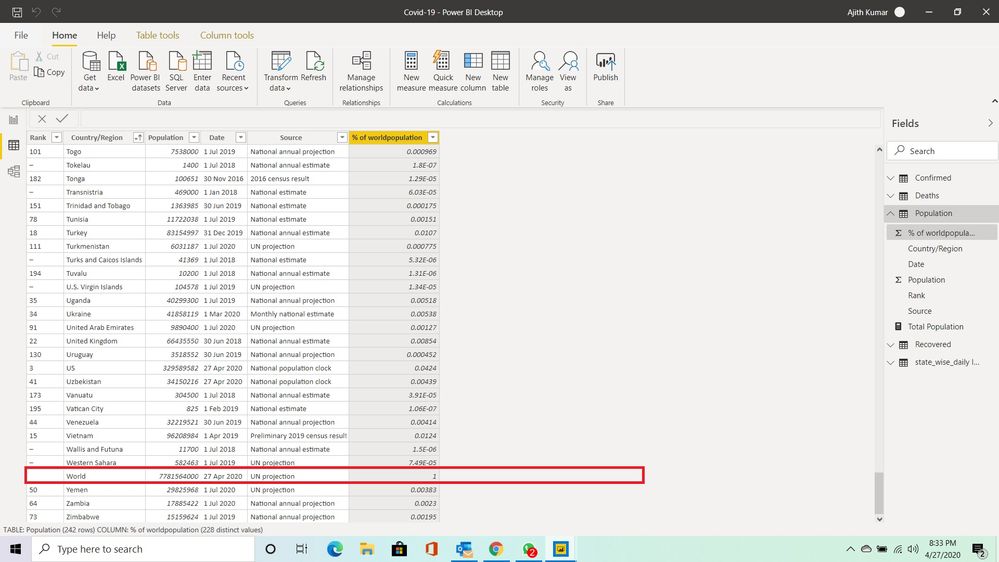
I wanted to disable WORLD row as its doubling the calculation.
Solved! Go to Solution.
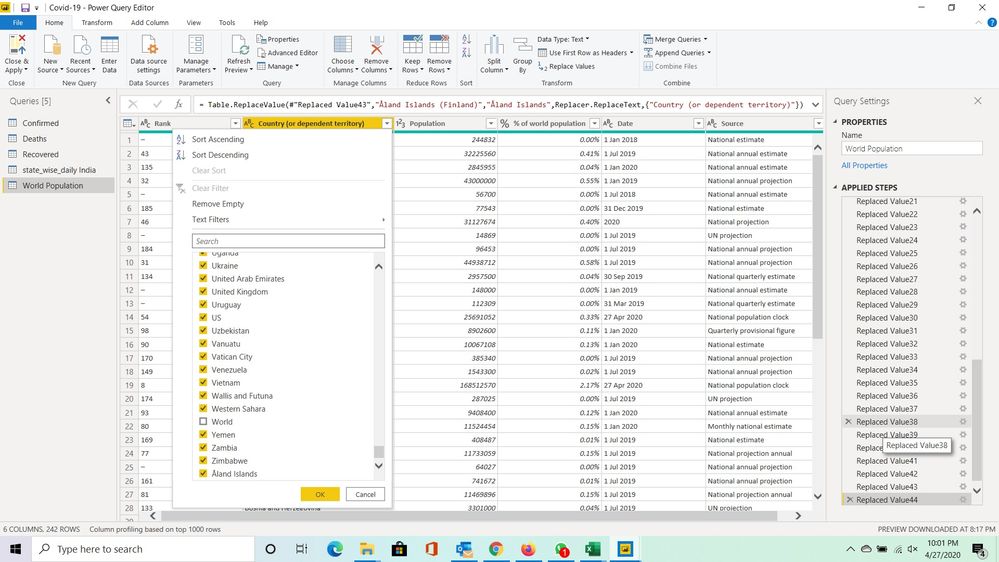
Just use a filter by clicking the arrow to the right of the column name in the 'Transform Data' window. Unselect "World" in the 'Country/Region' column.
Yes. Filters specified in the 'Tranform Data' window remain as an 'Applied Step' regardless of refresh.
Just use a filter by clicking the arrow to the right of the column name in the 'Transform Data' window. Unselect "World" in the 'Country/Region' column.
In that case will it be permanantly removed, the data will be auto refreshed every day.
Yes. Filters specified in the 'Tranform Data' window remain as an 'Applied Step' regardless of refresh.
Like below right
Yes, that is correct.
The Power BI Data Visualization World Championships is back! Get ahead of the game and start preparing now!
| User | Count |
|---|---|
| 38 | |
| 36 | |
| 33 | |
| 33 | |
| 29 |
| User | Count |
|---|---|
| 134 | |
| 96 | |
| 78 | |
| 67 | |
| 65 |