Join us at FabCon Atlanta from March 16 - 20, 2026, for the ultimate Fabric, Power BI, AI and SQL community-led event. Save $200 with code FABCOMM.
Register now!The Power BI Data Visualization World Championships is back! Get ahead of the game and start preparing now! Learn more
I'm having difficulty with making a card display as 0.00.
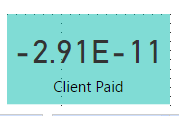
This is as the card displays now.
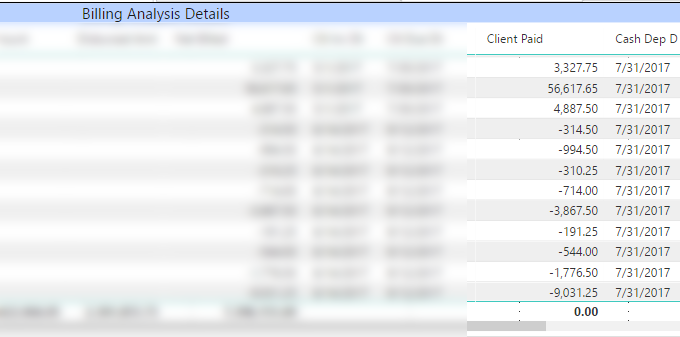
However, the same column displays as 0.00 in a table on the same report page.
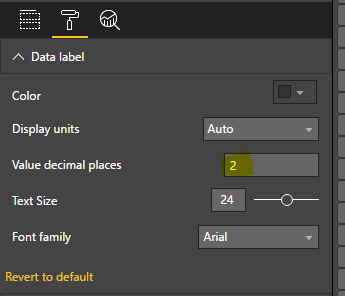
For the card visualization, I've made sure to set it to 2 decimal places.
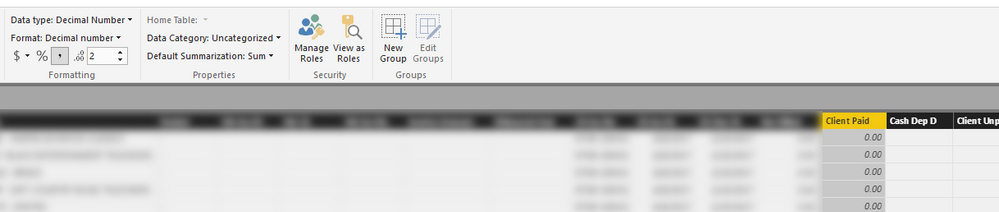
And the column is set at the Data Level to display as a decimal number with only 2 decimal places.
Yet for some reason, it still displays a very small decimal in exponential form on the card visualization. Is there a way to fix this so it just reads 0.00?
Thanks
Solved! Go to Solution.
I think this is caused by floating point imprecision.
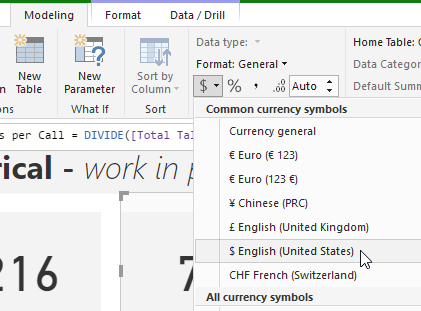
Try changing your data type to a currency type, seeing as how you're apparently working with money:
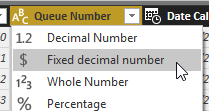
Rather, you ought to do this at the query level, changing the data type to a fixed decimal type, which you ought to be doing anyway when working with money (I'm unsure if the currency format changes your underlying data to a fixed decimal type; do this if the first option doesn't help):
In the card formating pane make display unit as Auto.then it work
@Anonymous Use the Below mentioned DAX
Client Paid = FORMAT(SUM(Table1[Billed]),"00000")
Regards,
Chetan K
I think this is caused by floating point imprecision.
Try changing your data type to a currency type, seeing as how you're apparently working with money:
Rather, you ought to do this at the query level, changing the data type to a fixed decimal type, which you ought to be doing anyway when working with money (I'm unsure if the currency format changes your underlying data to a fixed decimal type; do this if the first option doesn't help):
Try changing the Display Units setting on the card well from Auto to None.
The Power BI Data Visualization World Championships is back! Get ahead of the game and start preparing now!
| User | Count |
|---|---|
| 58 | |
| 47 | |
| 40 | |
| 39 | |
| 22 |
| User | Count |
|---|---|
| 175 | |
| 138 | |
| 118 | |
| 80 | |
| 54 |