Join us at FabCon Atlanta from March 16 - 20, 2026, for the ultimate Fabric, Power BI, AI and SQL community-led event. Save $200 with code FABCOMM.
Register now!The Power BI Data Visualization World Championships is back! Get ahead of the game and start preparing now! Learn more
Hi All
I have 2 charts that interact with each other in the usual way, so when click on a column on one graph it filters the other graph but leaves the total data shaded in the background.
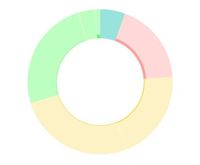
This is a great tool but I'm finding in some cases when you filter down to a small amount of data the visuals really don't look great, especially on pie and donut charts. (see example)
I still want crossfiltering to work but I don't want the shaded part of the graph to display and therefore the axis will adjust so I can more easily see the filtered selection
Can this be done?
Many thanks
Hi @Hibbster
What you see is for you have selected the highlight icon on the donut viusal.
when you filter down to a small amount of data the visuals, switch to select the filter icon.
https://docs.microsoft.com/en-us/power-bi/service-reports-visual-interactions
Best Regards
Maggie
Community Support Team _ Maggie Li
If this post helps, then please consider Accept it as the solution to help the other members find it more quickly.
The Power BI Data Visualization World Championships is back! Get ahead of the game and start preparing now!
| User | Count |
|---|---|
| 38 | |
| 36 | |
| 33 | |
| 32 | |
| 28 |
| User | Count |
|---|---|
| 129 | |
| 88 | |
| 79 | |
| 68 | |
| 63 |