cancel
Showing results for 
Search instead for 
Did you mean: 

Try your skills in the Power BI Dataviz World Championship! Round one ends June 26. Join now

Reply
Hibbster
Frequent Visitor

Disable Crossfilter

Hi All

I have 2 charts that interact with each other in the usual way, so when click on a column on one graph it filters the other graph but leaves the total data shaded in the background.

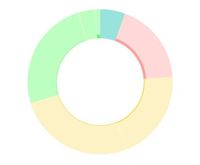
This is a great tool but I'm finding in some cases when you filter down to a small amount of data the visuals really don't look great, especially on pie and donut charts. (see example)

donut.JPG

I still want crossfiltering to work but I don't want the shaded part of the graph to display and therefore the axis will adjust so I can more easily see the filtered selection

Can this be done?

Many thanks


1 REPLY 1
v-juanli-msft
Community Support
Community Support

Hi @Hibbster 

What you see is for you have selected the highlight icon on the donut viusal.highlight icon


when you filter down to a small amount of data the visuals, switch to select the filter icon.filter icon


https://docs.microsoft.com/en-us/power-bi/service-reports-visual-interactions


Best Regards
Maggie


Community Support Team _ Maggie Li
If this post helps, then please consider Accept it as the solution to help the other members find it more quickly.

Helpful resources

Announcements
Fabric Data Days is here Carousel

Fabric Data Days 2026

Don't miss out on Data Days, June 15 through August 7. Learn Fabric, Power BI, SQL, AI and more.

May Power BI Update Carousel

Power BI Monthly Update - May 2026

Check out the May 2026 Power BI update to learn about new features.

Power BI DataViz World Championships carousel

Power BI DataViz World Championships - June 2026

A new Power BI DataViz World Championship is coming this June! Don't miss out on submitting your entry.