Join us at FabCon Atlanta from March 16 - 20, 2026, for the ultimate Fabric, Power BI, AI and SQL community-led event. Save $200 with code FABCOMM.
Register now!The Power BI Data Visualization World Championships is back! Get ahead of the game and start preparing now! Learn more
Hello!
I have a data model uploaded to my PPU capacity.
I create a report and connect to my datamodel with no problems.
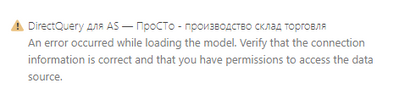
When I try to import additional data into model and try to switch into directquery mode I get an error
Have tried it with the other models in my PPU space - same thing.
I'm the sole owner of the models. All models have no errors and refresh 6 times a day (xlsx and txt sources).
Any ideas?
Thank you
Solved! Go to Solution.
Hi @Anonymous ,
If you want to make a DirectQuery connection to a Power BI dataset, your tenant needs to have "Allow XMLA Endpoints and Analyze in Excel with on-premises datasets" enabled. My test found that if this option is not enabled, you will get such an error.
For more limitations, please refer to https://docs.microsoft.com/en-us/power-bi/connect-data/desktop-directquery-datasets-azure-analysis-services#considerations-and-limitations
If the problem is still not resolved, please provide detailed error information or the expected result you expect. Let me know immediately, looking forward to your reply.
Best Regards,
Winniz
If this post helps, then please consider Accept it as the solution to help the other members find it more quickly.
Hi @Anonymous ,
I would assume that the credentials can access the SQL Server, otherwise you wouldn't be able to use the datasource. My thought is that while it can reach the SQL Server, it can't access all the tables/views that it needs to in order to produce the report results... what level of permission does it have on the SQL Server? Is it a different account, or your credentials?
Alternatively, did you use a basic auth connection in the Desktop?
Thank You !!
Preeti
My dataset uses only xlsx and txt files and is not connected to an SQL server of any kind.
All the files are located on a protected network drive.
Where can I check the auth connection type in Desktop used?
Hi @Anonymous ,
If you want to make a DirectQuery connection to a Power BI dataset, your tenant needs to have "Allow XMLA Endpoints and Analyze in Excel with on-premises datasets" enabled. My test found that if this option is not enabled, you will get such an error.
For more limitations, please refer to https://docs.microsoft.com/en-us/power-bi/connect-data/desktop-directquery-datasets-azure-analysis-services#considerations-and-limitations
If the problem is still not resolved, please provide detailed error information or the expected result you expect. Let me know immediately, looking forward to your reply.
Best Regards,
Winniz
If this post helps, then please consider Accept it as the solution to help the other members find it more quickly.
Data is from dataset.
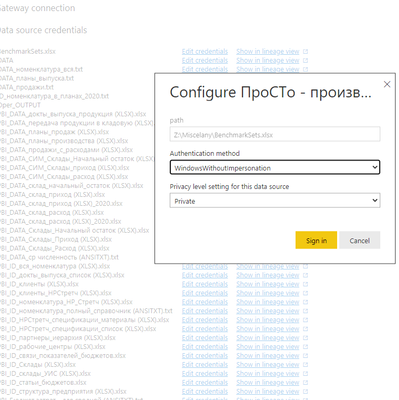
All the sources credentials are verified with conf level set to Private.
The dataset and all the reports connected to it withour DIrectquery mode work just fine. Dataset refreshes. If I had problems with credentials for the sources the dataset wouldn't refresh. Right?
The Power BI Data Visualization World Championships is back! Get ahead of the game and start preparing now!
| User | Count |
|---|---|
| 143 | |
| 123 | |
| 102 | |
| 79 | |
| 54 |